Create a User Journey Map for UX Design: Step-by-Step Guide

Bhhavesh Desalhey

Blog / Create a User Journey Map for UX Design: Step-by-S

On one hand, your studio’s reputation is built on delivering award-worthy experiences and pixel-perfect execution.

On the other hand, you face relentless pressure to scale designs across ever-expanding customer pathways

Every new product launch, marketing campaign, or international market multiplies the complexity.

You’ve likely felt the sting of the "Vision Gap"—that heartbreaking moment you see your fluid, meticulously crafted prototype degraded into a clunky, compromised website.
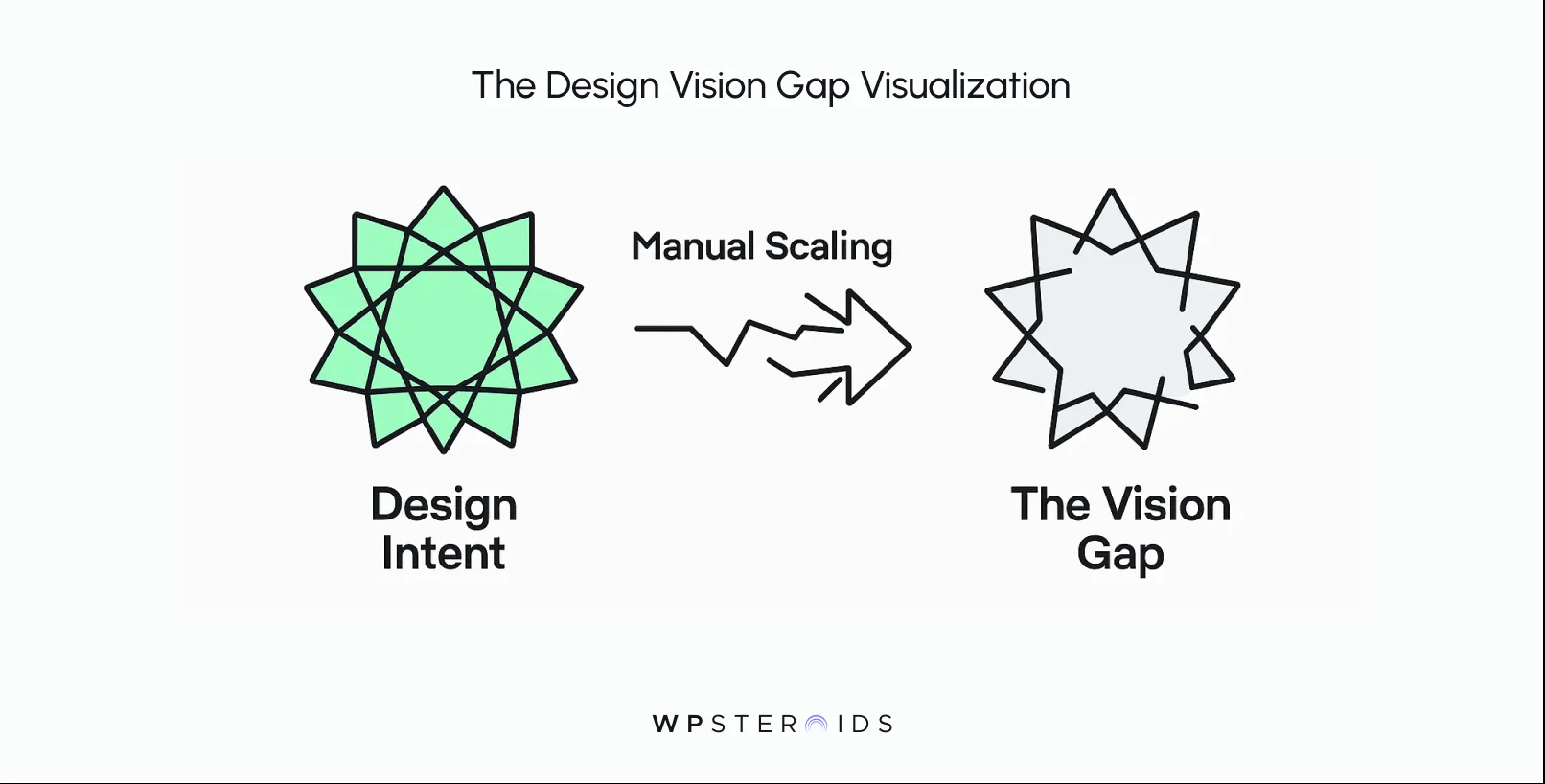
Graphic showing 'The Design Vision Gap Visualization'. A green star labeled 'Design Intent' on the left transforms via arrows labeled 'Manual Scaling' into a grey star labeled 'The Vision Gap' on the right.

It’s the gap between your intent and the final product, a gap that widens with every new page and user segment. 

The answer isn’t to work harder or hire more developers to manage an infinite number of static journey maps. The answer is to change the engine that powers the customer experience itself.

AI integration allows design studios to scale their creative vision by automating the generation of on-brand assets and personalizing user experiences in real-time, preserving design intent while meeting the demands of growth.

This process improves efficiency, lowers customer acquisition costs, and meets modern user expectations for dynamic, consistent interactions.

Why AI-Powered Scalability in Journeys is Now a Growth Imperative

The pressure you're feeling isn't imaginary.

The ground is shifting beneath the design industry, and the old blueprints for creating user journeys no longer lead to success.

Embracing AI-powered scalability isn't a "nice-to-have" for the future; it’s a critical response to fundamental changes happening right now in technology, economics, and customer behavior.

For the modern creative studio, it's a matter of growth or irrelevance.

Balancing Meticulous Craft vs. Infinite Scale

You've built your reputation on meticulous craft.

Every decision—from the weight of a font to the easing on an animation—is deliberate. Your team pours hundreds of hours into creating a singular, perfect customer experience.

But then, the business needs to scale. Suddenly, you're asked to adapt that experience for ten different personas, five new markets, and a dozen product variations.

The result is almost always a dilution of the original vision. You’re forced into an impossible choice: either compromise your craft to meet demand or resist growth to protect your art.
This is the Brand Guardian's dilemma, and it’s a battle you cannot win with traditional workflows.

Why Static Journeys No Longer Work

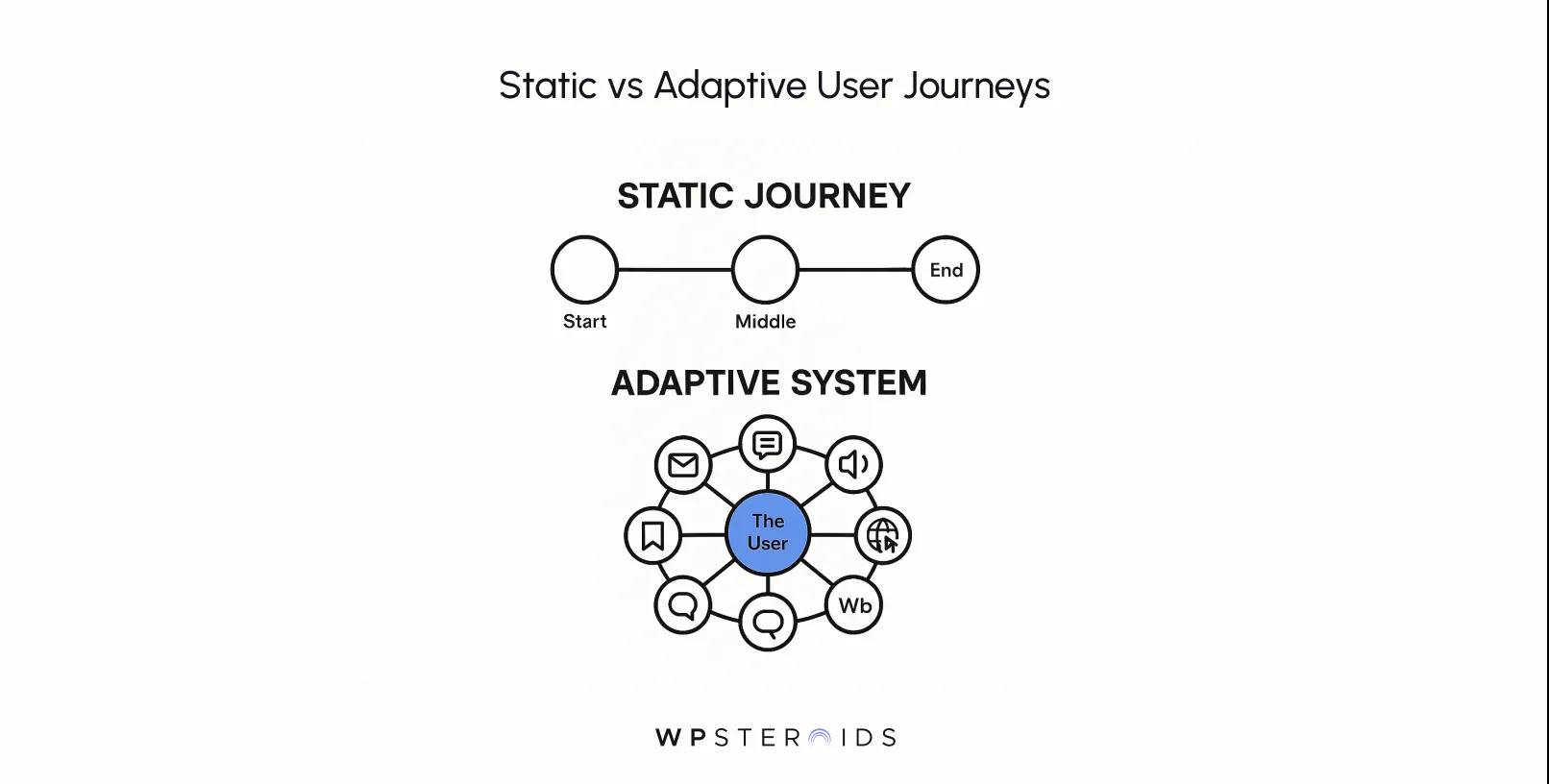
Diagram comparing user journeys. Top: Static journey with linear flow from start to end. Bottom: Adaptive system with user at center, surrounded by interconnected icons.

For years, we’ve designed with a map in mind—a neat, linear customer journey with a clear beginning, middle, and end. We obsessed over click paths and conversion funnels, guiding users along a route we defined. But that's not how people behave anymore.

They enter your ecosystem from countless different points, with a huge range of motivations and contexts. As AI continues to evolve, clinging to this outdated model is like handing someone a paper map in the age of GPS.

The customer journeys you design are no longer rigid pipelines; they must be living, breathing systems that adapt to a user's intent in the moment.

How Adaptive AI Experiences Improve LTV and Lower CAC

This shift isn't just a philosophical one; it has a direct and powerful impact on your studio's (and your clients') bottom line.
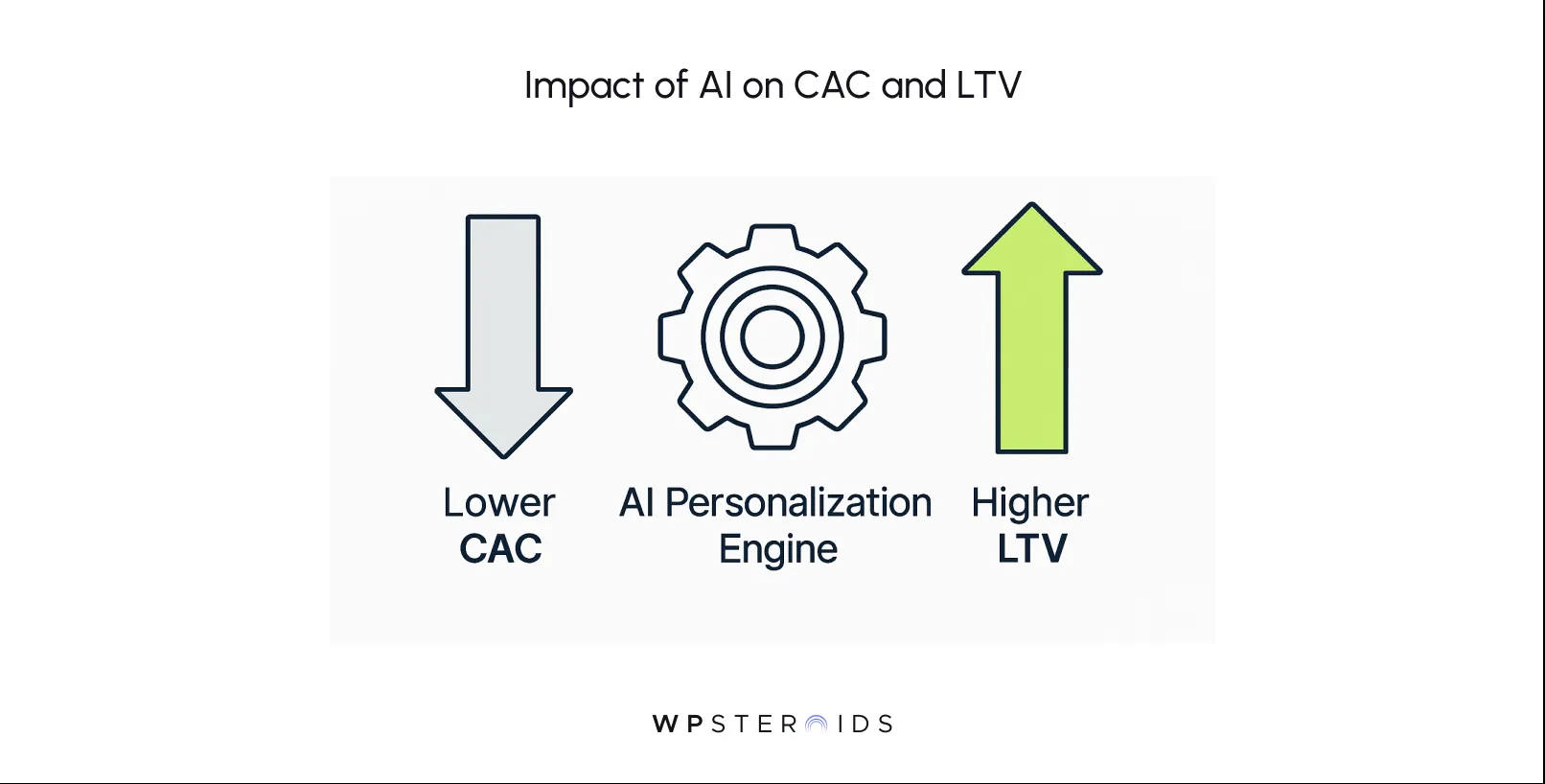
Graphical image titled "Impact of AI on CAC and LTV" showing a blue downward arrow for "Lower CAC," a gear for "AI Personalization Engine," and a green upward arrow for "Higher LTV."

When a website can adapt its messaging, imagery, and flow to an individual user, two critical business metrics improve.

  1. Lower Customer Acquisition Cost (CAC): A personalized experience converts better. By showing the right user the right call-to-action or product variant at the right time, you reduce friction and increase the likelihood of that crucial first conversion. This makes your marketing spend vastly more efficient.
  2. Higher Lifetime Value (LTV): When a user feels understood, they are more likely to return. These adaptive, personalized experiences build loyalty and increase engagement over the long term, turning one-time buyers into repeat customers and brand advocates.

The Shift in Customer Expectations Toward Real-Time Personalization

Your users are being trained every day by platforms like Netflix, Spotify, and Amazon to expect personalization.

They don’t just appreciate it; they assume it. A generic, one-size-fits-all website now feels static, unintelligent, and out of touch. They expect brand interactions to be as consistent and relevant on your website as they are on your social media or in your emails.

This is a far cry from what traditional marketing automation can deliver. Meeting this expectation requires a system that can process signals and adapt the experience in milliseconds.

Studios That Can’t Guarantee Flawless, Dynamic Live Experiences Will Lose Deals and Reputation

This is the final, unavoidable truth. In the very near future, clients won't just be buying your design vision; they'll be buying your ability to execute that vision in a live, intelligent, and scalable environment.

If you can only present a beautiful Figma prototype, but your competitor can present a prototype and a clear plan for how AI will ensure that beauty translates into a dynamic, high-performing website, you will lose the deal.

How AI Preserves Your Design Intent While Enabling Massive Scale

The biggest fear any creative leader has about AI is that it will sand down the sharp, interesting edges of their work, replacing bespoke design with generic, automated templates.

But this fear comes from a misunderstanding of what modern AI is capable of. When implemented correctly, AI doesn't dilute your design intent; it becomes the most powerful engine you've ever had for preserving it.

AI as Your Creative Co-Pilot

Let's move past the idea of AI as a simple automation tool that just checks boxes. Instead, think of it as a creative co-pilot, an extension of your own design direction that can operate at an impossible scale. Its job is not to have the ideas, but to execute your ideas flawlessly and consistently.
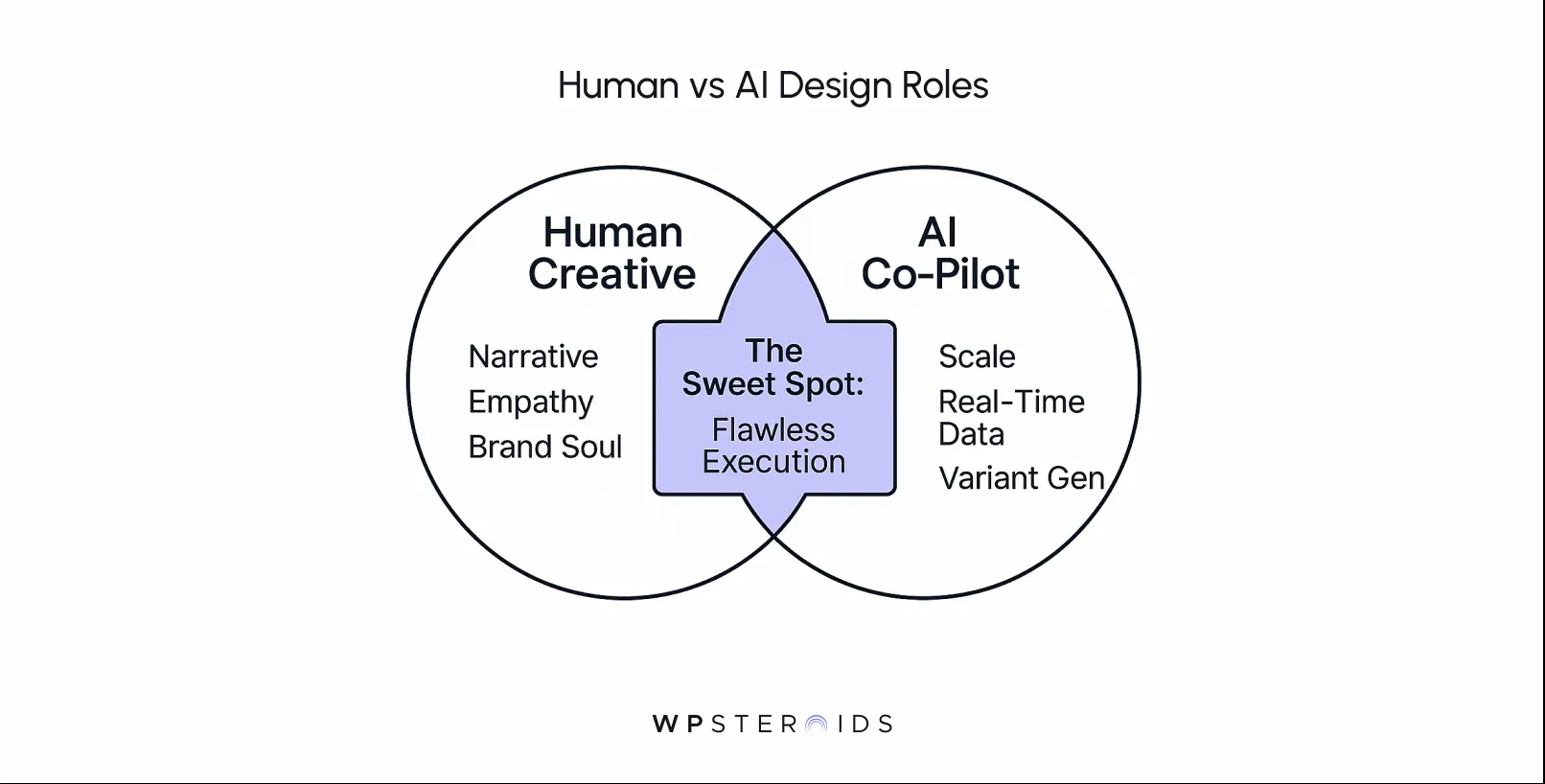
Venn diagram titled "Human vs AI Design Roles." Left circle: Human Creative (Narrative, Empathy, Brand Soul). Right circle: AI Co-Pilot (Scale, Real-Time Data, Variant Gen). Overlapping area labeled "The Sweet Spot: Flawless Execution." Tone: Collaborative efficiency.

You define the narrative, the tone, the style. It’s a partnership that protects, not replaces, the core creative act.

Generative Assets That Adhere to Brand Systems for Production Speed

One of the most powerful ways AI achieves this is through generative assets. We’re not talking about asking an AI to "make a cool hero image."

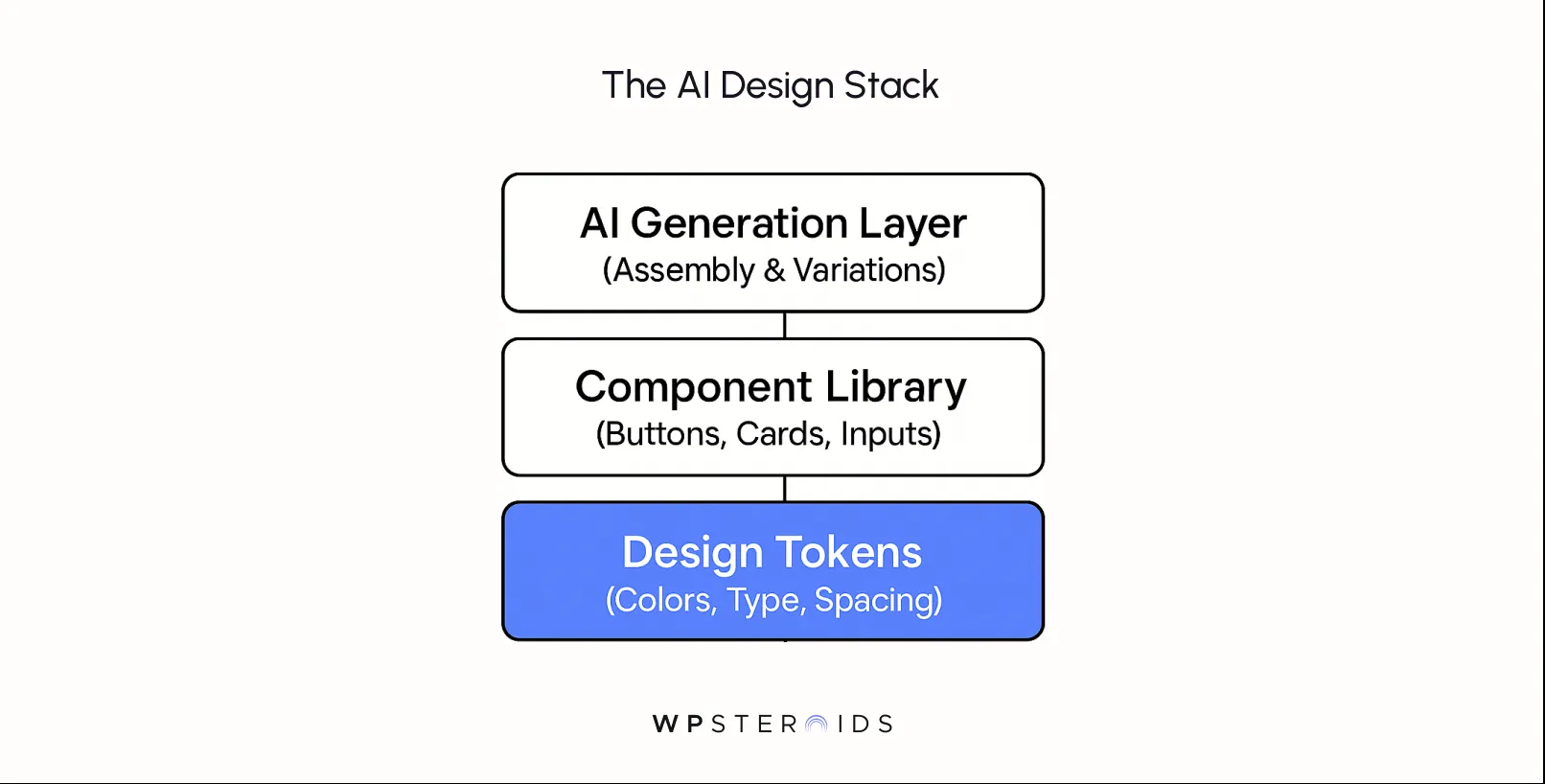
We’re talking about providing AI tools with your established brand system—your colors, typography, component libraries, and design tokens—and empowering them to create variations within those rules.

Real-Time Decisioning and Predictive Analytics That Choose the Right Variant

Generating assets is only half the battle. The real magic happens when AI acts as a real-time art director.

Using predictive analytics to interpret user signals—like past behavior, demographics, and real-time intent—the system can choose the perfect creative variant for that specific user in that specific moment.

This moves beyond clunky, manual A/B testing templates and into a world where you can tailor the customer experience for an audience of one.

In July 2025, 93% of web designers incorporated AI tools into their web design workflows within the previous three months, and 67.39% of business owners favored AI website builders over traditional methods, reflecting a 50% surge in consumer interest in AI website builders over the last 12 months.

In July 2025, 93% of web designers incorporated AI tools into their web design workflows within the previous three months, and 67.39% of business owners favored AI website builders over traditional methods, reflecting a 50% surge in consumer interest in AI website builders over the last 12 months.

The global AI website builder market is projected to grow at a compound annual rate of 31.1% from 2023–2033, reaching $20.1 billion by 2033.

By using AI to analyze individual customer behaviors and preferences, the system can ensure that a first-time visitor from a tech conference sees a case study-focused hero image, while a returning customer sees an image related to a product they previously viewed, creating a truly personalized experience.

Performance-Aware Adaptation for a Flawless User Experience

Finally, preserving your design intent isn't just about visuals; it's about feel. A beautiful design that loads slowly is a failed design.

AI can also protect your vision by making it performant. An AI-driven system can be performance-aware, adapting the experience based on user context. 

This ensures that every user gets the best possible version of your design, preventing the frustration of a clunky, broken website and preserving the feeling of quality your brand stands for.

A Studio-Friendly AI Implementation Roadmap

Adopting AI can feel like being asked to build a rocket ship when you specialize in designing beautiful cars.

This isn't about a massive, one-time overhaul; it's about a gradual, intelligent evolution of your workflow. Here is a practical path from your first idea to a fully scaled, AI-driven experience.
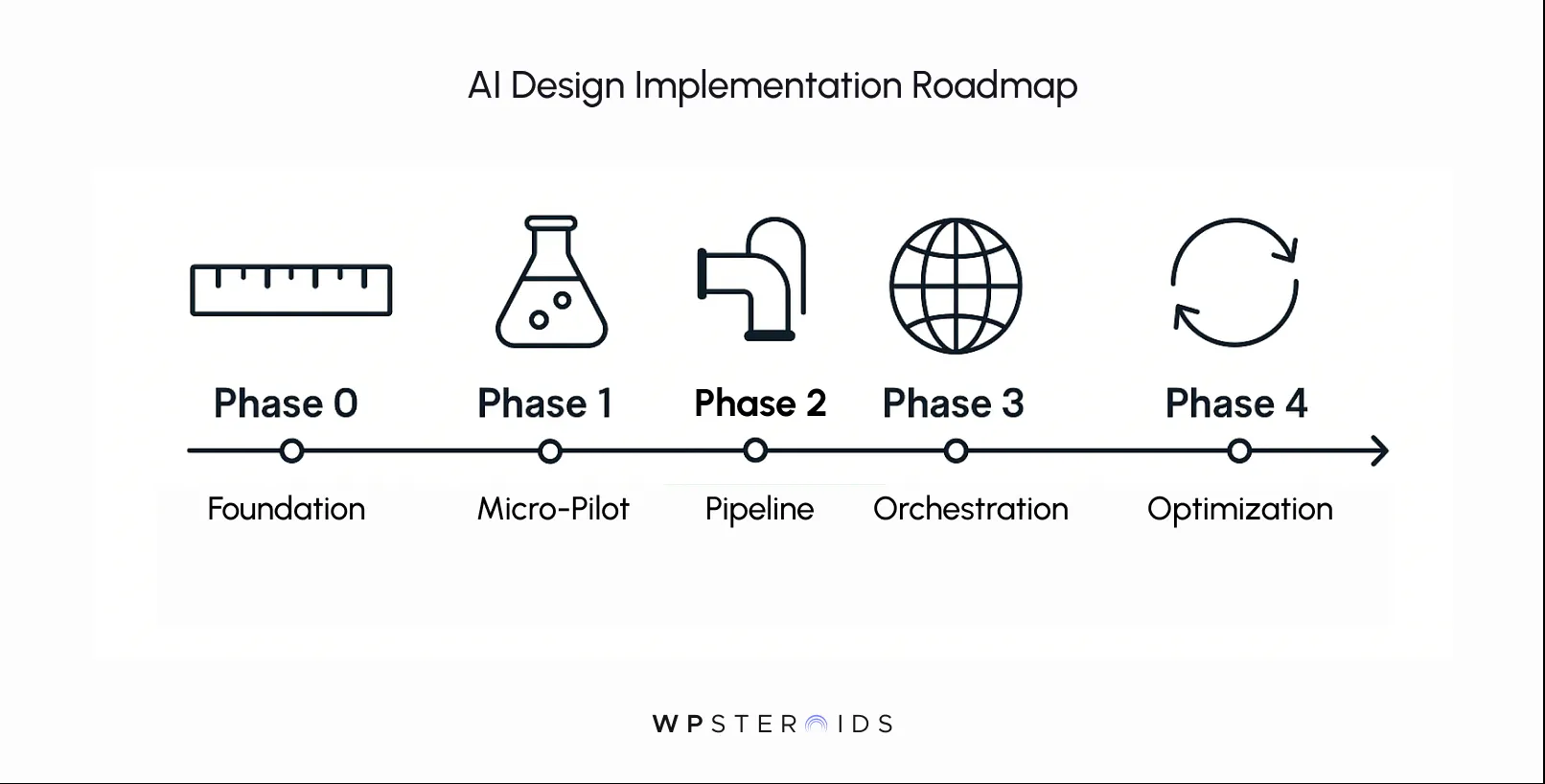
AI Design Implementation Roadmap with five phases: Foundation, Micro-Pilot, Pipeline, Orchestration, and Optimization. Visuals include a ruler, flask, pipe, globe, and arrows, representing each phase. Tone is structured and informative.

Phase 0 — Defining Your Foundation for AI Success

Before you touch any technology, you must define the rules of engagement. This is where you, the creative leader, set the guardrails.

Your brief should clearly articulate:

  • Brand Fidelity SLAs (Service Level Agreements): Define what is non-negotiable. Specify the exact design tokens, animation timings, typographic scales, and accessibility standards the AI must adhere to.
  • Key Performance Indicators (KPIs): Don't get lost in vanity metrics. Focus on tangible outcomes. Is the goal to increase user activation rates?
  • AI Guardrails: Set clear ethical and creative boundaries. For example, "The AI will not generate any imagery that includes human faces.”

Phase 1 — The High-Impact Micro-Journey Pilot

You don't start by rebuilding your entire website. You start with one critical micro-journey where a win can be clearly measured and felt.

Good candidates for a pilot include:

  • New User Onboarding: A perfect place to personalize the welcome experience to increase activation.
  • A High-Value Product Page: Ideal for testing AI-driven image or feature-highlighting variations.
  • A Key Conversion Funnel: Such as a "request a demo" or "add to cart" sequence, where small improvements can have a big revenue impact.

At this stage, the goal is to learn quickly and demonstrate a clear, measurable lift in the KPIs you defined in Phase 0.

Phase 2 — Building the Design-to-Deploy Pipeline

This is where the AI integration begins to take shape. You'll work with a design engineer or technical partner to build the pipeline that connects your creative assets to the AI's decision-making logic.

The core components are:

  • Componentized Design Tokens: Your existing design system is the source of truth. The AI needs access to your library of tokens and components to generate anything on-brand.
  • Generative Asset Templates: Create flexible templates for assets like hero banners or product cards. You define the layout and constraints; the AI populates the content (e.g., image, headline, CTA) based on the user.
  • A Decisioning Layer: This is the "brain" of the operation. It's a simple set of rules or a lightweight machine learning model that takes in user data and decides which creative variant to serve in real-time.

Phase 3 — Scaling with Orchestration

Once your pilot is successful, you'll want to scale the experience. Doing this safely requires orchestration tools. This isn't about flipping a giant switch, but gradually dialing up the AI's influence.

  • Feature Flags: Think of these as dimmer switches. You can use them to roll out an AI-powered feature to a small percentage of users first (say, 5%), monitor its performance, and, if all looks good, gradually increase the exposure to 25%, 50%, and then 100%.
  • MLOps (Machine Learning Operations): This is simply the practice of managing your AI models in a production environment. It ensures that as you retrain your model with new data, you can deploy the new version smoothly with existing systems without causing downtime or unexpected behavior.

Phase 4 — Continuous Optimization

An AI-powered experience isn't a "set it and forget it" project. Its real power is its ability to learn and improve over time. At this stage, you move into a cycle of continuous optimization.

  • Bandit Experiments: This is a more advanced and efficient alternative to traditional A/B testing. Instead of splitting traffic 50/50 for a fixed period, a bandit algorithm learns as it goes, automatically sending more traffic to the winning variation in real-time.
  • Automated Creative Variants: As the system gathers more data, it can begin to identify patterns you might have missed and suggest new creative combinations to test, turning it into a true creative partner. This is one of the key best practices for AI-driven journey optimization.

By following this phased approach, you can de-risk the process of adopting AI, maintain creative control at each stage, and build a powerful system for scaling your vision.

Reorganizing for Real-Time: Your Team's AI Handoff Playbook

Adopting AI-driven design is not just a technological upgrade; it's an operational one.

The traditional, linear handoff from design to development—a process often fraught with misinterpretation and delay—is simply too slow and rigid for a world of real-time adaptation.

The Minimal Cross-Functional Model for Small Studios

You don't need a massive data science department. A small, agile, cross-functional "pod" can effectively manage and scale an AI-driven experience.
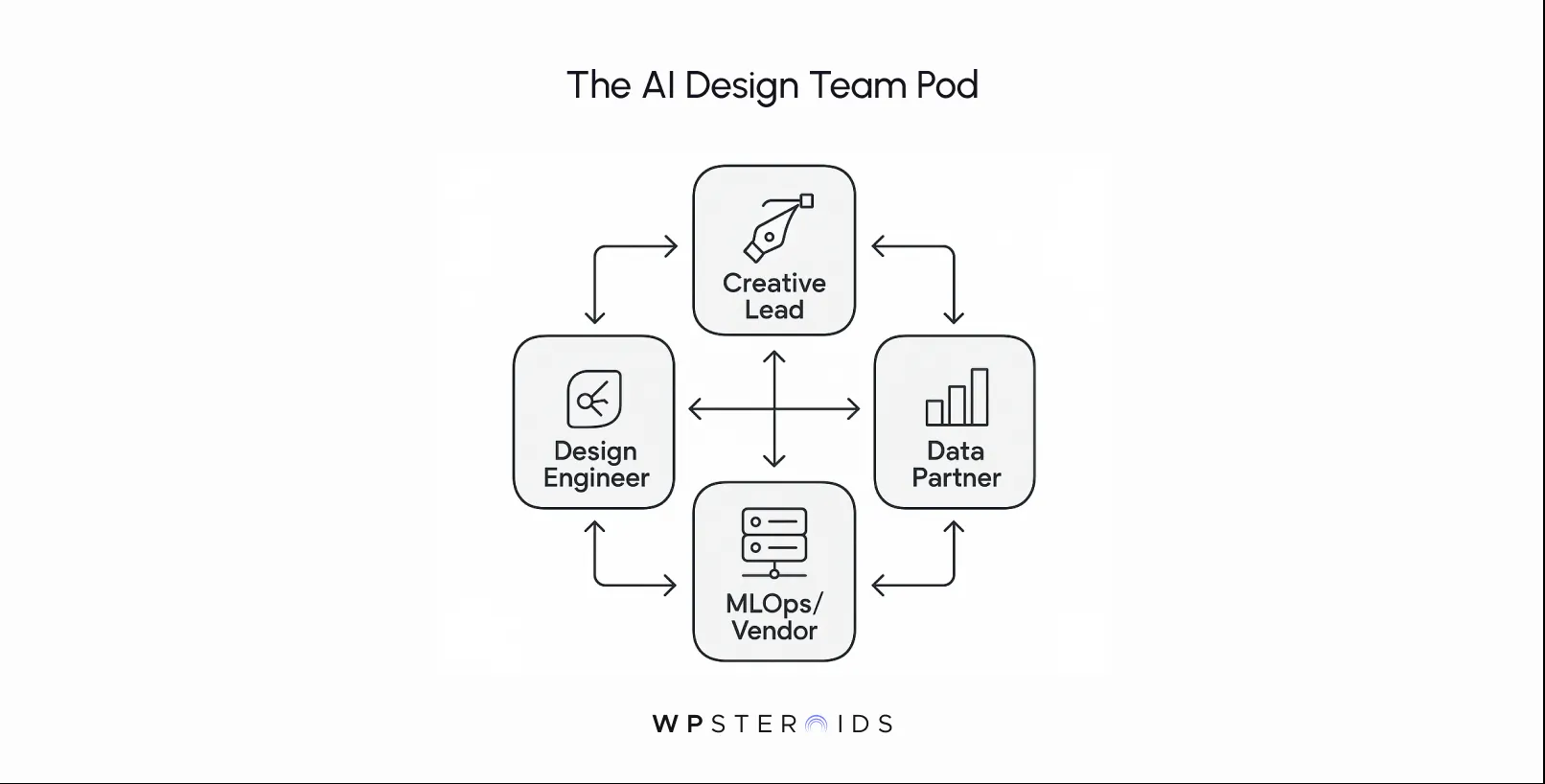
Diagram titled "The AI Design Team Pod" showing four interconnected roles: Creative Lead, Data Partner, Design Engineer, and MLOps/Vendor. Each role is in a rectangle with arrows illustrating the collaboration flow.

This team is built for speed and tight feedback loops.

The essential roles are:

  1. Creative Lead: This is you. You remain the brand guardian, defining the aesthetic SLAs, approving creative variants, and setting the strategic direction for personalization.
  2. Design Engineer: A hybrid role that is becoming indispensable. This person lives at the intersection of design and code.
  3. Data/Analytics Partner: This is your source of truth. They set up the measurement frameworks, analyze experiment results, and monitor the KPIs.
  4. MLOps or Vendor: This is your engine mechanic. For most small studios, this will not be an in-house hire but a partnership with a vendor or a freelance specialist.

The Rapid Handoff Checklist: From Intent to Code

The "handoff" is no longer a one-time event but a continuous, lightweight process. For every new AI-powered component or experiment, the Creative Lead provides a rapid handoff brief.

This document isn't a 100-page spec; it's a concise checklist that ensures nothing is lost in translation. Iti includes:

  • Assets: A clear list of all creative variations (images, headlines, etc.).
  • Design Tokens: The specific, non-negotiable tokens (colors, fonts, spacing) that must be used.
  • Animation Specs: Details on timing, easing, and duration to ensure the experience feels right.
  • Acceptance Tests: A simple list of "pass/fail" conditions. For example: "The component must not cause layout shift," or "The fallback state must display within 100ms."
  • Performance Budget: A hard limit on the component's impact on page load speed and resources.

This checklist-driven approach dramatically improves efficiency by combining automation in the system with clarity in the creative direction.

The Client Communication Script: Setting Expectations and Building Trust

Bringing your clients along on this journey is critical. You must proactively frame AI's role to protect your studio's reputation and manage expectations. Your communication should be clear, confident, and focused on the benefits to their business.

Use these talking points as a script:

  • Frame it as a "Scalability Engine": "We're integrating an AI-driven personalization engine. Think of it as a system that allows us to apply our core creative vision to every single one of your users individually, ensuring the brand feels personal and relevant at a scale that's impossible to achieve manually."
  • Emphasize Data-Driven Creativity: "Real-time data will now enhance our design decisions. We'll be able to see which creative approaches resonate most with specific user segments and automatically optimize the experience to improve conversion and engagement."
  • Be Transparent About the Process: "This is an iterative process. We'll start with a small pilot, measure the impact, and scale what works. You'll have full transparency into the results and the creative rules governing the system."

This new operational model, which enables seamless collaboration regardless of physical location, is the future.

It’s time to join the AI remote revolution and build a studio that’s as dynamic and intelligent as the experiences it creates.

Cost, Tools, and ROI for AI Personalization

Leaping AI-driven design requires the right tools. For a creative leader, the tech can seem like an intimidating black box of acronyms and complex diagrams.

Essential Architecture and Data Flows

The architecture for real-time AI personalization is a loop. It’s a simple, logical flow that moves from user action to data insight to creative response.
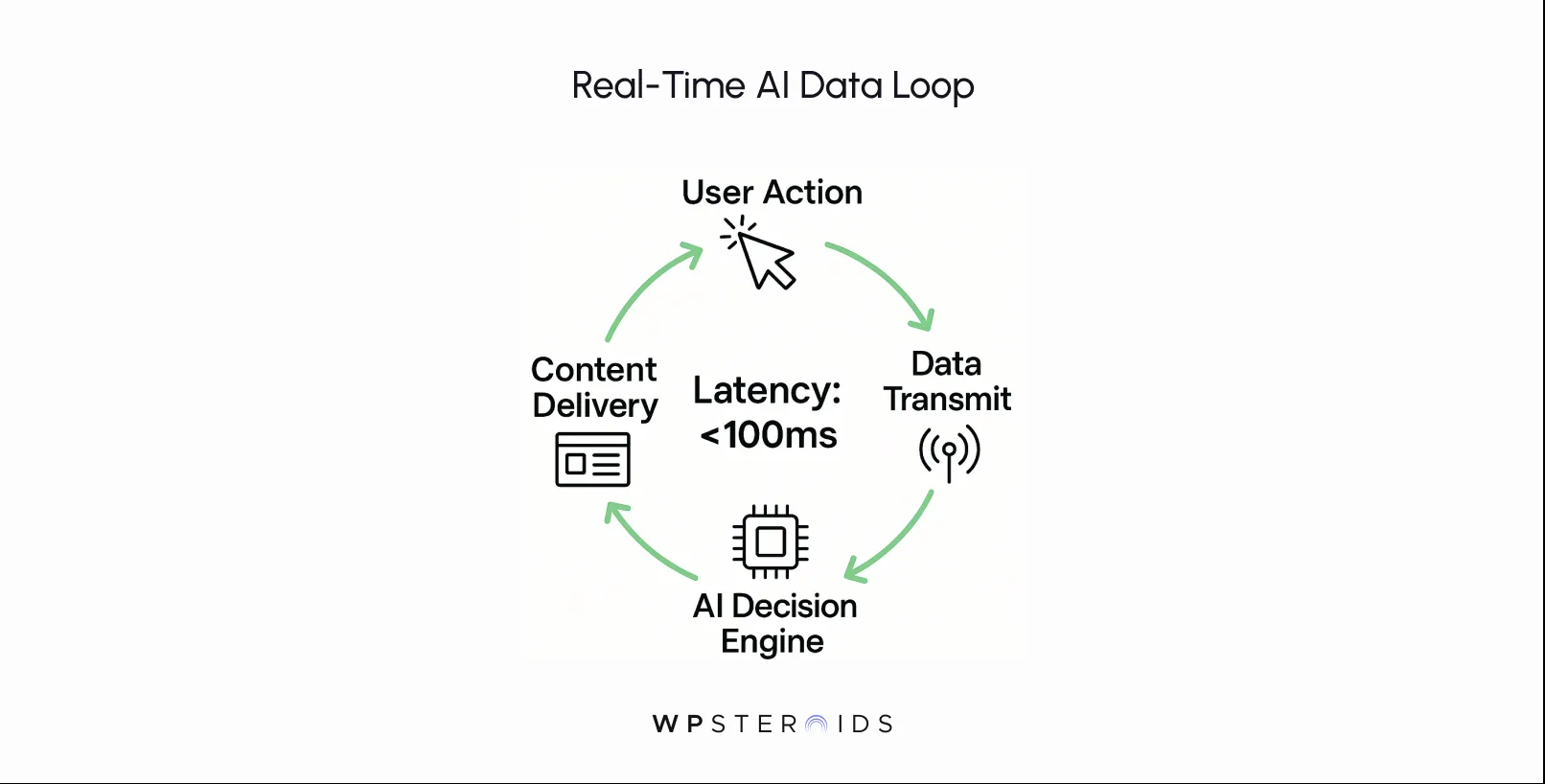
Diagram titled "Real-Time AI Data Loop" showing a circular flow: User Action, Data Transmit, AI Decision Engine, Content Delivery. Center text: "Latency: <100ms."

  1. Data Collection: A piece of code on your website (often from a Customer Data Platform, or CDP) listens for user actions, such as clicks, scrolls, form fills, and time spent on the page.
  2. Data Transmission: This behavioral data is instantly sent to the AI's "brain."
  3. The AI Decision Engine: This is the core automation technology. It takes the user's data, compares it against patterns it has learned, and decides in milliseconds which creative variation is most likely to resonate.
  4. Content Delivery: The decision is sent to your website's front-end, which then displays the chosen on-brand component or asset to the user, often before the page has even finished loading.

This entire loop happens in the blink of an eye, creating a seamless and adaptive experience.

Decision Rules for Build vs. Buy: When to Use Off-the-Shelf AI Tools

For over 95% of creative studios, the answer is simple: buy. The personalization market AI tools have matured rapidly, offering powerful, user-friendly platforms that handle the complex infrastructure for you.

Building a custom AI model is a massive undertaking requiring specialized talent and significant investment.
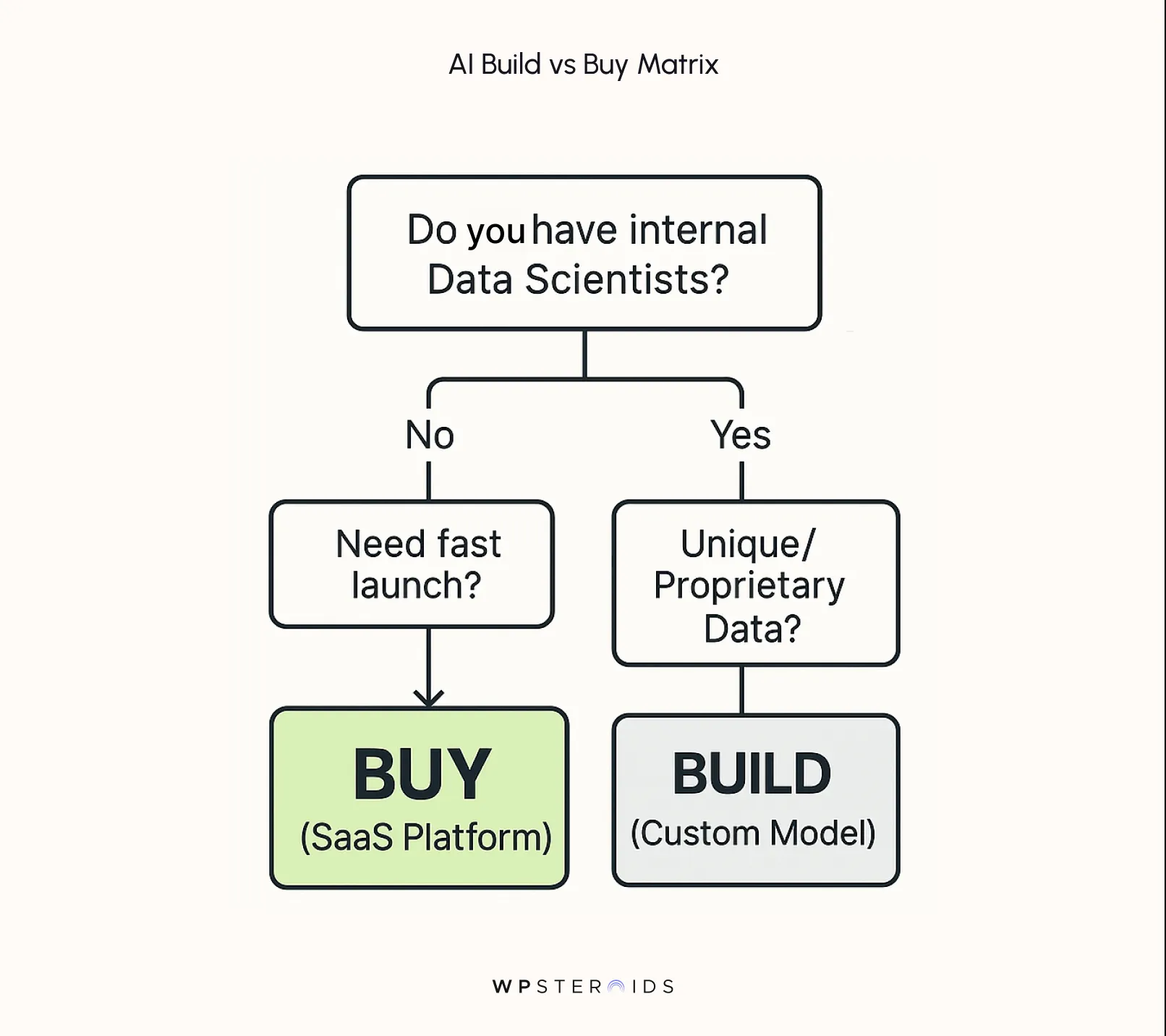
ai-build-vs-buy-matrix.webp

Choose "Buy" if:

  • You want to launch your first pilot within weeks, not years.
  • You want a user-friendly interface for your creative and marketing teams to manage experiments.
  • You want to leverage the collective intelligence from a platform that serves billions of personalized experiences across hundreds of clients.
  • You want predictable SaaS-based pricing.

Consider "Build" only if:

  • You have a truly unique data set or personalization need that no existing tool can meet.
  • You have an in-house team of data scientists and machine learning engineers.
  • You view this proprietary technology as a core long-term competitive advantage worth millions in investment.

For most, a successful AI integration means choosing the right partner, not building the technology from scratch.

Budget Bands for Pilot vs. Scale

Providing exact costs is impossible, but we can talk in orders of magnitude to help you budget.

  • Pilot Phase (3-6 months): Think of this like a small-to-midsize web project. Your investment will cover the SaaS fees for the personalization tool, plus the time for your design engineer and data partner to set up the pilot, integrate the first few components, and analyze the results. The goal is a quick, demonstrable win.
  • Scale Phase (Ongoing): Once the pilot proves its value, the cost shifts to an ongoing operational expense. This includes the monthly or annual fees for your AI tools, which typically scale based on website traffic or the number of personalized experiences served. This becomes part of your client's marketing or technology budget, justified by the clear ROI.

The Return on Creative AI

The investment pays for itself by directly improving efficiency and effectiveness.

The ROI comes from three key areas:

  1. Fewer Revisions & Faster Launches: By using AI to generate on-brand variations, you dramatically reduce the manual labor required for creating assets for every campaign, segment, and A/B test.
  2. Higher Conversion Rates: This is the most direct return. Showing the right creative to the right user at the right time is proven to lift conversion rates, directly increasing revenue.
  3. Increased Brand-Faithful Personalization: You can finally execute a highly personalized strategy without diluting your brand. This increases customer lifetime value and builds the kind of brand loyalty that drives long-term growth.

Speed is Not Negotiable

A common fear is that adding this layer of technology will slow down the website. This is a valid concern, but a solved problem. Modern personalization platforms are built for performance.

Performance is not an issue with the right AI platform; it is a core feature. The technology ensures your brand feels fast, responsive, and alive, no matter how many users you're serving.

Risks, Ethics, and Brand Safety with AI

Wielding AI to shape user experiences is a profound responsibility.

The same technology that allows you to create deeply personal connections can, if used carelessly, erode the very trust you’ve worked so hard to build. As a brand guardian, your role expands.

You must become a steward of not just the brand's aesthetic, but its ethics. Navigating this new frontier requires a proactive stance on privacy, a vigilant eye for bias, and a commitment to transparency.

These aren't technical afterthoughts; they are core principles of modern brand safety.

AI-Driven UX in Action

Theory is one thing; results are another. To make this tangible, let's look at how these principles play out in the real world.

These mini case studies show how creative studios are using AI-driven personalization not just to create novel experiences, but to solve critical business problems for their clients.

Many brands are using AI in subtle yet powerful ways to move the needle on key metrics.

Case A — Onboarding Micro-Journey: Preserving Brand Feel and Accelerating Activation

The Challenge: A fast-growing B2B SaaS client had a beautifully designed product, but analytics revealed a significant user drop-off during the initial onboarding.

Their one-size-fits-all tutorial felt generic and failed to connect with the diverse roles of their new users (e.g., marketers vs. project managers).

The AI-Powered Solution: Instead of creating dozens of manual onboarding flows, the studio designed a single, intelligent, and interactive micro-journey. Using data provided during sign-up (like the user's role), the AI subtly adapted the first three steps of the experience.

For a marketer, it would first highlight a campaign-tracking feature; for a project manager, it would showcase a new task management integration. All the creative—from the micro-interactions to the animated illustrations—was generated from a constrained, brand-approved component system, ensuring the brand's unique "feel" was perfectly preserved in every variation.

The Outcome: The results were immediate and clear. The new onboarding flow led to an 18% faster user activation rate and a measurable increase in feature adoption.

Critically, because the system was built on performance-aware principles, it had no negative impact on the site's Core Web Vitals like CLS or LCP, proving that personalization doesn't have to come at the cost of user experience. This led to increased customer engagement from day one.

Case B — E-commerce Product Page Personalization: Driving Conversions with On-Brand Imagery

The Challenge: A high-end e-commerce fashion brand was struggling to convert top-of-funnel traffic on its product detail pages.

They had a wealth of stunning lifestyle photography, but were manually A/B testing which hero image to show, a slow process that yielded inconclusive results.

The Solution: The studio implemented an AI decisioning engine to personalize the main product image. Working with the client, they categorized their existing brand-consistent photography based on aesthetic themes (e.g., urban/edgy, natural/serene, formal/elegant).

The AI then used real-time signals—like the user's traffic source (a high-fashion blog vs. an outdoor lifestyle influencer), past browsing history, and even the time of day—to select and display the image most likely to resonate with that specific user. The system also powered subtle content recommendations for "complete the look" sections.

The Outcome: This is a prime example of how ecommerce brands are using ai to directly impact the bottom line.

The personalized approach drove a 12% uplift in "add-to-cart" conversions compared to the generic control page.

This tangible result proved how using AI to drive revenue is not about flashy tricks, but about using intelligence to make a more relevant, emotional connection with the customer.

Key Takeaways and Common Pitfalls

These cases highlight a clear pattern: successful AI implementation is focused, measured, and built on a solid design foundation.

However, there are common traps to avoid:
  • Pitfall 1: Development Debt. Avoid the temptation to build one-off, hardcoded personalization hacks. Every solution must be built within your componentized design system. If it's not scalable and reusable, it's not a solution; it's future technical debt.
  • Pitfall 2: Token Mismatch. The integrity of your design system is paramount. If your design tokens in Figma drift out of sync with the tokens used in production, the AI will generate off-brand assets. A strict process for syncing tokens is non-negotiable.

Diagram titled 'The AI Design Stack' showing three layers. Top: AI Generation Layer (Assembly & Variations). Middle: Component Library (Buttons, Cards, Inputs). Bottom: Design Tokens (Colors, Type, Spacing) in blue. Footer: 'WPSteroids'.

  • Pitfall 3: "Creepy" Over-personalization. The goal is to be relevant, not omniscient. Using personalization in a way that feels too specific or invasive is a fast way to lose trust. Stick to subtle adaptations and progressive personalization. The user should feel understood, not watched.

Making AI Your Creative Co-Pilot

For too long, you've been forced into an impossible choice: protect your meticulous craft or compromise your vision to meet the demands of scale.

You've seen beautiful, nuanced designs get flattened and degraded by the rigid realities of development and the sheer complexity of a thousand different customer pathways. That era is over.

The central message of this guide is one of empowerment. AI is not the threat to your craft you may have feared; it is the most powerful and precise partner you've ever had for scaling it.

It's the co-pilot that can finally execute your creative direction with perfect fidelity, for every single user, in any context, at any moment.

This isn't about replacing designers; it's about liberating them from the repetitive, manual work that dilutes their focus.

The future of AI in customer experience is not about generic automation. It's about using technology to make digital interactions feel more human, more intelligent, and more personal.

The benefits of AI in customer journeys are clear: higher conversion, deeper engagement, and a stronger bottom line.

But for a creative leader like you, the ultimate benefit is this: You no longer have to compromise. By integrating AI into your UX design process, you can deliver highly personalized, brand-faithful user journeys at a scale that was previously unimaginable.

This is how you protect your art, grow your business, and deliver a level of proactive, intelligent customer service that anticipates user needs before they even have to ask.

Transform your user journey mapping and finally close the gap between your vision and the final product.

Book your discovery call today.

FAQs

Why should I use AI to create unique user journeys and designs?

The primary reason isn't to replace your creative process, but to finally scale it without compromise. AI solves the "Vision Gap" between your perfect prototype and the live website. It acts as a co-pilot, flawlessly executing your design intent across countless user segments and pathways. It allows you to deliver the bespoke, personal feel your studio is known for, but at a scale that's impossible to manage manually.

What business outcomes improve with AI-driven websites?

AI-driven experiences have a direct and measurable impact on the metrics that your clients care about most. Key improvements include:

  • Higher Conversion Rates: By showing the right user the right message or creative at the right time, you reduce friction and lift key actions like sign-ups, downloads, and sales.
  • Increased Customer Lifetime Value (LTV): A personalized experience builds loyalty. Users who feel understood are more likely to return, remain subscribed, and become brand advocates.
  • Lower Customer Acquisition Cost (CAC): When your website converts visitors more effectively, your marketing and advertising spend becomes vastly more efficient.

Which user problems are best solved by adding AI to a website?

AI is most effective when it solves problems related to relevance and friction. Focus on high-impact moments in the customer journey where a generic experience falls flat. Good starting points include:

  • New User Onboarding: "I'm new here and overwhelmed." AI can create a personalized welcome that guides users to the features most relevant to their stated goals.
  • Content & Product Discovery: "I can't find what I'm looking for." AI can surface the most relevant articles, case studies, or products based on a user's real-time behavior.
  • Feature Adoption: "I'm not getting the full value of this product." AI can proactively highlight useful features a user hasn't discovered yet.

How do I define goals and success metrics for an AI-powered user journey?

Success is measured at the intersection of brand integrity and business impact. Use a balanced scorecard with three types of metrics:

  1. Design Integrity Metrics: Track visual quality with regression testing, monitor performance with Core Web Vitals, and gather qualitative user feedback to ensure the brand's feel is preserved.
  2. Core Business Metrics: Measure the bottom-line impact through conversion lift, user activation rates, and revenue per user.
  3. AI System Health: Monitor technical metrics like model accuracy and latency to ensure the engine itself is running smoothly.

How do I identify the user segments that will benefit most from personalization?

While you can start with your existing personas, the true power of AI lies in dynamic segmentation. The system can identify and group users based on their real-time behaviors and intent, not just static profiles. To begin, identify broad, high-value segments where the user journey diverges significantly, such as:

  • First-time visitors vs. returning loyal customers.
  • Users arriving from a performance marketing campaign vs. organic search.
  • Users from different industries or with different job roles (for B2B).

What user research and data do I need before adding AI?

You don't need a massive data science team to start. Begin with the data you already have: your website analytics (Google Analytics), any existing customer data (from a CRM or email platform), and the results of past A/B tests. Your qualitative user research is still essential for forming the initial strategic hypotheses that your AI will then test and validate at scale. The golden rule is data minimization: only collect what is necessary to provide a clear user benefit.

How do I map user journeys that include AI-driven touchpoints?

You need to shift from designing a single, linear map to designing an adaptable system. Your process will look like this:

  1. First, map the ideal "default" journey. This is your safe, well-designed baseline.
  2. Identify key "decision points" within that journey where a user's intent might become clear (e.g., they click on a specific product category).
  3. Design the AI's role at those points. Instead of a single path, you design a set of rules and possibilities for how the journey can branch or adapt based on user signals. The map becomes a flexible framework, not a rigid railroad.

How does AI change the role of designers and UX teams?

It elevates the role from production to direction. The designer's job shifts from manually creating every asset and every page variation to designing the creative system that the AI operates within. You become the creative director for the AI—setting the brand rules, defining the aesthetic guardrails, curating the results, and focusing on the overarching user strategy. It frees you from repetitive tasks to focus on higher-level creative thinking.

What design patterns work best for AI-driven personalization?

To maintain brand integrity and a quality user experience, rely on these core patterns:

  • Brand-First Component Systems: Lock down your design tokens and component structures to ensure AI-generated variations are always on-brand.
  • Progressive Personalization: Start with subtle adaptations and only increase the level of personalization as the user provides clearer signals of intent.
  • Safe Defaults: For every personalized component, have a robust, well-designed default state. The user experience should feel great even if the AI personalization fails to load.

How do I keep interfaces predictable while allowing dynamic AI-driven changes?

Predictability comes from the strength and consistency of your underlying design system. The AI's changes should be limited to the content within your well-defined components, not the structure or interaction patterns of the interface itself. The page layout, navigation, and core UI elements remain stable. The user experiences a feeling of personal relevance ("This site understands me") without the jarring or chaotic feeling of an interface that randomly changes its structure.

Bhhavesh Desalhey
by Bhhavesh Desalhey
Jr. UX Designer

End Slow Growth. Put your Success on Steroids