Driving Digital Performance for a Digital Media Brand
Headless CMS scales and improves WPWhiteBoard’s content distribution, flexibility, and personalization
Aniket Ashtikar
You spend more time patching security holes and optimizing a bloated front end than you do building innovative features.
You know there has to be a better way, but the pressure to choose the right platform for your business is immense.
You’re not just picking a CMS; you’re making a decision that will impact your team’s velocity, your product’s performance, and your own sanity for years to come. You're not alone in this struggle.
For businesses aiming for a scalable, secure, and future-proof content platform, Sanity's headless architecture and structured content approach offer superior flexibility and performance over WordPress's traditional, page-based model.
For simple blogs or brochure sites where all-in-one simplicity is key, WordPress remains a viable option, and understanding how Sanity and WordPress differ is key to choosing correctly for your business.
We won’t just give you another list of pros and cons. Instead, we'll provide a data-backed architectural analysis that gets to the heart of the Sanity vs WordPress debate.
Sanity is not just another content management system; it's a unified platform for structured content.
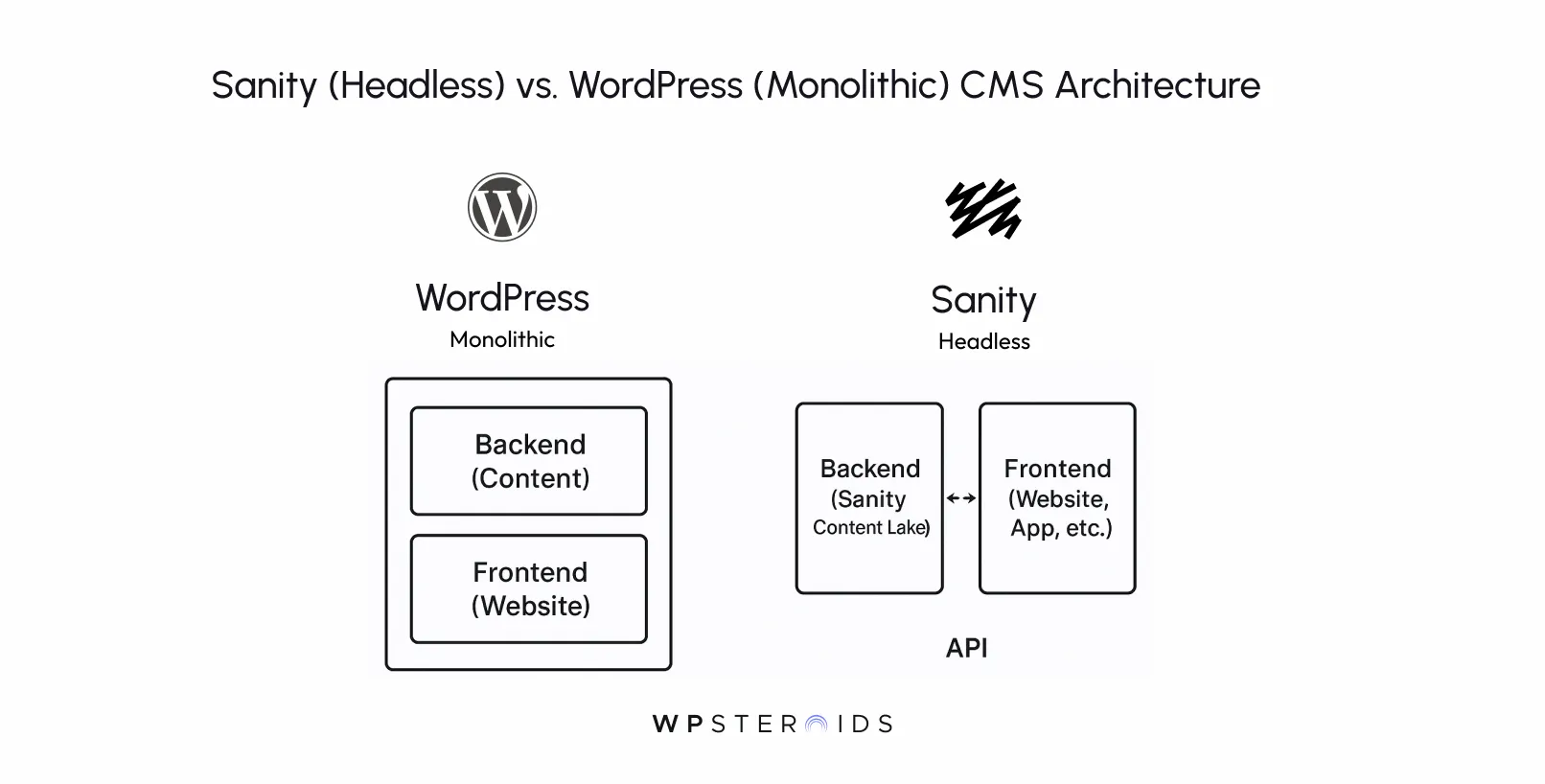
Unlike WordPress, which bundles your content, design, and code into a single, monolithic package, Sanity is fundamentally different.
It operates as a headless CMS, which completely separates your content "body" from its presentation "head."
Think of it this way: Sanity provides a powerful, hosted backend—the Sanity Content Lake—where all your content lives as pure, reusable data.
You interact with this content through a completely customizable, open-source editor called the Sanity Studio, which your developers can tailor to your team's exact workflow.
That content is then delivered via a lightning-fast API to any frontend you can imagine: a Next.js website, a native mobile app, a digital kiosk, or even an AI-powered chatbot. It doesn't care what the final product looks like; it only cares about serving the right content, instantly.
For a technical leader under pressure to build something that lasts, the advantages of Sanity CMS are significant.
Sanity is a powerful tool, but it's not the right fit for every project. It’s crucial to understand its limitations.
If you’ve worked on the web for any length of time, you’ve encountered WordPress. It's the undeniable titan of the CMS world, powering an estimated 43% of all websites.
WordPress is an open-source, monolithic content management system. "Monolithic" is the key term here: it means the backend where you manage content, and the frontend that visitors see is bundled together into a single, tightly-coupled application.
It was originally built for blogging, and that DNA is still very much present. Its core philosophy is to provide an all-in-one solution that makes it incredibly easy for non-developers to get a website up and running with WordPress quickly.
You install it on a server, pick a theme for the design, and add plugins and features as needed.
WordPress didn't become the market leader by accident. Its strengths are significant, especially for a certain type of user and project.
For the professional developer tasked with building a modern, scalable digital experience, the strengths of WordPress often become its most profound weaknesses.
The choice between Sanity and WordPress isn't just about features; it’s about two fundamentally different philosophies for managing content.
Aspect | Sanity (Headless) | WordPress (Monolithic) |
|---|---|---|
Architecture | Decoupled: Content backend is separate from the frontend presentation. | Monolithic: Content backend and frontend presentation are one unit. |
Content Model | Structured Content: Content is pure, reusable data delivered via API. | Page-Centric: Content is tied directly to a specific web page or post. |
Flexibility | API-First: Build any frontend with any technology (React, Vue, etc.). | Theme-Based: Customization is limited by the chosen theme and plugins. |
Primary User | Developers and content teams building scalable, omnichannel experiences. | Non-technical users, bloggers, and small businesses need a simple website. |
Core Strength | Unmatched flexibility, performance, and future-proofing. | Speed of setup for simple sites and a massive plugin/theme ecosystem. |
To truly grasp the differences between Sanity and WordPress, you have to look beyond a simple list of features.
The most critical distinction is a philosophical one that impacts everything from your developer workflow to your company's long-term digital strategy.
It's the shift from thinking about your content as a collection of web pages to seeing it as a valuable, independent asset—a future-proof content supply chain.
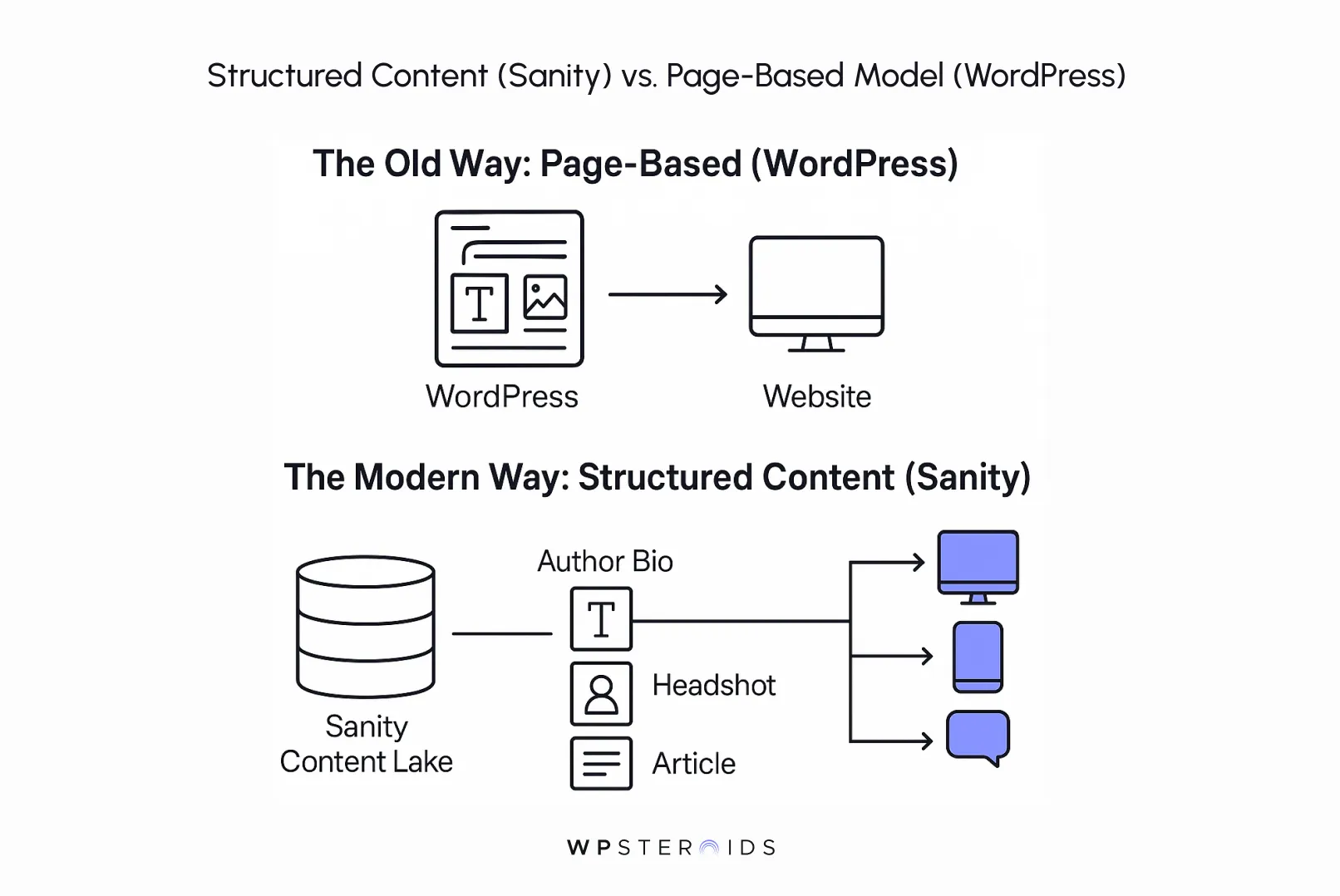
Traditional CMS platforms like WordPress were built for a simpler time on the web. Their entire worldview is based on the "page."
Your content—a blog post, an "about us" section, a product description—is created and stored inside a construct that is intrinsically tied to how it will look on a single website.
This model works perfectly fine if your digital presence begins and ends with a simple website. But we both know that's no longer the world we built for.
Today, your content needs to go everywhere. It needs to appear in a native mobile app, feed a voice-activated smart speaker, populate a digital kiosk, or become training data for an AI chatbot.
Your website is no longer the destination; it’s just one of many channels. In this reality, the page-based model becomes a strategic dead-end.
This is a primary source of the technical debt that keeps you up at night.
This is where the entire debate needs to be reframed. The critical question isn't about which CMS is "easier," but which one better handles the inevitable shift from creating "pages" to creating structured content.
A headless CMS like Sanity forces a superior workflow that is essential for modern content management for businesses.
Instead of starting with a blank page, you begin by modeling your content into pure, reusable data chunks. For example, you don’t create an "author bio page." You create an "Author" content model with specific fields: name (text), bio (rich text), and headshot (image).
This structured content is pure data, completely separate from any design. Once you have this clean, predictable data object, you can deliver it seamlessly to any destination.
Your Next.js website can render it as a sidebar biography. Your iOS app can display it on a native author profile screen.
An AI chatbot can pull the bio field to answer a user's question. You build the content model once and use it everywhere.
This approach changes everything. Your websites and digital products adapt more easily to new technology because the underlying content is clean and agnostic.
Projects that start as simple websites often evolve into applications with much broader needs.
By decoupling your content from the start, you are preparing for that future. The choice is no longer between two different ways to build a website.
It’s a choice between owning a rigid library of web pages versus owning an agile, future-proof content supply chain. For a technical leader, this isn't just a better architecture; it's a smarter, safer business strategy.
We've talked about the strategic shift from pages to structured content, but to understand why this shift is possible with Sanity and difficult with WordPress, we need to look under the hood at their core architecture.
This is the single most important technical distinction between Sanity and WordPress, and it's the root cause of nearly every other difference in performance, flexibility, and developer experience.
A traditional content management system like WordPress is what's known as a monolithic application. The word "monolith" says it all: it's one large, interconnected unit.
The backend system, where you write and manage your posts, upload images, and install plugins, is tightly coupled to the frontend system that generates the HTML, CSS, and JavaScript that your visitors see in their browser.
When a user visits your WordPress site, their browser sends a request to your server. WordPress then runs its PHP code, queries its MySQL database to fetch the content, processes it through the active theme's template files, and finally renders a complete HTML page to send back.
The content management and the content delivery are all happening in the same place, within the same application. WordPress is an all-in-one package, and for a long time, this was the standard way to build a website.
A headless CMS like Sanity flips this model on its head. The architecture is "decoupled," which means the content management "body" is completely separate from the content presentation "head." This is the essence of the headless architecture.
With this model, Sanity is your centralized content hub. It's a highly optimized platform for storing, structuring, and delivering content. That's its only job. It doesn't know or care what your website looks like.
There are no themes or template files. Instead, it makes all of your structured content available through an API (Application Programming Interface). Your developers then build a completely separate frontend application—the "head"—using whatever modern technology they prefer (like React or Vue.js).
This application calls the Sanity API to fetch the content it needs and then renders it for the user. In fact, you can have many heads: a website, an iOS app, a smart display, all pulling from the same content body.
To make this abstract concept tangible, let's use an analogy.
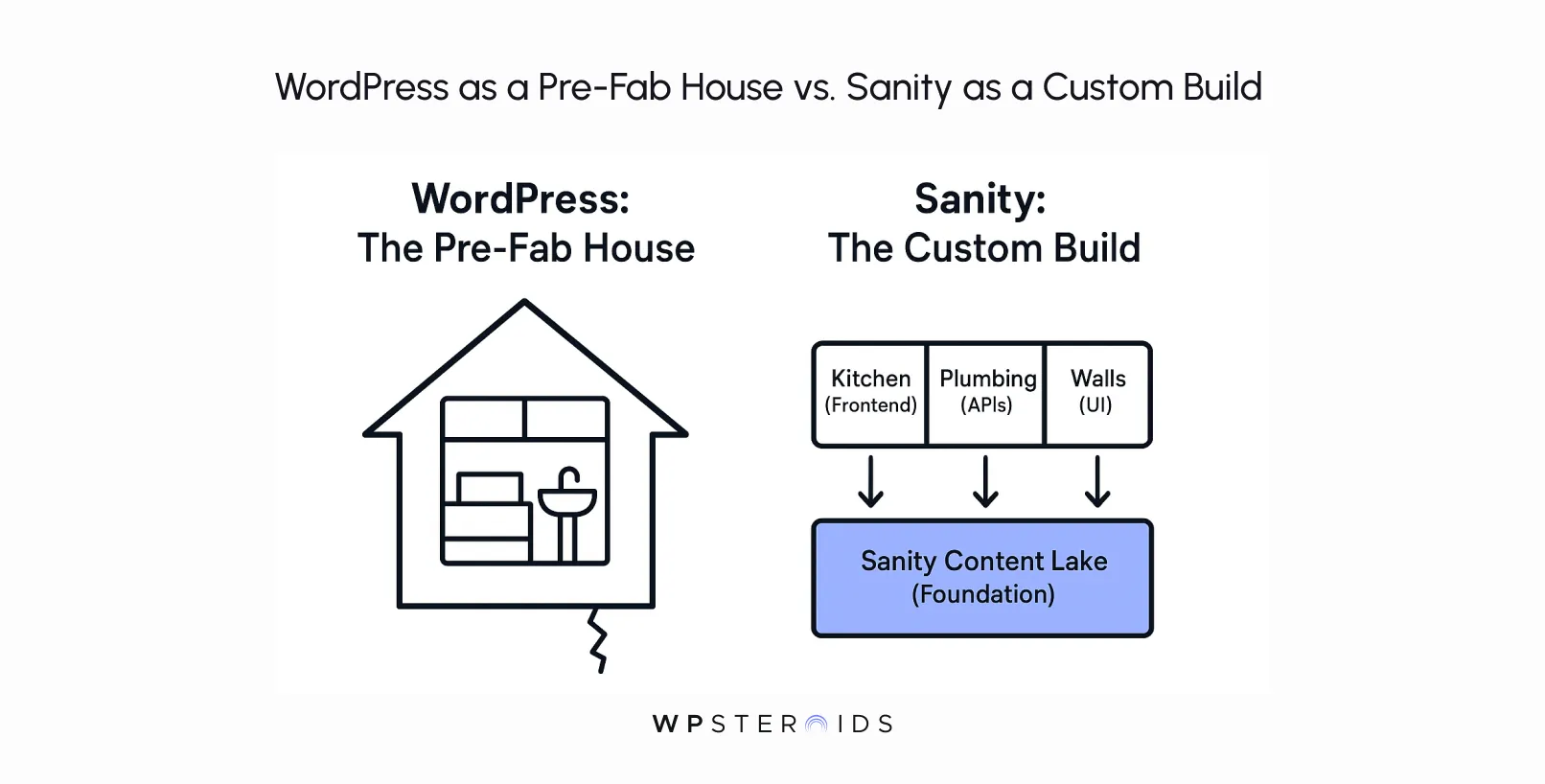
WordPress (Monolithic) is like a Pre-Fab House: It comes as a complete package with the foundation, walls, plumbing, and electrical all locked together.
You can easily paint the walls and choose new furniture (themes and plugins), but if you decide you want to move the kitchen to the other side of the house,
It's a massive, messy, and expensive renovation that threatens the integrity of the whole structure. You're fundamentally constrained by the original blueprint.
Sanity (Headless) is like a Custom Architectural Build: You start with a world-class, unshakeable foundation and structural blueprint (Sanity's structured content).
Then, you hire best-in-class specialists: an expert electrician for your front-end (a Next.js developer), a master plumber for your data pipes (an e-commerce API), and a renowned interior designer for the user experience.
Every component is top-tier and independent, allowing you to place the kitchen wherever you want, now or in the future, without tearing down the house.
This core architectural difference is what gives you, the developer, the freedom to build without constraints and the confidence that your platform can evolve with your business needs.
Now that we understand the core architectural and philosophical differences, let's drill down into the practical, day-to-day realities of working with each platform.
For a technical lead, these are the factors that will directly impact your project timelines, your team's happiness, and the long-term health of your application.
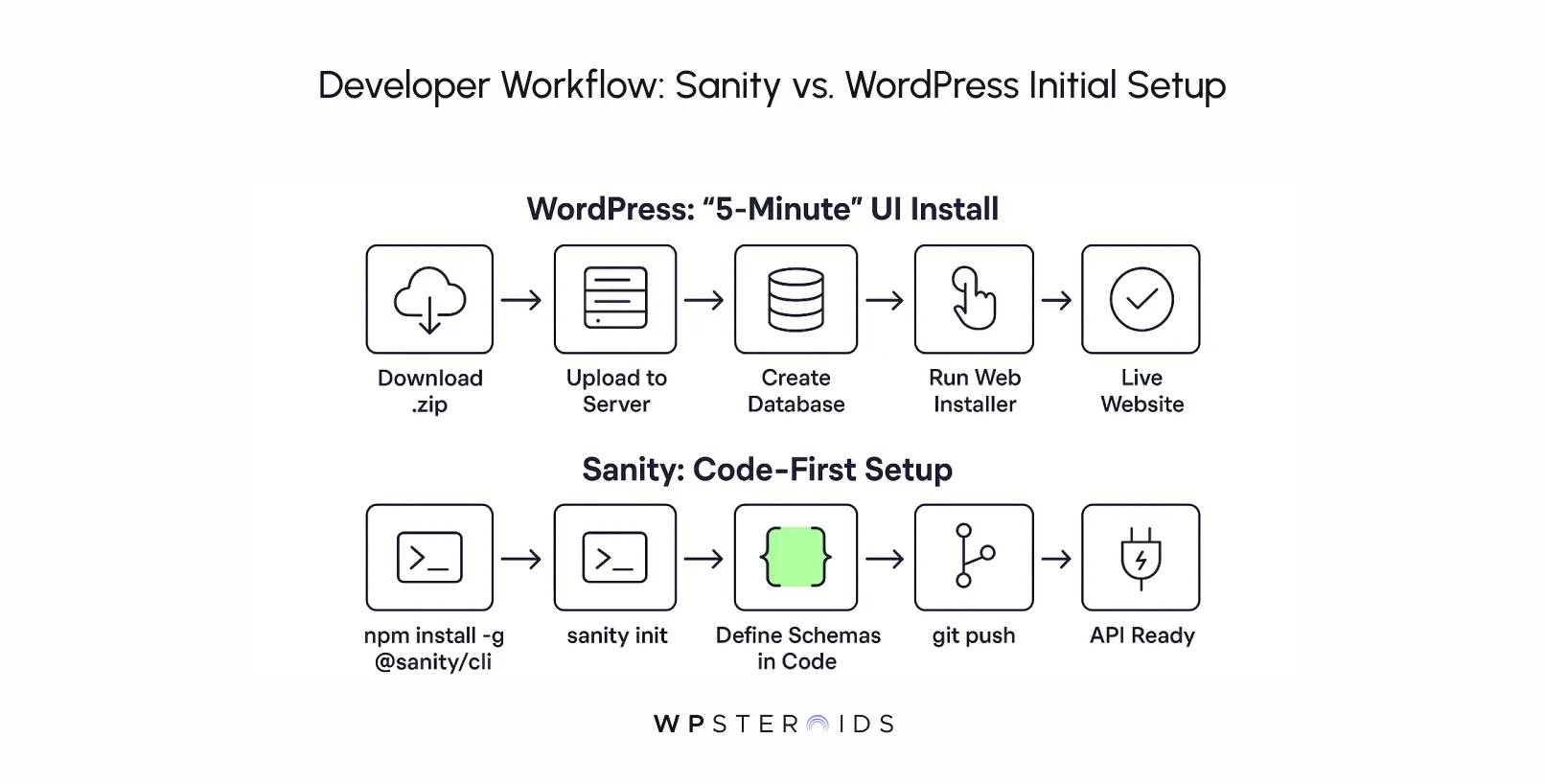
The initial setup process for each CMS clearly reveals who it was built for.
The process is designed to get non-technical users up and running with a live website as quickly as possible. From there, your workflow is largely UI-driven: installing themes, adding plugins, and creating content through the web-based dashboard.
Sanity, on the other hand, is built for a modern development workflow from the ground up. You don't start with a web installer; you start in your terminal.
After installing the Sanity CLI, you run sanity init to scaffold a new project. This creates a local development environment for the Sanity Studio—a completely customizable editing interface built with React.
So yes, you absolutely need coding skills to use Sanity. It is not a replacement for WordPress for those who need a no-code solution. It is a superior alternative for development teams who value a structured, code-first workflow.
This is where the power of Sanity's architecture truly shines.
Working with Sanity is a completely different experience. You have absolute control over your content model because you define it as code.
Using simple JavaScript or TypeScript objects, you create schemas for your content types. You can build anything from simple text fields to complex, nested arrays of objects with custom validation rules.
This means you can build a Sanity Studio that is perfectly tailored to your content model, providing editors with an intuitive interface that prevents them from creating unstructured or invalid data.
This isn't just customization; it's a level of control that ensures your content is clean, predictable, and ready for any channel.
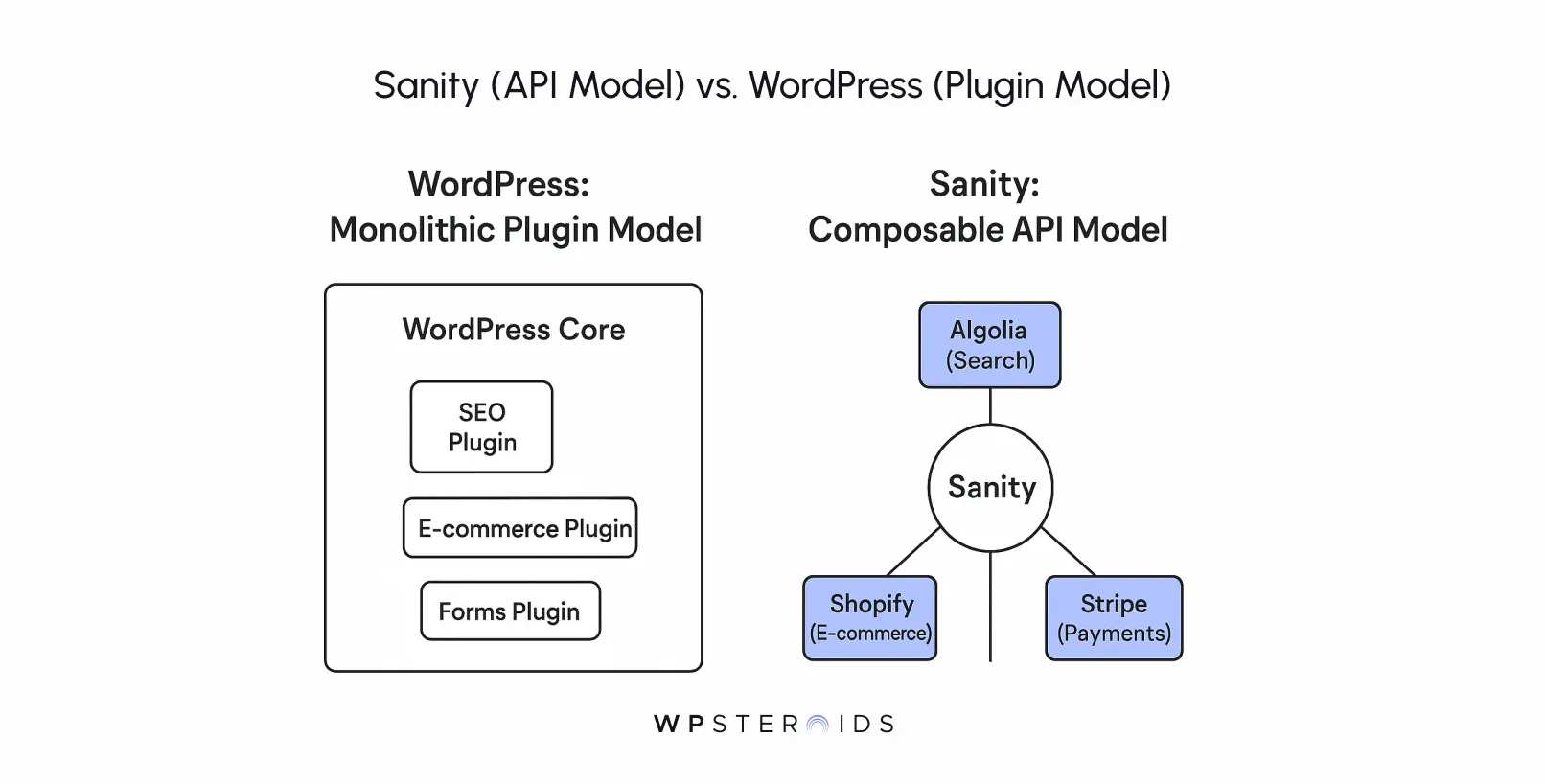
How you expand functionality is a defining difference between the two platforms.
However, this is also the platform's greatest weakness. Every plugin adds bloat, potential security risks, and the risk of conflicts with other plugins or your theme.
Sanity favors an API integration-first approach. Instead of installing a monolithic plugin that takes over part of your site, you integrate with best-in-class, dedicated services.
Your Sanity backend remains a pure content engine, and your frontend application orchestrates these various services.
For any critical project, performance is non-negotiable.
The monolithic nature of WordPress makes high performance a constant challenge. Every page visit requires multiple round-trip requests to the database, PHP processing, and the loading of assets from potentially dozens of plugins.
This can result in slow load times, especially under heavy traffic. While caching plugins are a necessity, they are often complex to configure correctly and can't fully solve the underlying architectural bottlenecks.
A staggering 66.8% of developers who have used it said they have no desire to do so again. That frustration is born from fighting a system that wasn't built for the performance demands of the modern web.
Sanity's headless architecture, by contrast, is designed for performance with scalability.
The content itself is served from Sanity's own highly optimized and globally distributed Content Lake. This model is inherently faster, more secure, and can handle massive traffic spikes with ease.
This is one of the most common questions in the Sanity vs WordPress debate, and the answer is often misunderstood.
On the surface, the common wisdom is that WordPress is better for SEO.
These tools are genuinely fantastic, but they only address one part of the modern SEO equation. For a technical leader, it's crucial to understand that plugins are not a strategy. The underlying architecture of your platform has a far greater impact on your search engine performance than any single plugin.
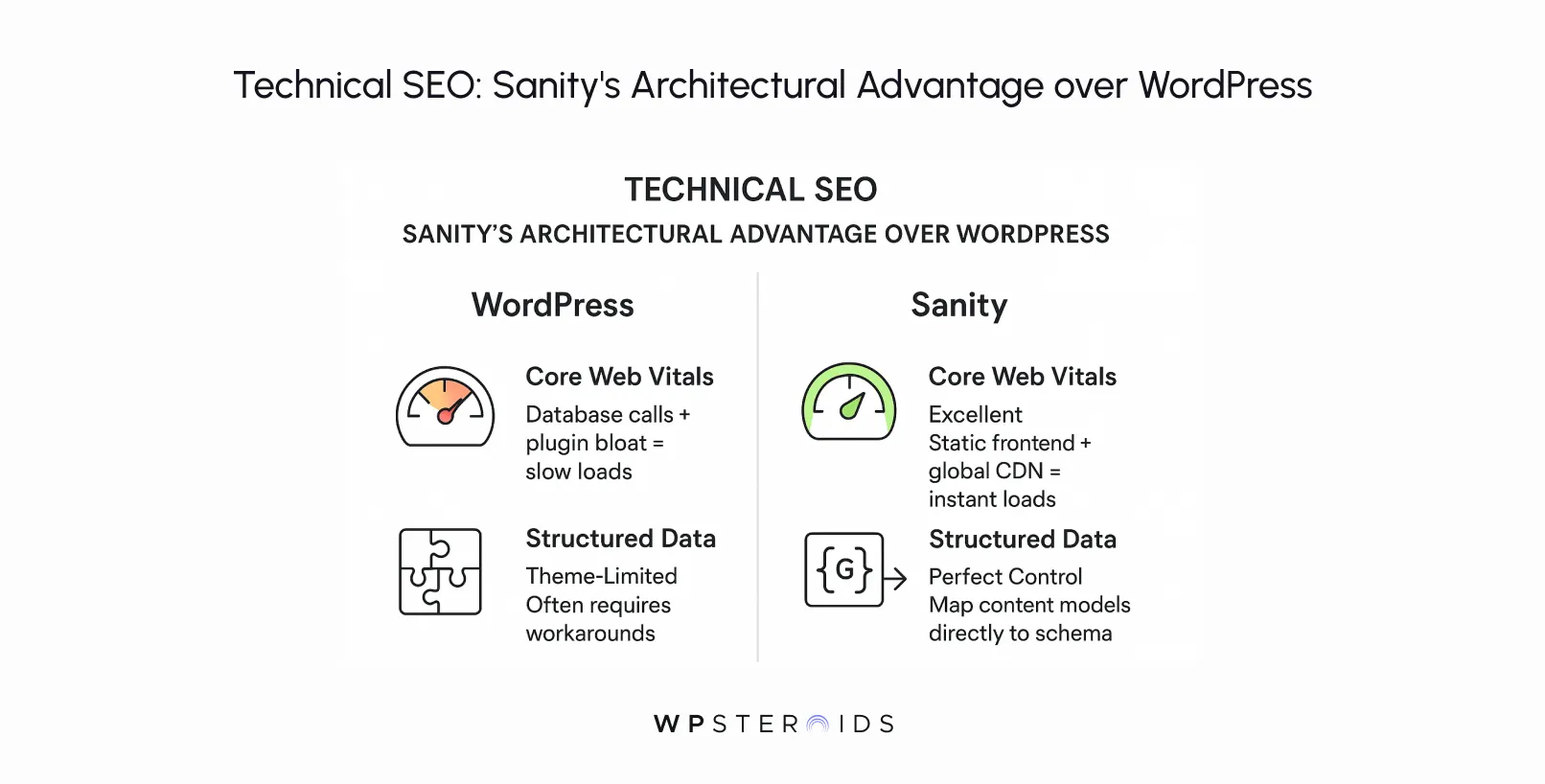
When you look at the foundational pillars of technical SEO, the story changes dramatically.
The reliance on a database for page generation, combined with the bloat from multiple plugins and heavy themes, means developers spend an enormous amount of time on caching, image optimization, and code minification just to achieve acceptable speeds.
While plugins can help generate structured data (Schema.org markup), implementing complex or custom schemas often involves fighting with your theme's limitations.
For Sanity: A headless CMS like Sanity provides a fundamentally superior foundation for technical SEO.
The Verdict: While WordPress offers superior out-of-the-box tooling for non-technical users to manage on-page SEO, Sanity provides the superior architectural foundation for achieving excellence in technical SEO.
If your business depends on organic search and you're competing in a crowded space, the performance and structured data advantages of a headless architecture give you a significant, sustainable competitive edge.
For any technical leader, security isn't just a feature; it's a foundational requirement. A single breach can destroy user trust and lead to catastrophic business consequences.
When comparing Sanity and WordPress, the difference in their architectural approach leads to a night-and-day difference in their out-of-the-box security posture.
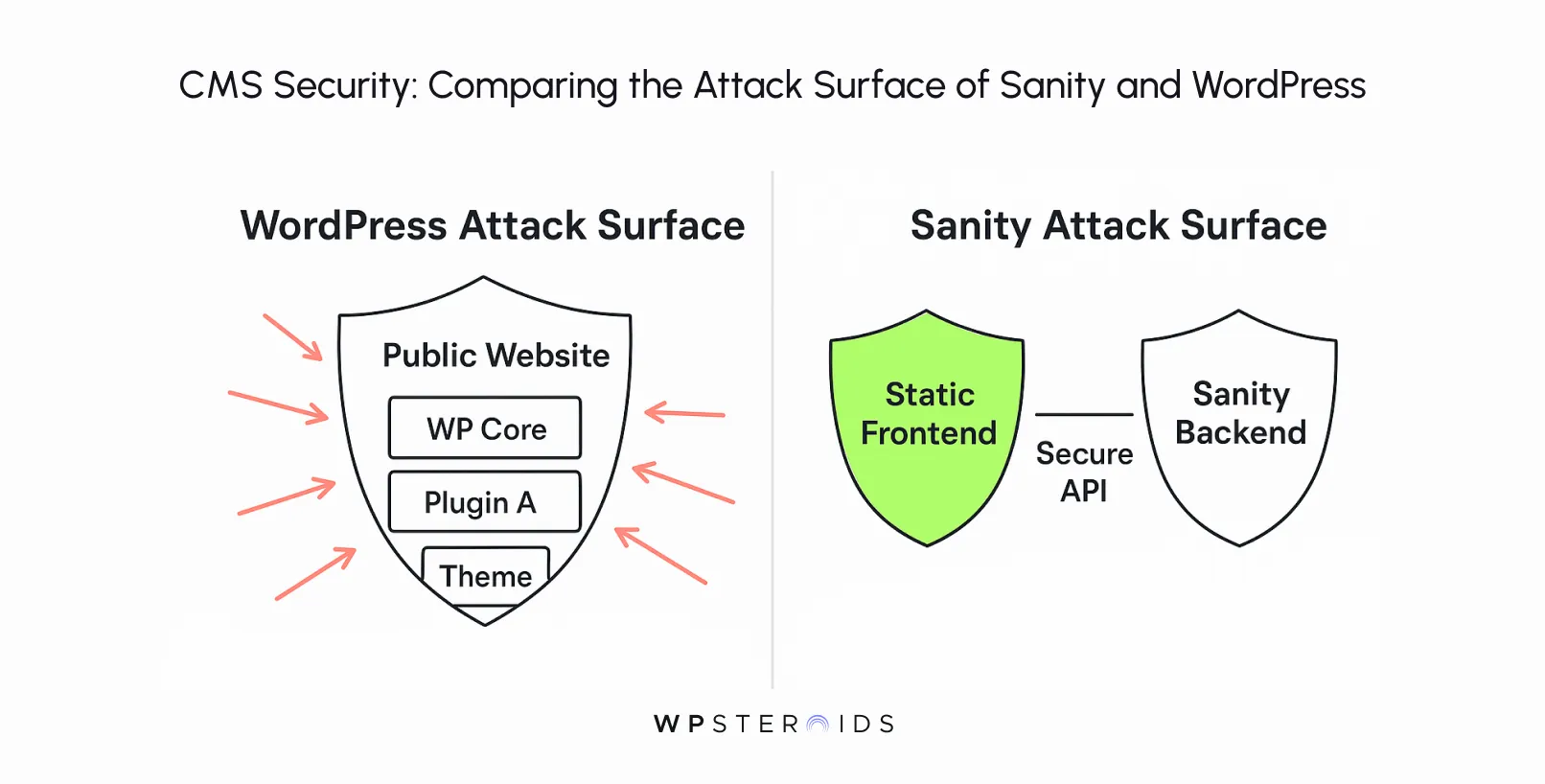
While the WordPress core software is actively maintained and generally secure, every single theme and plugin you install is a potential doorway for an attacker.
These third-party extensions, often developed by small teams or individual developers, may not adhere to the highest security standards. An unpatched vulnerability in even a minor plugin can compromise your entire website.
Because WordPress is a monolithic system, a breach on the user-facing side can often provide a direct path to the admin dashboard and the underlying database, compounding the potential damage.
The sanity cms, by contrast, is architecturally designed for greater security. The single most important factor is the decoupling of the content backend from the public-facing frontend.
Your Sanity Studio and the underlying Content Lake live on a separate, managed infrastructure. The public-facing website or application has no direct connection to this content database. It only communicates through secure, read-only APIs.
This model dramatically reduces the attack surface. Common WordPress vulnerabilities like SQL injection are simply not possible against a static frontend. No third-party PHP plugins are running on your web server that can be exploited.
Extending functionality with sanity cms is done through API integration with other secure, specialized services, not by installing executable code into your core CMS.
The Verdict: While a well-maintained WordPress site can be secured, it requires constant vigilance, disciplined update processes, and often, paid security services. Its security is a process of active mitigation.
Sanity is fundamentally more secure out of the box because its headless architecture eliminates entire classes of common web vulnerabilities.
By separating your content management environment from your delivery layer, you significantly reduce your risk profile from day one.
When a project scales to the enterprise level, the definition of a "good CMS" changes dramatically. The conversation moves beyond simple page creation and traffic spikes.
Enterprise readiness is about handling complexity: complex team workflows, stringent security and compliance requirements, a global user base, and the need to integrate seamlessly into a wider ecosystem of digital tools. Can both platforms rise to this challenge?
The short answer is yes, both can be used for enterprise-level projects, but they do so in fundamentally different ways, with vastly different implications for your development team and total cost of ownership.
Can WordPress be Used for Enterprise-Level Business?
Absolutely. Many large corporations run on WordPress, often using managed hosting solutions like WordPress VIP. However, making WordPress work in a complex enterprise environment is often an exercise in fighting against its core architecture.
It requires a significant, ongoing investment in specialized development and operations teams to manage performance, security, and scalability.
For an enterprise user, the monolithic nature of WordPress becomes a major source of friction. Simple requests from a marketing team can require complex development workarounds to avoid disrupting the fragile plugin ecosystem.
Integrating with other enterprise systems (like a CRM or a product information manager) often involves custom, brittle plugins that add to the maintenance burden.
The system of granular user roles and permissions can be extended, but it lacks the deep customizability required for intricate corporate workflows.
In essence, you end up building a complex, custom application on top of a blogging platform, accumulating technical debt with every step.
Can Sanity be Used for Enterprise-Level Business?
Sanity, on the other hand, was architecturally designed for the complexity that enterprises face. It thrives in this environment because it isn't a website builder; it's a programmable content platform.
The Verdict: While WordPress can be wrangled to serve enterprise needs, it often results in a high-maintenance, fragile system that resists modern development practices.
Sanity provides a more robust, flexible, and future-proof foundation for enterprise content operations, designed from the ground up to handle the complexity and scale that large businesses demand.
A CMS decision isn't just a technical one; it's a financial and strategic one that directly impacts your marketing team's capabilities.
The total cost of ownership and the available marketing tools can look very different between a monolithic system like WordPress and a headless platform like Sanity.
The answer to "which is cheaper?" depends entirely on the complexity of your project and how you define "cost."
For a small business launching a simple brochure website or blog, WordPress is almost always more cost-effective upfront.
You can get started with a shared hosting plan for a few dollars a month, use a free theme, and rely on free plugins. The initial cash outlay is minimal.
However, as a site grows in complexity, the total cost of ownership (TCO) for WordPress begins to climb.
The "hidden costs" start to appear:
For enterprises and scaling businesses, Sanity's cost model is often more predictable and cost-effective in the long run.
The upfront cost is higher because you must invest in dedicated development resources to build your custom frontend and configure the Sanity Studio.
However, the TCO is often lower.
Ultimately, WordPress is cheaper for simple sites, but Sanity provides better long-term value for complex, custom applications by trading unpredictable maintenance costs for a planned upfront investment in quality development.
This is where you must weigh a team's comfort zone against strategic capability. Many marketing professionals have years of experience in WordPress.
They know the dashboard, and they love the immediate feedback and control they get from tools like the Yoast SEO plugin. This familiarity is a real asset, and for many teams, it makes WordPress the cms of choice.
However, choosing the right content management system is a crucial part of your marketing and strategy. While WordPress offers excellent tools, Sanity enables a more powerful, modern approach.
With WordPress, the marketing team is largely confined to what their theme and plugins allow them to do. With Sanity, you can build them a completely bespoke editing experience.
A developer can create custom content preview environments, allowing a marketer to see exactly how a new piece of content will look on the company website, a native mobile app, and an in-store display—all from a single interface.
This unlocks true omnichannel marketing.
Regarding SEO, as we've discussed, WordPress plugins provide fantastic on-page checklists. But Sanity provides the underlying architectural advantages—blazing speed and perfectly structured data—that are critical for competitive search rankings today.
A good development team can build the core functionality of a tool like Yoast (meta titles, descriptions, etc.) directly into the Sanity Studio, giving marketers the controls they're used to on a platform that delivers far superior technical performance.
We’ve covered the architecture, the developer experience, the performance, and the strategic implications. Now it’s time to bring it all together and provide a clear, unambiguous answer to the core question.
After all, understanding how sanity and WordPress differ is only useful if it leads to a confident decision.
The most important thing to recognize is that this isn't about which CMS is universally "better". Both platforms serve different needs and cater to different users with different goals.
The right choice for your project depends entirely on your team's resources, your technical requirements, and your long-term business strategy.
This is the decision-making framework you need.
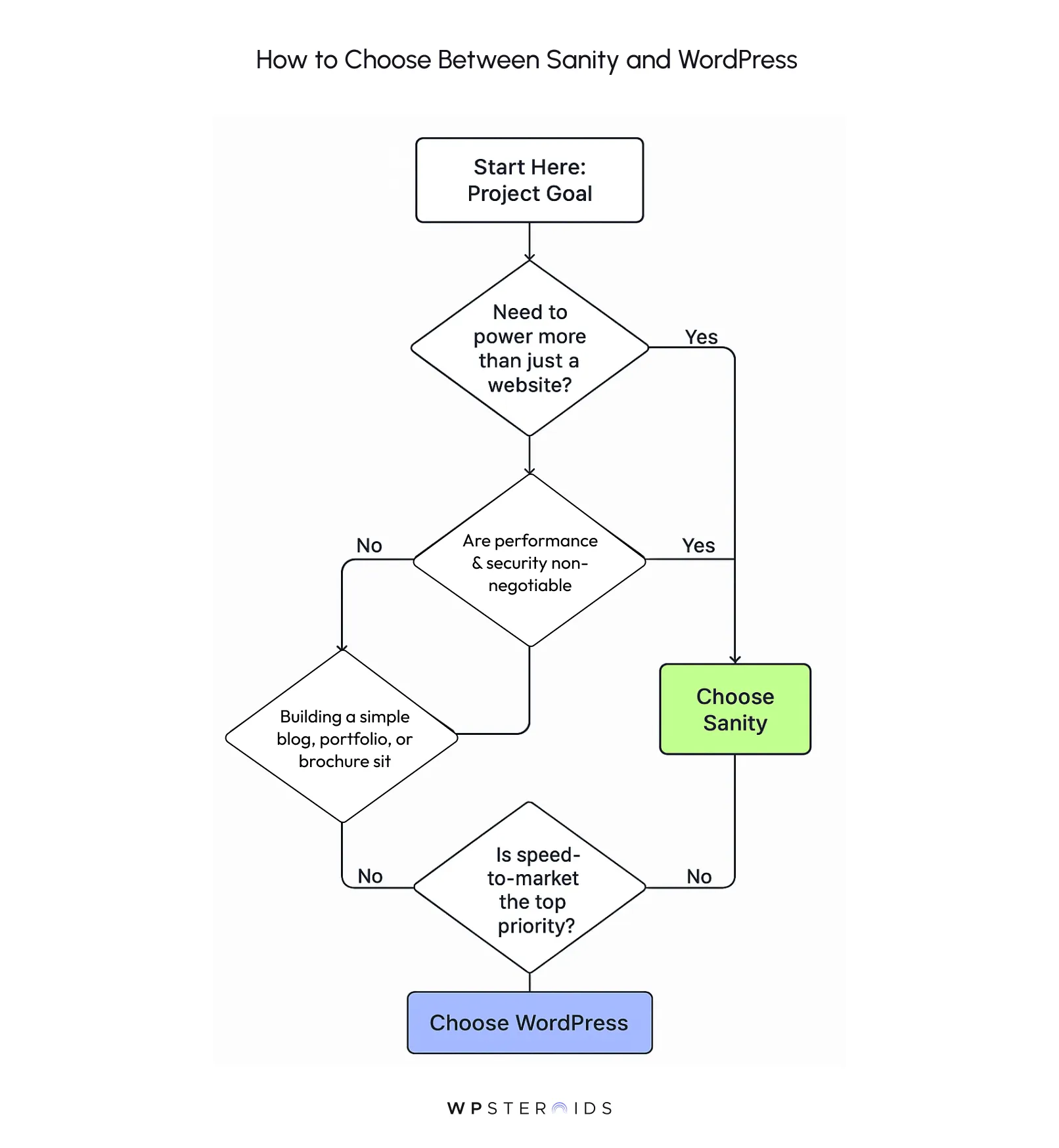
Sanity, on the other hand, is the clear choice when you're building for the future and view content as a strategic asset.
You should choose Sanity if:
WordPress, on the other hand, remains a dominant force for good reason. It is the pragmatic and correct choice under a specific set of circumstances.
You should choose WordPress if:
Choosing the right content management platform is one of the most critical decisions you'll make for your business.
As we've seen, the choice between Sanity and WordPress isn't a simple matter of features. It's a strategic decision about what you are building and how you want to build it.
The debate of WordPress and Sanity comes down to this core strategic choice
WordPress offers a well-trodden path for those who need a simple, all-in-one website with minimal upfront technical investment. It’s a tool that has empowered millions to get online quickly.
Sanity provides a modern, flexible, and powerful foundation for those building sophisticated digital experiences that extend beyond a single website. It’s an investment in a future-proof content architecture.
The decision ultimately comes down to this: Are you building a website, or are you building a content engine for the future of your digital presence?
Of course, Sanity and WordPress are not the only two players in the game. The CMS market is vast, with other excellent headless options like Contentful and Strapi, and other traditional CMSs like Drupal.
However, the fundamental architectural divide—monolithic vs. headless—is the most important one to understand.
The core principles we've discussed today will help you evaluate any CMS. When you look at other options, ask the same critical questions: Does this platform treat content as structured data?
Does it give my developers the freedom to build with the best tools? Does it lock my content into a single presentation layer?
Answering those questions will almost always lead you back to the same conclusion: the future of digital experiences is flexible, scalable, and headless.
The Sanity vs WordPress debate is more than just a technical comparison; it's a look at the past and future of the web.
WordPress represents the proven, page-centric model that defined the last decade—an all-in-one solution for building websites. Sanity represents the future—a flexible, powerful engine for delivering structured content to any platform, device, or channel you can imagine.
Choosing the right content management for your business isn't just a technical decision; it's a strategic choice between owning a collection of web pages and owning an agile, future-proof content supply chain.
One path leads to ongoing maintenance and architectural constraints. The other leads to innovation, speed, and the freedom to build whatever comes next.
Stop building on a platform that wasn't designed for the demands of the modern web. Stop fighting a system that limits your team's potential.
It's time to see how a modern, headless CMS can unlock true content velocity and set your projects up for long-term success.
Ready to make the switch? Book a discovery call with our experts today.
Is sanity better than WordPress?
Neither is universally "better"—they are better for different jobs. Sanity is the superior choice for developers building modern, scalable, and secure digital experiences that need to deliver content to multiple channels. WordPress is the better choice for non-technical users who need a simple, all-in-one website, like a blog or brochure site, and rely on a vast ecosystem of pre-built themes and plugins.
Why are people moving away from WordPress?
Many developers are moving away from WordPress to escape the common pain points of a monolithic architecture. The primary reasons include chronic performance issues caused by database bottlenecks and plugin bloat, significant security vulnerabilities introduced by a massive third-party plugin ecosystem, and the inflexibility of a page-based model when building modern, multi-channel applications.
How much does Sanity CMS cost?
Sanity operates on a usage-based model with a very generous free tier that includes three non-admin users and ample API requests for many small-to-medium projects. Paid plans scale based on your usage of resources like API requests, bandwidth, and additional users. This model is often more predictable in the long run than WordPress, where costs can accumulate through premium hosting, themes, plugins, and ongoing developer maintenance.
What are the cons of Sanity CMS?
The main drawbacks of Sanity are that it is not a beginner-friendly, all-in-one solution. Its primary cons are:
Can you self-host Sanity?
The Sanity Studio—the open-source React application used for editing content—can be self-hosted anywhere you can host a web application. However, the core content backend, the Sanity Content Lake, is a fully managed cloud service. You cannot self-host the database itself. This hybrid model provides the best of both worlds: customization and control over your editing environment, with the scalability, security, and performance of a managed content infrastructure.
What companies use Sanity CMS?
Sanity is trusted by some of the world's leading companies for their content platforms, including Nike, Figma, AT&T, Burger King, and Cloudflare. Its adoption by major tech and enterprise companies highlights its power and scalability for mission-critical digital projects.
Is Sanity a headless CMS, and what does that mean compared to WordPress’s traditional model?
Yes, Sanity is a headless CMS. This means its content management backend ("the body") is completely separate from the presentation layer or frontend ("the head"). In contrast, WordPress is a traditional, monolithic CMS where the backend and the user-facing website are tightly coupled into a single application. The headless model allows Sanity to deliver content via an API to any frontend—a website, mobile app, etc.—offering far greater flexibility.
Do I need coding skills to use Sanity CMS?
Yes. To set up and configure a Sanity project, define content models, and build a frontend to display the content, you need a developer or development team. While the editing experience is very user-friendly for content creators, the platform itself is a tool for developers.
How steep is the learning curve for Sanity compared to WordPress?
For a non-technical user, WordPress has a much gentler learning curve. For a developer comfortable with JavaScript and modern frameworks like React, the learning curve for Sanity is relatively shallow, as it aligns with existing skills. In contrast, the learning curve for deeply customizing WordPress can be very steep, as it requires learning its specific PHP-based template hierarchy and "the WordPress way" of doing things.
Can I build custom frontends with both Sanity and WordPress?
Yes, but Sanity is designed for this from the ground up, making the process much smoother and more efficient. While WordPress has a REST API that allows it to be used headlessly, it is an add-on to its core monolithic structure, which can be less performant and more cumbersome to work with. Building a custom frontend is Sanity's primary use case.
Which CMS performs better under heavy traffic: Sanity or WordPress?
Sanity performs significantly better under heavy traffic. Its headless architecture allows for blazing-fast, modern frontends that can be deployed as static sites on a global CDN. This model is inherently more scalable and resilient to traffic spikes than a traditional WordPress site, which has to query a database to build each page on demand.
Is Sanity more scalable than WordPress for enterprise projects?
Yes. Sanity's structured content approach, API-first architecture, customizability for complex workflows, and superior performance make it a far more scalable and robust solution for the demands of large enterprise projects compared to WordPress.
Does Sanity require regular updates like WordPress plugins and themes?
No. This is a major advantage. Sanity's backend is a managed service, so you don't perform any server updates. The Sanity Studio is a dependency in your project's package.json, which you can update on your own schedule, eliminating the constant and often urgent need to patch plugins and themes that is characteristic of WordPress maintenance.
Which CMS is better for e‑commerce: Sanity or WordPress?
It depends on the complexity. For a straightforward, all-in-one store, WordPress with WooCommerce is an excellent and popular choice. For a more sophisticated "composable commerce" strategy—where you might use a best-in-class backend like Shopify and need to display product content across multiple platforms (web, mobile app, etc.)—Sanity's headless architecture provides the flexibility and performance needed for a superior, custom e-commerce experience.