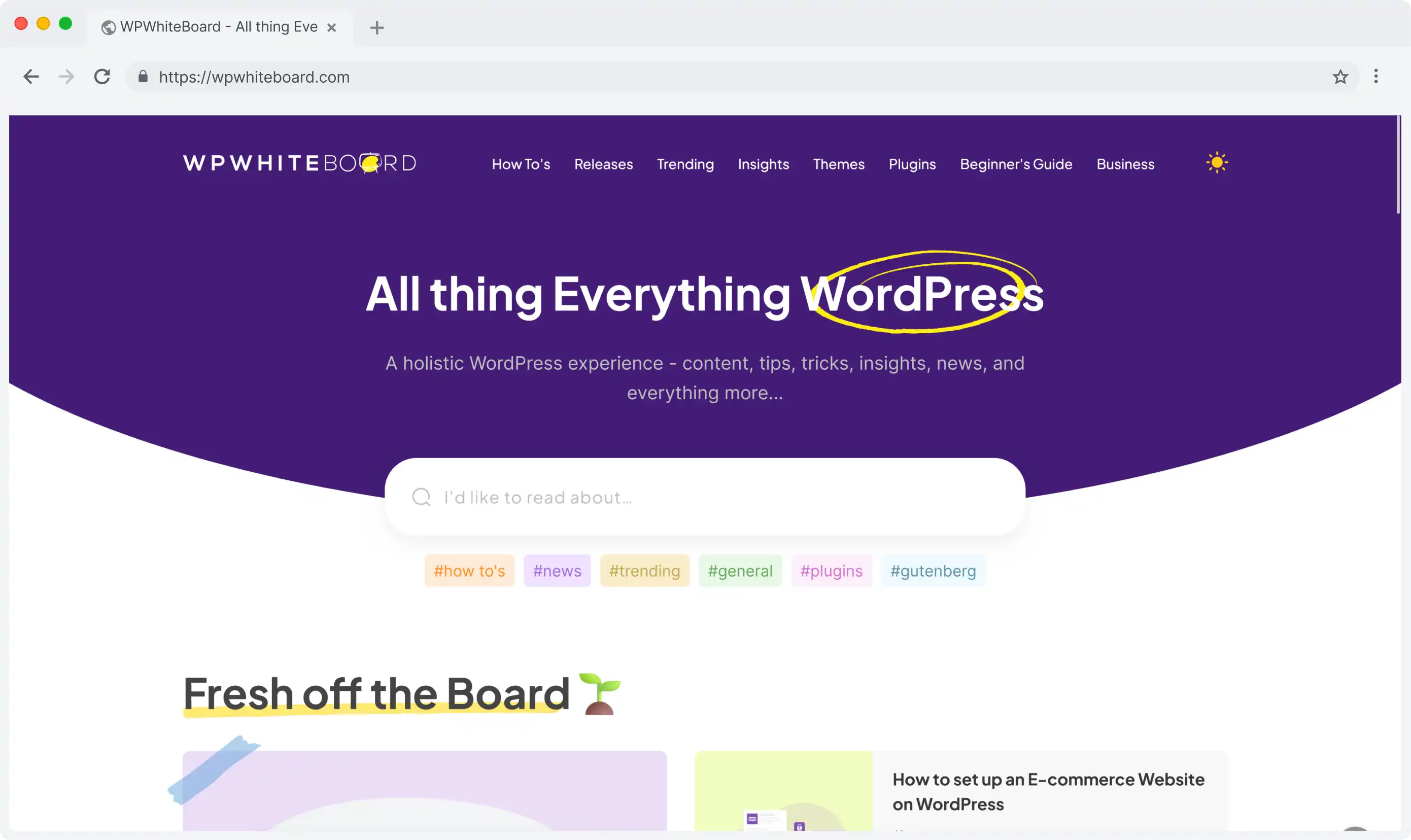
Driving Digital Performance for a Digital Media Brand
Headless CMS scales and improves WPWhiteBoard’s content distribution, flexibility, and personalization
Sahil Mahalley
Developer bottlenecks constantly delay your marketing teams!
If you're watching competitors launch on new channels while you're stuck in maintenance cycles, you’re not imagining the problem.
That system is limiting your company's growth and ability to keep up with modern demands.
A legacy CMS is a monolithic content management system that couples the back-end (content creation) with the front-end (presentation layer).
This outdated architecture often creates significant limitations in flexibility, scalability, and the ability to integrate with new technologies, directly hindering business agility and innovation.
This isn't just a technical inconvenience; it's a strategic bottleneck. The truth is, these crippling legacy systems can be the invisible anchor holding back your entire organization.
A legacy CMS is defined by its architecture: a tightly-coupled, monolithic structure where the back-end (where you create and manage content) is permanently fused to the front-end (the website or presentation layer).
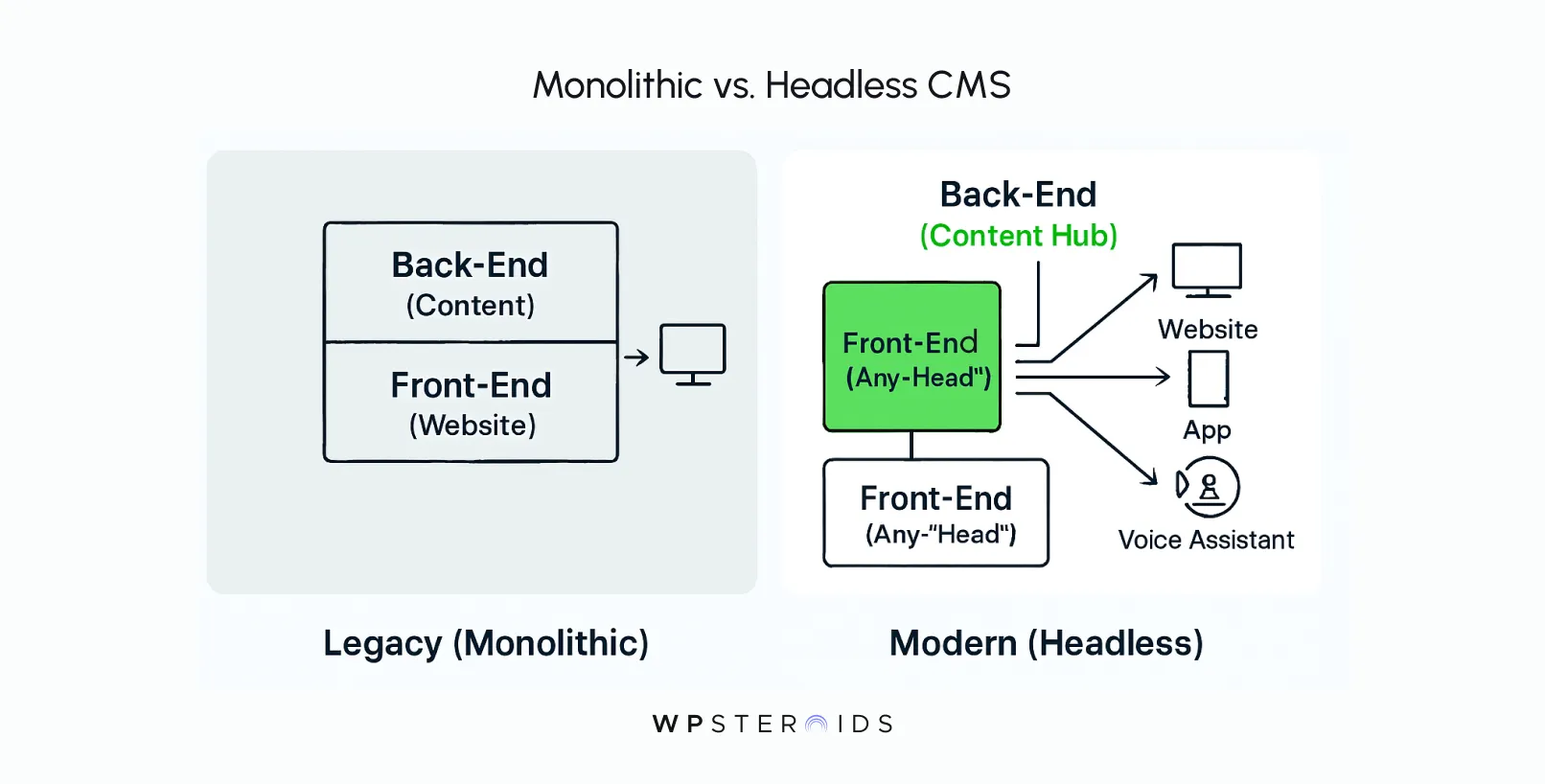
Twenty years ago, this all-in-one model was revolutionary.
Traditional CMS platforms were built for one job, and they did it well: managing a single website. They were reliable workhorses for a simpler digital era.
You wrote your content, pushed it into a template, and it appeared on your company's .com. Mission accomplished.
But the world changed. Now, your content needs to be on a website, a mobile app, a smartwatch, an in-store kiosk, and maybe even a voice assistant. The monolithic design of legacy systems was never meant for this.
Because the content and its presentation are locked together, you can't simply send that content to a new channel. You're forced into costly, time-consuming workarounds or, worse, a complete rebuild for every new screen.
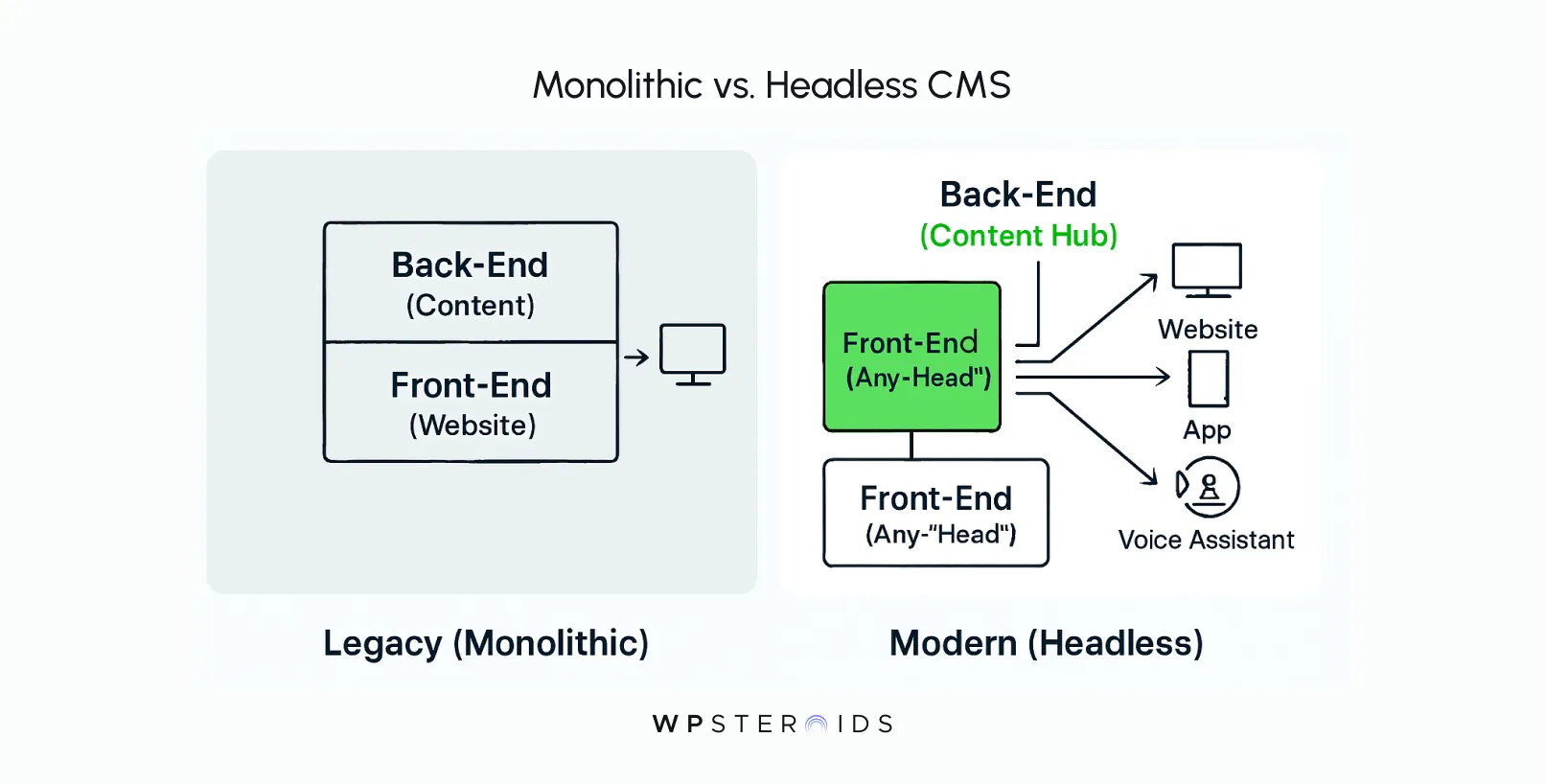
This is where a modern CMS fundamentally differs. Architectures like headless and composable are API-first. They decouple the content "body" from the presentation "head."
Content is treated as pure, structured data that can be delivered to any front-end, on any device, through an API.
What was once a rigid, website-centric box has become a flexible, centralized content hub. The reliable workhorse has become an innovation bottleneck because the very thing that made it simple—its all-in-one design—is now its greatest liability.
If the architectural flaws are so clear, why are so many smart companies still using legacy systems?
The surface-level reasons are familiar to any tech leader. The perceived complexity of migration feels daunting. The upfront cost of a new platform seems prohibitive. And there’s always organizational inertia—the powerful "if it ain't broke, don't fix it" mentality.
But these reasons often mask a deeper, more systemic issue. The problem isn't just technical debt; it's cultural debt.
Legacy CMS platforms aren’t just technical debt—they are cultural debt.
Think about it. Your legacy CMS forces your teams to work in a specific, rigid way. Marketing has an idea but can't execute it without filing a ticket and waiting for a developer.
Your engineers, in turn, are forced to act as gatekeepers rather than innovators, spending their days patching a brittle system instead of building value.
The technology's limitations create friction, enforce silos, and teach your entire organization to be risk-averse.
The phrase "our CMS can't do that" becomes a recurring theme in meetings, slowly eroding ambition and agility. Clinging to the old system isn't just a technical decision; it's a cultural one.
The true impact of legacy systems isn't found on a balance sheet under "CMS Licensing Fee." It's an insidious, creeping cost that drains resources, stifles creativity, and actively holds your business back.
The sticker price of your old platform is dwarfed by the hidden price you pay every single day in lost productivity and missed opportunities.
When you calculate the cost of ownership for a legacy CMS, the licensing and hosting fees are just the tip of the iceberg.
The real financial drain is happening below the surface, in the day-to-day operations.
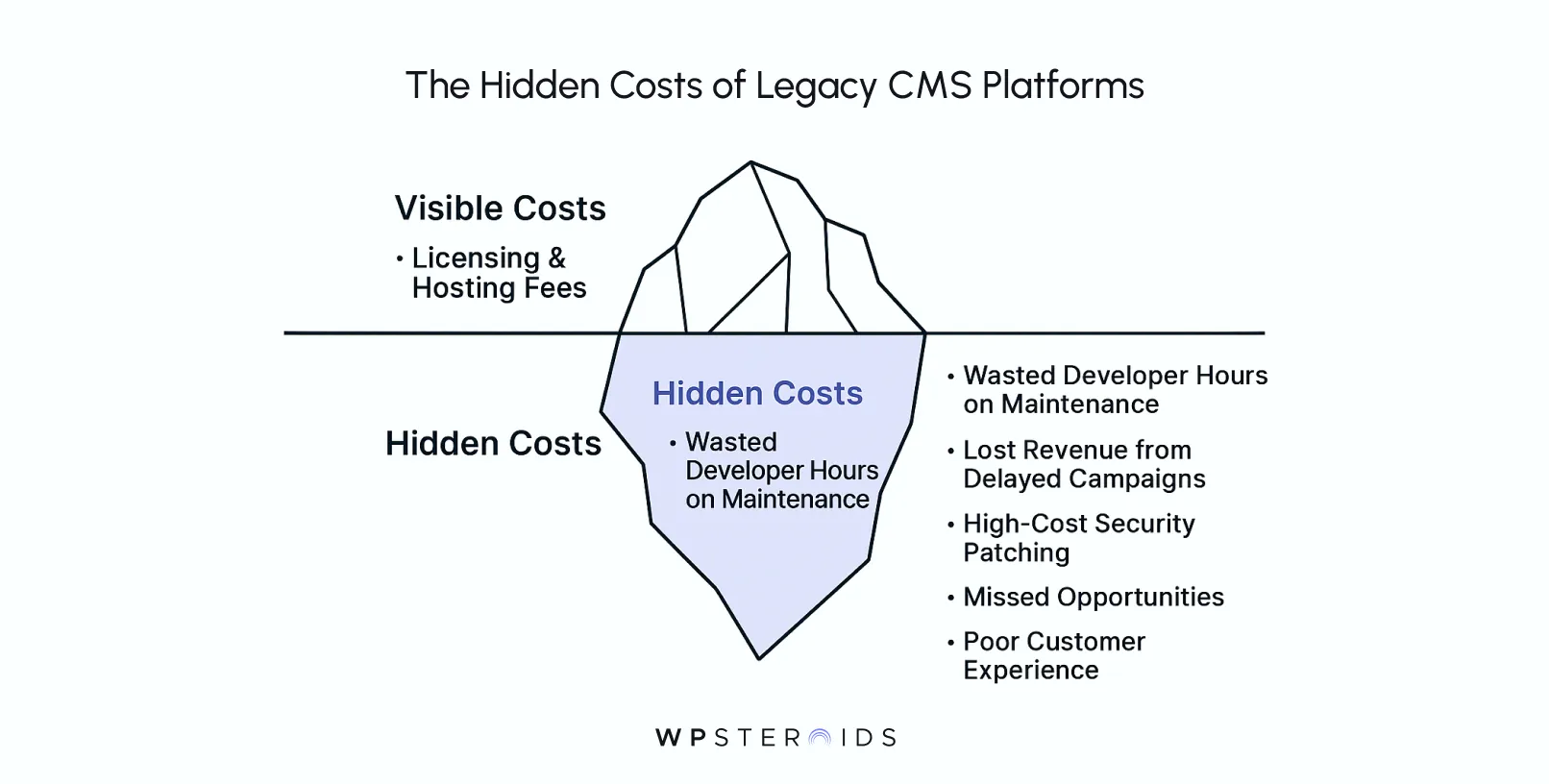
Consider the developer hours. How many of your best engineers are tied up making simple content updates, fixing broken templates, or building convoluted workarounds just to get a new marketing campaign live?
Every hour a developer spends on maintenance is an hour they aren't spending on building your next revenue-driving feature. Add to that the opportunity cost.
When a campaign is delayed by weeks because the CMS can't support a new integration, you've lost more than time—you've lost momentum and potential revenue.
Then there’s the constant, high-stakes cost of security. Older platforms require relentless patching and monitoring.
A single vulnerability in an outdated codebase can expose your entire business to risk, making these legacy system challenges a constant source of anxiety for any technical leader.
The friction caused by an outdated CMS extends deep into your organization, slowing down your teams and limiting their ability to work effectively. The rigid, developer-dependent workflows create a permanent bottleneck.
Your marketing and content teams have the strategy and the vision, but they can't execute without filing a ticket and waiting in line.
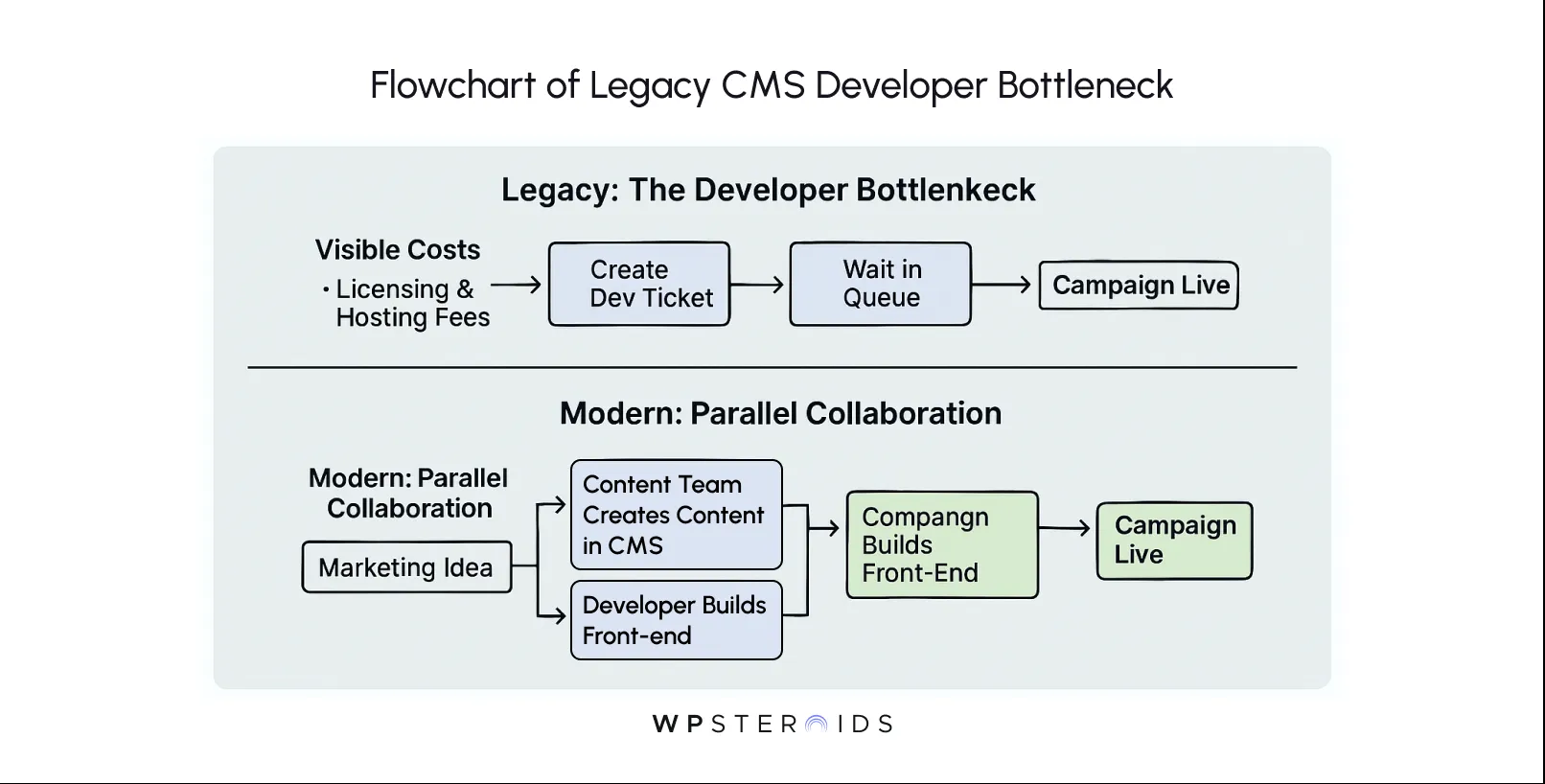
This creates a culture of frustration, where technical teams feel like support staff and non-technical teams feel powerless.
This internal friction inevitably spills outward, degrading the customer experience. Monolithic architectures are notoriously slow and clunky.
They struggle to deliver the fast, responsive experiences that modern customers demand and that search engines reward.
Your site performance suffers, bounce rates climb, and your brand perception takes a hit. In an omnichannel world, this problem is magnified.
A legacy CMS that was built only for a website simply cannot deliver a consistent, high-quality experience on a mobile app, kiosk, or any other touchpoint, leading to a fragmented and frustrating journey for your customers.
Perhaps the most significant way these systems can hinder progress is their inability to connect with the modern toolset your business relies on.
You want to integrate sophisticated analytics, new personalization engines, and cutting-edge AI tools, but your legacy CMS wasn't built for an open, interconnected digital ecosystem. Every new integration becomes a massive, custom development project fraught with risk.
Think of your legacy CMS as an old power grid. Every time you add a new building (channel or integration), you overload the system because it was never designed for this demand.
A modern, composable CMS is like upgrading to a smart grid—it intelligently routes energy (content) exactly where it’s needed, adapting to new demands without outages.
Your legacy platform forces you into a corner. You either abandon the new tools that could accelerate your growth, or you invest heavily in fragile, custom-coded bridges that are expensive to build and even more expensive to maintain.
It’s a choice between stagnation and technical debt—a choice no competitive business should have to make.
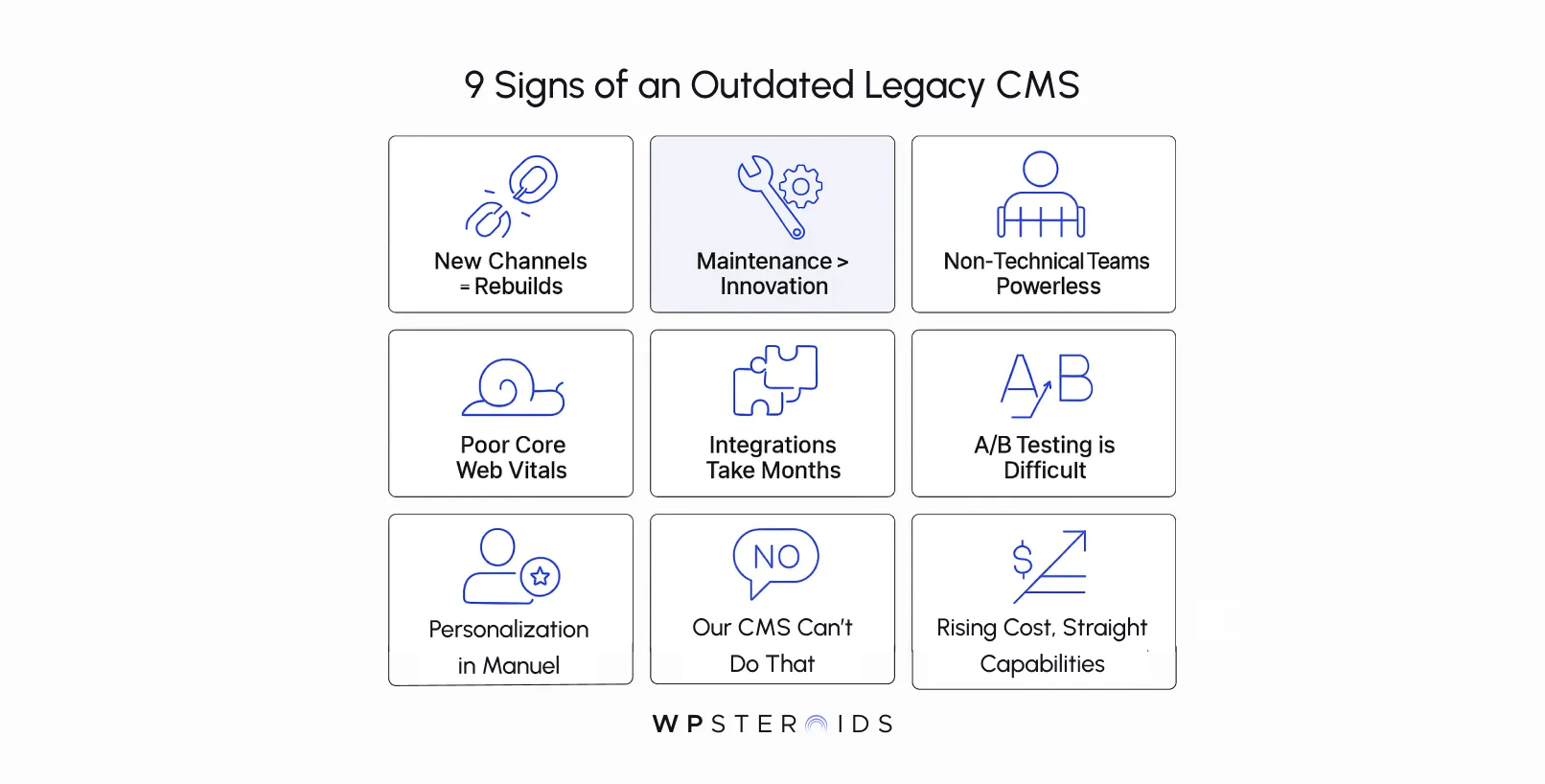
You feel the friction every day, but it can be hard to pinpoint the source. Is it a process problem?
A team issue? Or is it the technology itself? If you’re constantly hitting roadblocks that seem to defy logic, it’s time to assess if your CMS is the root cause.
These aren’t just minor annoyances; they are clear, flashing red flags that your CMS is actively limiting your growth.
If more than a few of these sound painfully familiar, you don’t have a collection of small issues holding you back—you have a systemic problem that needs to be addressed.
Recognizing the problem is the first step. The good news is that the frustrations you're experiencing aren't unique, and a clear, proven path forward exists.
The solution isn't just an incremental upgrade; it's a fundamental shift in how we think about content architecture.
Modern CMS platforms are designed specifically to eliminate the bottlenecks of legacy systems, providing the agility your business needs to thrive.
At the heart of this modern approach is the headless CMS. In simple terms, a headless CMS is a content management system that has been "decoupled" from the front-end presentation layer.
Unlike a traditional monolithic system, where the content (the "body") and the design (the "head") are fused, a headless CMS deals only with the content. It stores it, organizes it, and makes it available via an API.
This simple change has massive implications.
Your content is no longer trapped in a single website template. It becomes pure, structured data that your developers can pull into any front-end they choose—a React-based website, a native mobile app, a digital sign, or a voice assistant.
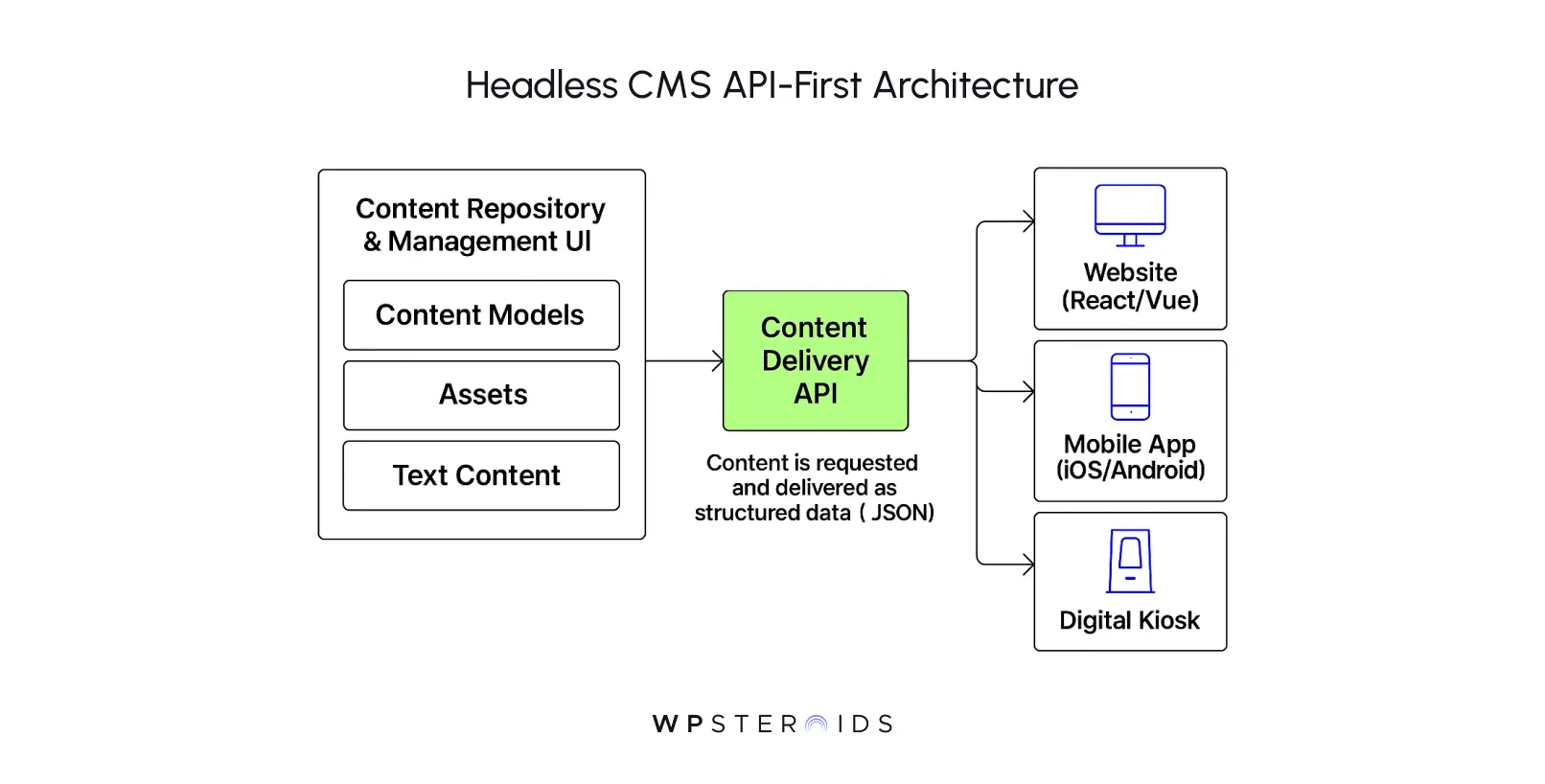
This architectural freedom is the foundation of a composable solution. Instead of being locked into the mediocre, built-in features of a single monolithic platform, you are free to compose a "stack" of best-in-class tools.
This moves you from a rigid, closed system to a flexible, open ecosystem built for innovation.
This isn't just a theoretical advantage for developers. The shift to headless and composable architectures delivers powerful, measurable business results.
For technical leaders focused on ROI, modernizing legacy systems provides clear, tangible benefits that directly impact the bottom line.
Moving beyond anecdotes, the data proves the value of this transition.
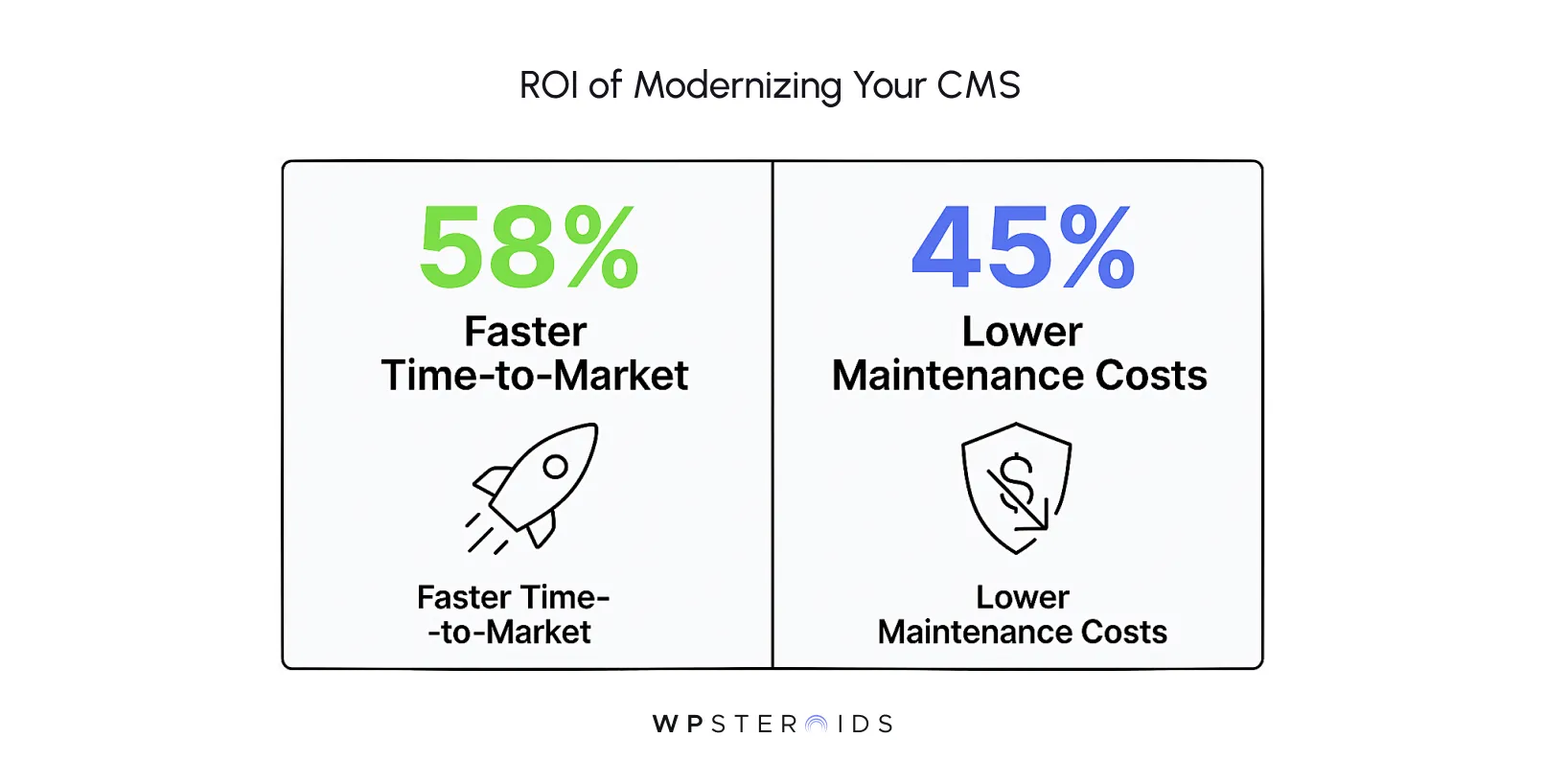
Let’s break down what those numbers mean for you. A 58% faster time-to-market means your marketing teams can launch campaigns and enter new markets in weeks, not months. It means beating your competitors to the punch.
A 45% reduction in long-term maintenance costs means freeing up your most valuable engineering talent to focus on building new, revenue-generating features instead of patching a brittle, outdated system.
This is how you build a future-ready organization—by investing in an architecture that accelerates growth instead of just keeping the lights on.
Embarking on a legacy modernization journey isn't just about replacing old software; it's about fundamentally re-architecting your company's ability to innovate.
By moving toward a composable architecture, you're not just solving today's problems—you're building a foundation that can adapt to the unpredictable demands of the future.
The goal is to move from a defensive, reactive posture to an offensive, proactive one.
For years, "omnichannel" has been a buzzword, but legacy systems have made it more of a pipe dream than a reality.
Because monolithic platforms lock your content and presentation together, delivering a truly consistent experience across a website, mobile app, and in-store kiosk has been incredibly difficult.
Any attempt to experiment with new channels like voice assistants or AR/VR experiences would require a separate, costly, and time-consuming development cycle.
This is where API-first content delivery changes the game.
With a modern, decoupled architecture, your content exists as a single source of truth, ready to be delivered to any front-end. This empowers your teams to innovate fearlessly.
Your developers can spin up a new mobile app or an experimental IoT device using the latest frameworks without ever touching the back-end content repository.
This parallel workflow dramatically accelerates innovation. Marketing can launch a new product, and the content is instantly available for the web team, the app team, and the retail experience team to pull into their respective front-ends simultaneously.
The process of replatforming to a modern stack is about breaking these dependencies and unlocking true omnichannel agility.
The limitations of a legacy CMS are glaring today, but they become an existential threat when you look at the trends shaping the future of digital experience.
Your current system is not equipped to handle the new technologies that will define customer engagement in the coming years.
Legacy systems with their block-based "what you see is what you get" (WYSIWYG) editors simply can't provide the clean, structured data these technologies require.
As your competitors leverage AI to create deeply personal customer journeys, your monolithic system will leave you stuck offering generic, one-size-fits-all content.
Looking further ahead, consider emerging channels like the metaverse, augmented reality, and increasingly sophisticated voice interfaces.
These platforms will require content that is not just text and images, but 3D models, spatial data, and conversational flows.
A legacy CMS, built for the singular purpose of rendering a 2D webpage, is an architectural dead-end.
It has no capacity to manage or deliver these new forms of content, making it impossible to innovate where your customers are heading next.
As you begin planning the shift from a self-hosted legacy platform to a modern SaaS solution, the high-level strategy gives way to critical, practical questions.
For any organization of scale, SSO isn't a luxury; it's a cornerstone of IT security and operational efficiency. It centralizes user access, simplifies onboarding and offboarding, and reduces the security risks associated with password fatigue.
This brings us to a crucial question when evaluating modern CMS platforms: "Is SSO a notable barrier to entry, and will it always be an expensive 'Enterprise' feature?"
The direct answer is that for enterprise-grade protocols like SAML or SCIM (which integrate with providers like Okta, Azure AD, or Auth0), SSO is frequently a key feature that differentiates standard plans from premium "Enterprise" tiers.
There's a clear reason for this. Vendors in the modern CMS ecosystem use these high-value security and compliance features as a primary lever to segment their customer base.
They understand that large organizations have strict IT and security requirements and are willing to pay for solutions that meet them.
So, will it always be this way?
While some features in the SaaS world tend to become commoditized over time and trickle down to lower-priced tiers, core security and compliance features like advanced SSO are likely to remain a premium offering for the foreseeable future.
They require a higher level of support, security assurance, and maintenance, making them a natural fit for top-tier plans.
However, this doesn't have to be a deal-breaking barrier.
Here’s how to navigate it:
The challenges you're facing—the developer bottlenecks, the frustrated marketing teams, the missed opportunities—are not symptoms of a failing team. They are symptoms of a failing foundation.
The right architecture is the foundation of your digital presence, and its job is to get out of the way, freeing your teams from battling system limitations and empowering them to focus on innovation and growth.
The decision of modernizing legacy systems is no longer just about keeping up; it's about unlocking the true potential of your business. It’s about choosing speed over stagnation, flexibility over friction, and future-readiness over technical debt.
Moving away from a crippling legacy system isn't just one option among many; it is the single best move for your growth and your company's future success.
You now have the clarity on why everything feels so slow and difficult. The next step is to act on that clarity. Let us help you move forward with confidence.
Map out a modernization journey that builds the powerful, flexible foundation your business truly deserves. Book your discovery call today →
What is a legacy CMS?
A legacy CMS, often called a traditional or monolithic CMS, is an all-in-one platform where the back-end (content creation and storage) is tightly coupled with the front-end (the website presentation layer). This architecture was designed primarily to manage a single website, making it inherently inflexible for modern, multi-channel digital experiences.
How do I know if my CMS is considered “legacy”?
Look for the red flags discussed in this article. Key signs include: your developers spend more time on maintenance than building new features; you can't easily publish content to new channels like mobile apps without a major rebuild; your non-technical teams are completely dependent on developers for content updates; and your site struggles with performance and modern integrations. If the phrase "our CMS can't do that" is common in your strategy meetings, you're likely working with a legacy system.
Why do legacy CMS platforms struggle to keep up with modern business needs?
They struggle because their core architecture is rigid. They were built for a single output (a website), so they cannot easily adapt to the modern need for omnichannel content delivery, API-driven integrations with tools like AI and marketing automation, or the fast development cycles required to stay competitive. Their monolithic nature creates bottlenecks that slow down innovation across the entire organization.
What are the hidden costs of maintaining a legacy CMS?
The hidden costs go far beyond licensing fees. They include excessive developer hours spent on maintenance and workarounds, lost revenue from delayed marketing campaigns, the high cost and risk associated with patching outdated security vulnerabilities, and the significant opportunity cost of not being able to innovate or enter new markets quickly.
Are legacy CMS solutions better than modern CMS solutions?
For the vast majority of modern business use cases, the answer is no. While a legacy CMS might seem simpler for a very basic, single-channel website with no integration needs, this is an increasingly rare scenario. Modern headless and composable solutions offer far greater flexibility, scalability, security, and performance, making them a strategically superior choice for any business focused on growth and future-readiness.
What challenges do developers face when working with outdated CMS platforms?
Developers often face a frustrating cycle of restrictive, proprietary technologies, poor documentation, and a lack of modern development tools. They spend their time fighting the system to implement simple features, debugging complex integration issues, and patching security holes instead of using their skills to build innovative, high-value user experiences. This not only slows down progress but also leads to low morale and high turnover on technical teams.
What ROI can I expect from modernizing my CMS?
The ROI is multifaceted. Quantitatively, reports like Forrester's show significant improvements in time-to-market (up to 58% faster) and reductions in long-term maintenance costs (up to 45%). Qualitatively, the ROI includes increased developer productivity, higher team morale, improved brand perception from better customer experiences, and the strategic advantage of being able to innovate and adapt to market changes faster than your competitors.