Driving Digital Performance for a Digital Media Brand
Headless CMS scales and improves WPWhiteBoard’s content distribution, flexibility, and personalization
Ankita Deb
Does the thought of updating a simple landing page without getting in a developer queue seem like a distant dream? You’re not alone.
For countless technical leads and content managers, the promise of delivering modern, fast, and elegant experiences is constantly hamstrung by a monolithic system that just can’t keep up.
You know a headless CMS is the answer, but the path from here to there looks complex, and the fear of a misstep leading to costly rework is very real.
A successful headless CMS implementation is a multi-phased project that prioritizes strategic content modeling and business goal alignment before platform selection.
It involves defining a scalable content architecture, planning a meticulous content migration, choosing the right front-end technology, and establishing robust security and maintenance protocols to create a future-proof digital experience platform.
The challenge of implementing a headless cms isn't just about the technology; it's about the strategy.
Before we dive into the how, let's align on the what. At its core, a headless CMS is about one thing: freedom.
Freedom for your developers to build with the tools they love, and freedom for your content team to create experiences for any channel without being locked into a single presentation template.
You opt for a headless CMS when the limitations of a traditional, monolithic system are actively costing you time and opportunity.
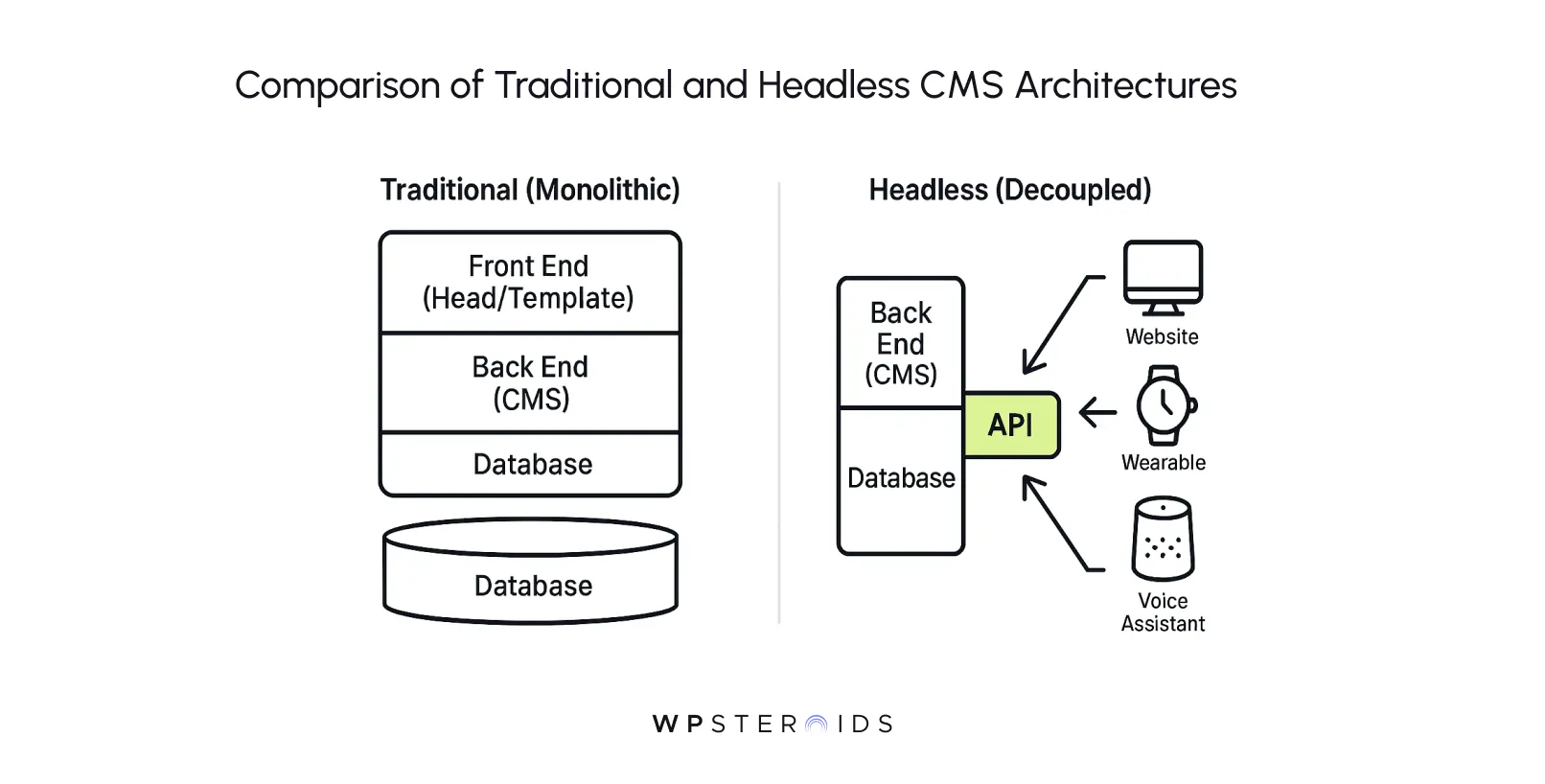
A traditional CMS bundles everything together—the database where content is stored, the application for managing it, and the website design that displays it.
This all-in-one approach is simple to start with, but it creates immense friction when you want to innovate.
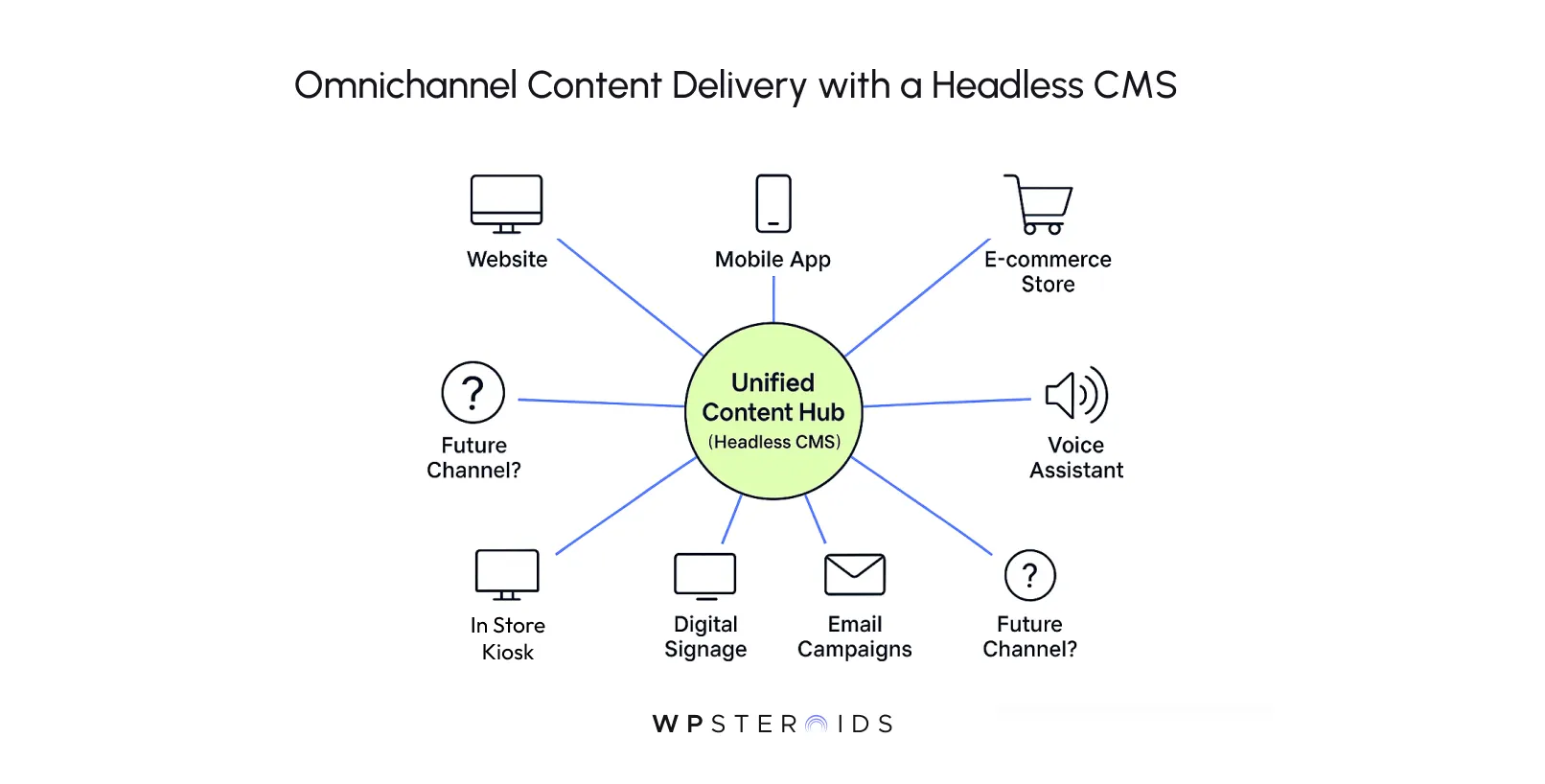
Want to add a mobile app? A kiosk display? A smartwatch notification? Each new channel requires a complex, custom-built integration that often feels like you're fighting the system every step of the way.
A headless approach decouples these components, giving you the flexibility to adapt and grow without starting from scratch.
In a traditional CMS, the "head" (the front-end design or template) is fused to the "body" (the back end content repository). A headless CMS surgically removes the head, leaving you with a pure content repository and an API.
This API acts as a secure, universal plug, allowing any front end—a website, an app, a digital sign—to request and retrieve data from the backend.
This separation of concerns is the magic key. Your content lives in one central hub, structured and ready, while your development teams are completely free to build the best possible user experience for any device or channel using whatever technology they see fit.
To make this tangible, think of a headless CMS like a film production crew. The script (your content) is written and stored independently of the actors, sets, and camera work (your front end delivery).
Directors (your developers) can interpret the same script into different movies — a blockbuster for cinema (your website), a TV series (your mobile app), or a streaming short (an IoT display) — without rewriting the core story.
This architectural freedom isn't just a technical nicety; it translates directly into powerful business advantages. When your teams can work in parallel, you can deploy content across multiple channels with incredible speed.
This new model fundamentally changes your workflow, improving both your content delivery capabilities and your operational efficiency.
That's not just an improvement; it's a transformation in how you build and manage digital experiences. It’s the ability to meet your customers wherever they are, faster and more efficiently than ever before.
This is the single most critical juncture in your implementation journey, and it’s where most guides lead you astray. The temptation is to jump straight into vendor demos and feature comparisons.
But a successful implementation doesn't start with technology; it starts with a deep understanding of your content.
Scan through most implementation roadmaps, and you’ll find "Choose a Headless CMS Platform" as step one.
This approach seems logical, but it’s a trap.
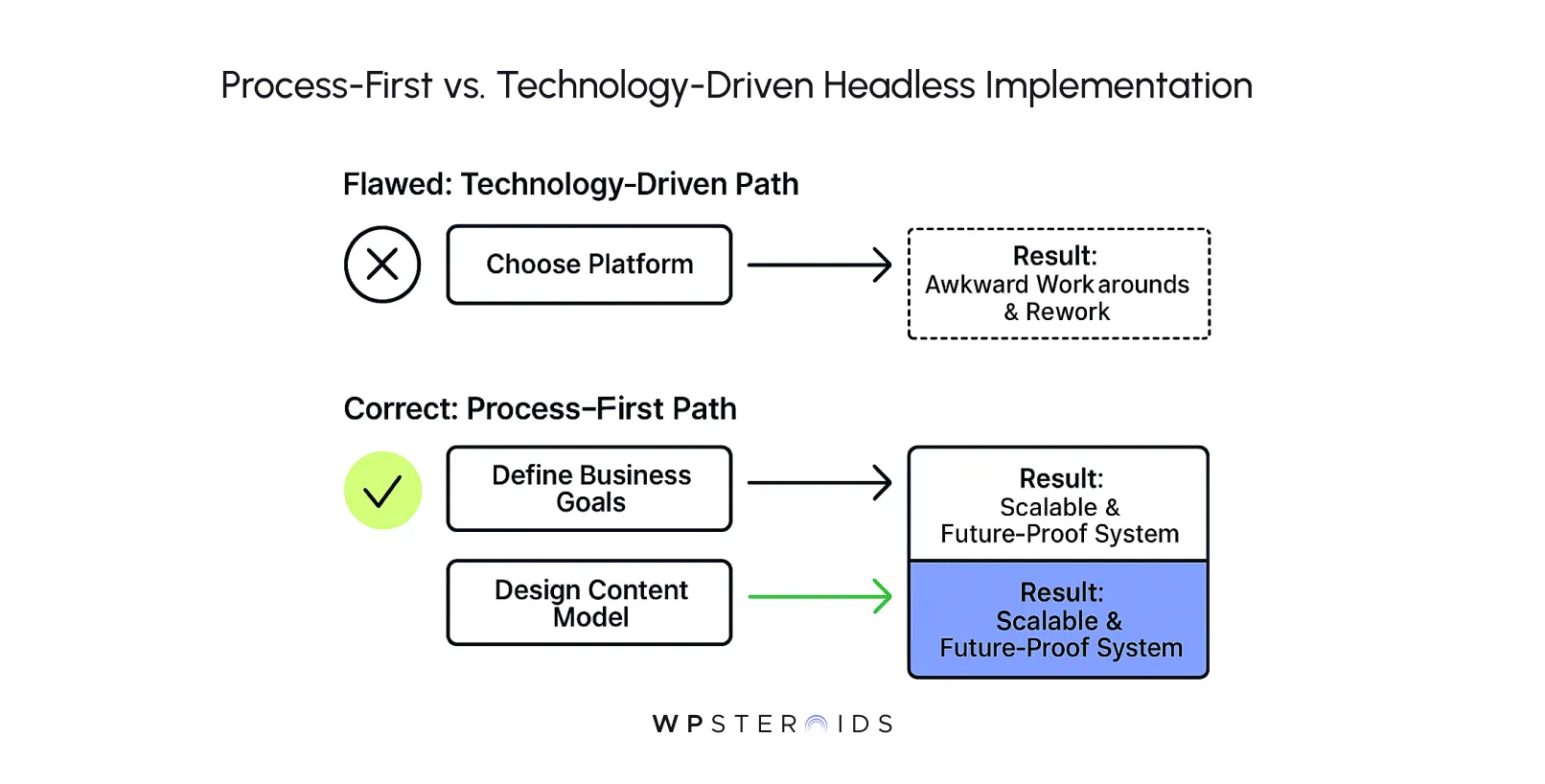
When you lead with technology, you inevitably start making concessions. You begin to shape your content strategy to fit the constraints and features of the platform you’ve chosen.
A truly successful cms implementation strategy recognizes that the platform is a tool to serve the business, not the other way around.
This kind of project requires careful planning, and the most important part of that plan is defining the structure of your content before you ever look at a vendor's website.
To build a truly effective and scalable headless cms, you must flip the script. Instead of asking, "Which platform should we buy?" you must first answer the question, "How should our content be structured to meet our business goals for the next five years?" This is the essence of building your content model.
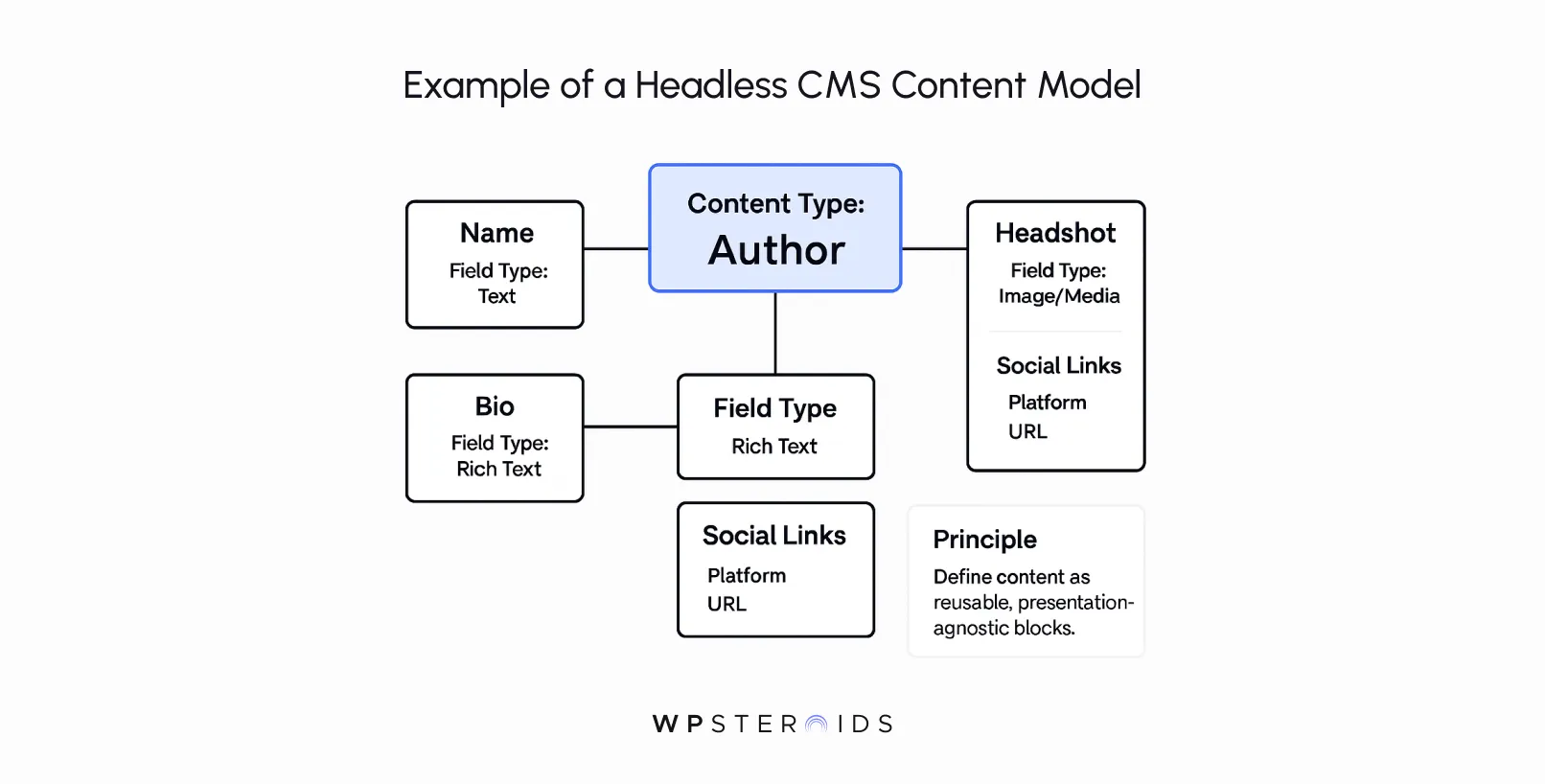
You're not just defining a blog post; you're defining what an "Author," a "Product," a "Case Study," and a "Landing Page" look like as independent, reusable blocks of information.
This strategic planning and execution ensures that the system you build is tailored precisely to your needs.
This isn’t just our opinion; it’s a lesson learned the hard way by many who have gone before. As industry architect Marsha Klein stated at the 2025 CMS Future Summit, the content modelling process should precede tool choice.
She warns that selecting a CMS first leads to ‘technology-driven modelling’ where teams fit content into the platform’s constraints rather than defining ideal structures for business needs.
By defining your ideal content model first, you create a clear blueprint. The task of choosing a platform then transforms from a speculative guessing game into a straightforward evaluation: which CMS best supports the structure we’ve already designed?
Before you dive headfirst into planning, it’s crucial to pause and confirm that a headless architecture truly aligns with your organization's goals. A headless CMS is a powerful solution, but it isn't a silver bullet for every problem.
The decision to go headless should be driven by clear business objectives, not just technical trends. If your organization is prioritizing the following goals, then you have a strong case for why opt for a headless approach.
The term "headless" is often used as a catch-all, but it's important to understand the nuances.
What you might need isn't necessarily a "pure" headless system. Here are the key approaches to consider for a successful cms project:
The right choice depends entirely on your team's skills, your specific project requirements, and your long-term vision.
| Feature | Fully Headless | Decoupled | Hybrid |
|---|---|---|---|
| Front-end Freedom | Total Freedom | Coupled by Default | Optional Freedom |
| API Acces Only | API Only | API as Add-on | API is Native |
| Best For | Omnichannel projects, max flexibility | Adding new channels to a traditional CMS | Large enterprises with mixed needs |
Now that you’ve validated the strategic fit and understand the foundational importance of content modeling, it’s time to move from theory to action.
A successful rollout isn’t a single sprint; it’s a well-orchestrated project with distinct phases.
We’ve broken down the journey into a clear, three-phase good implementation plan that covers everything from initial strategy to long-term success.
These are the best practices for implementing headless cms that will turn your vision into a reality.
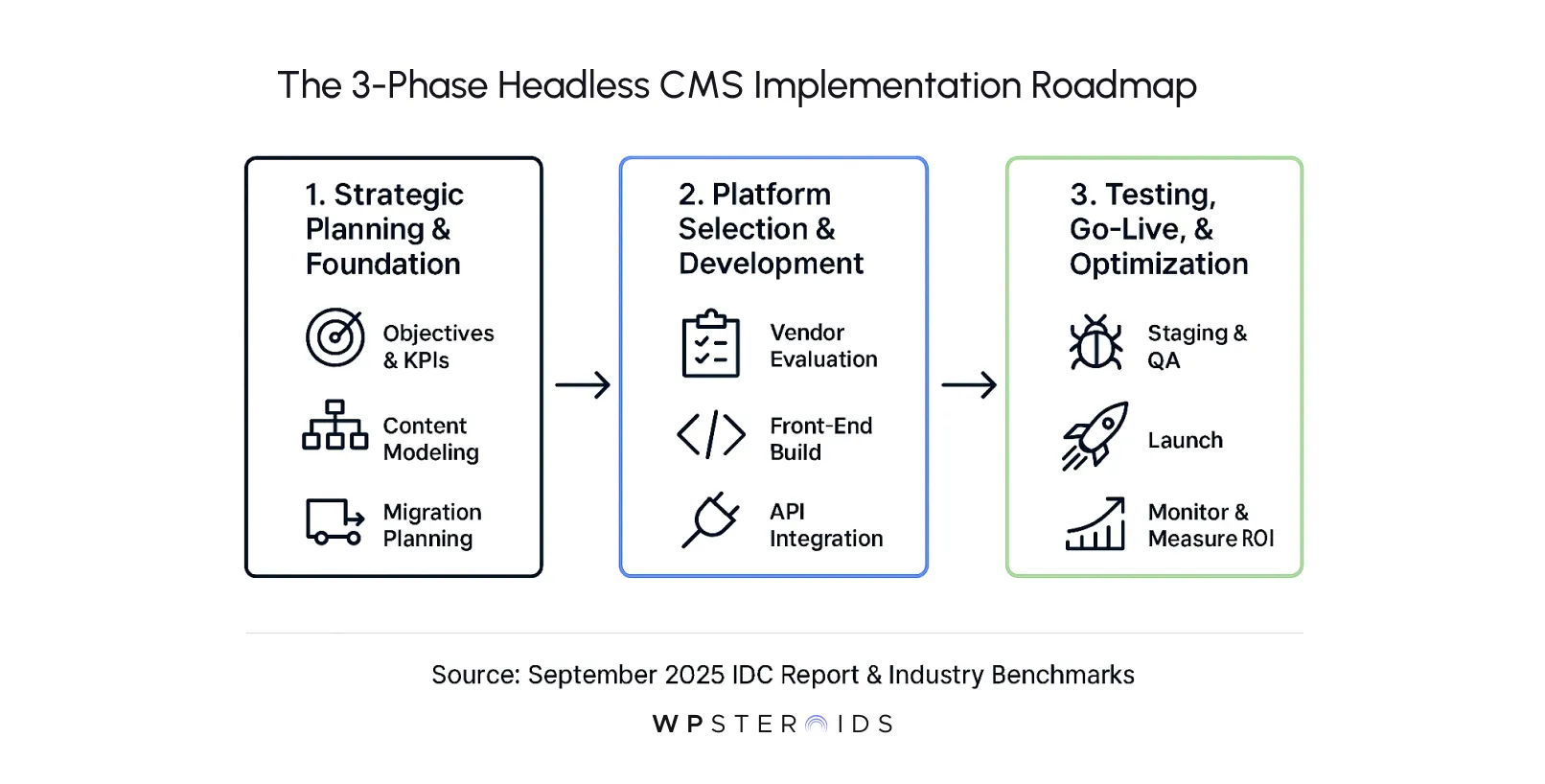
This is where you lay the groundwork. Rushing this phase is the most common mistake teams make, leading to misalignment and costly rework down the line.
Get this right, and everything that follows becomes exponentially easier.
With a rock-solid strategic foundation and a clear content model in hand, you are now finally ready to choose your technology and start building.
The finish line is in sight, but the work isn’t over. This final phase is about ensuring a flawless launch and setting yourself up for continuous improvement.
We've covered a lot of ground, moving from high-level strategy to the nuts and bolts of execution. The core takeaway is this: a successful headless CMS implementation hinges on a strategic, process-first approach.
It’s a journey that prioritizes deep thinking about your content model long before you ever see a platform demo.
By following a phased plan that moves deliberately from strategy to development and finally to optimization, you aren't just replacing an old system; you're building a flexible and scalable content engine designed to power your entire digital experience for years to come.
Shifting your mindset from "which tech should we buy?" to "how should our content work to serve our business?" is the single most important factor in achieving long-term success.
This is how you create future-proof content architecture that adapts to new channels you haven't even imagined yet. When your foundation is this solid, the challenge of maintaining and scaling your headless system transforms from a constant struggle into a straightforward process of evolution.
You escape the cycle of costly rebuilds and empower your teams to focus on what they do best: creating exceptional experiences for your customers.
The path from feeling stuck with a rigid CMS to confidently launching a dynamic, adaptable content hub is now clear. You have the framework.
Build a content foundation that grows with your business? Book your discovery call today.
Why should an organization consider implementing a headless CMS?
An organization should consider a headless CMS when its primary goals are to deliver content across multiple channels (like websites, mobile apps, and IoT devices) from a single source, improve developer velocity by letting them use modern technologies, enhance website performance and scalability, and future-proof their digital architecture against changing front-end trends.
What are the first steps in planning a headless CMS implementation?
The critical first steps are strategic, not technical. Before looking at any platform, you must: 1) Define clear, measurable business objectives and KPIs for the project. 2) Design a scalable, presentation-agnostic content model that maps out all your content types and their relationships. 3) Involve your content creators to prioritize the editorial features they need. 4) Develop a detailed content migration plan.
How do you choose the right headless CMS platform for your needs?
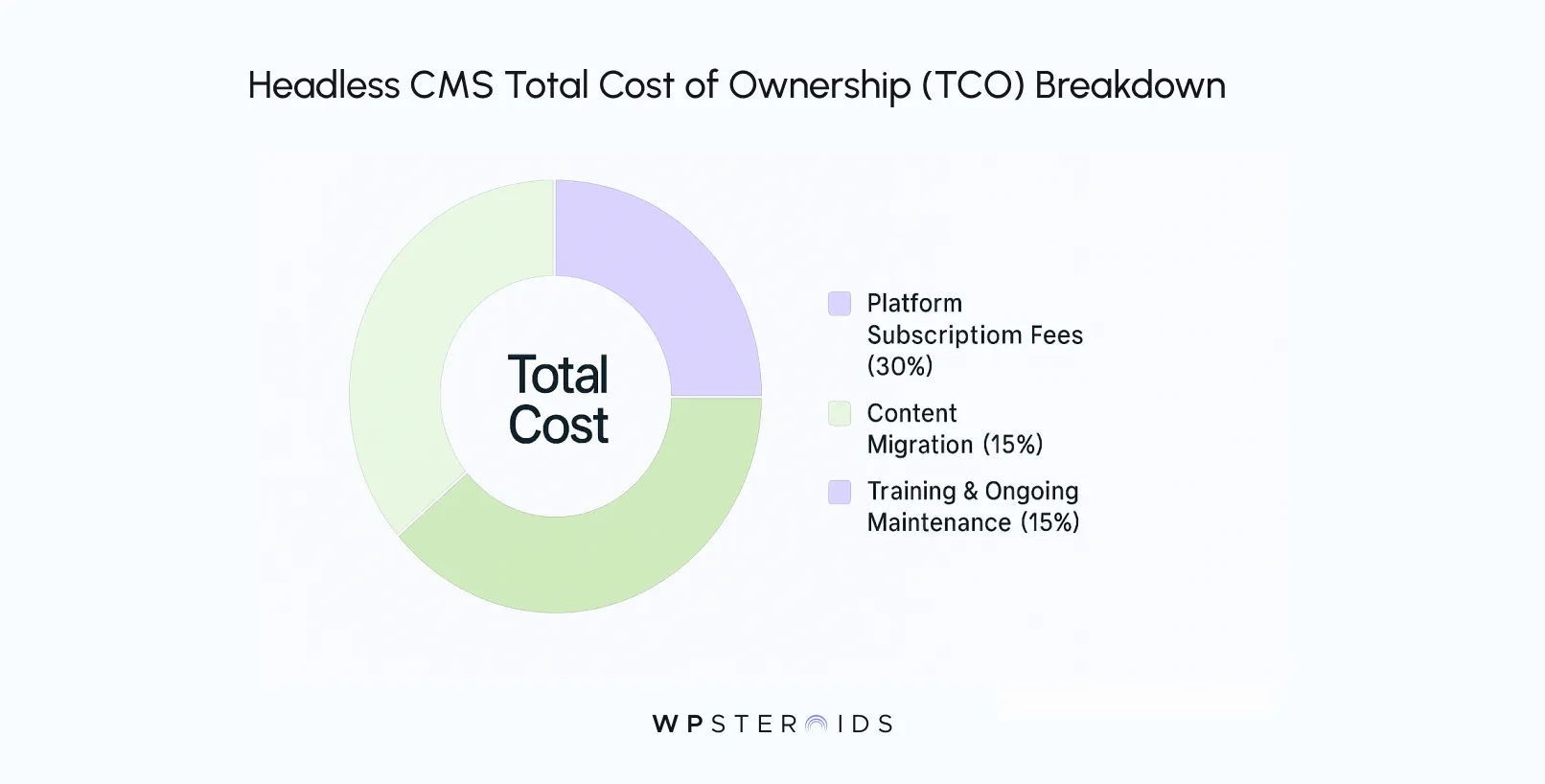
Once you have defined your content model, use it as your primary evaluation tool. The right platform is the one that best supports your specific content structures, relationships, and workflow needs. Beyond that, consider the developer experience (quality of API and documentation), integration capabilities with your existing tools, security protocols, and the total cost of ownership (TCO).
How should APIs be structured for scalability and performance?
How do you structure content models for flexibility and future growth?
The key is to create atomic and reusable content types. Instead of building large, monolithic "page" types, break content down into its smallest logical components (e.g., "Author," "Testimonial," "Product Feature"). Define clear relationships between these components. This presentation-agnostic approach ensures you can assemble these blocks in new ways for future channels without having to re-architect your content.
How do you set up editorial workflows in a headless environment?
Editorial workflows are configured within the headless CMS itself. You establish them by defining user roles and permissions (e.g., writer, editor, publisher) that dictate who can create, edit, and approve content. Many platforms also allow you to create custom content statuses (e.g., "Draft," "In Review," "Ready for Legal") to mirror your team's specific process.
How do you optimize performance when delivering content across multiple channels?
Performance optimization is a two-part process. On the back end, ensure your API calls are efficient. On the front end, use modern frameworks and techniques like static site generation (SSG) or server-side rendering (SSR) to serve pre-built pages. Aggressively optimize images, leverage browser caching, and always use a Content Delivery Network (CDN) to serve assets from locations close to the user.
What are the key security considerations when implementing a headless CMS?
Key security considerations include: securing the API with proper authentication and authorization (e.g., API keys, OAuth), configuring robust user roles and permissions within the CMS to prevent unauthorized content changes, ensuring the platform is regularly updated with security patches, and protecting your separate front-end application from common web vulnerabilities.
How do you monitor and maintain a headless CMS after launch?
Post-launch, you should implement monitoring for both the CMS API (uptime, response times) and the front-end application (load times, user experience metrics). Establish a regular maintenance schedule for applying updates and security patches. Finally, continuously track the KPIs you defined in the planning phase to measure ROI and identify areas for improvement.
What are common mistakes to avoid when implementing a headless CMS?
The most common mistakes are: 1) Choosing a platform before defining your content strategy (technology-driven modeling). 2) Neglecting the needs and workflow of the content creators. 3) Underestimating the complexity and resources required for content migration. 4) Failing to define clear, measurable success metrics from the start.
What role does GraphQL play in headless CMS implementations?
GraphQL is a query language for APIs that is highly popular in headless architectures. Its main advantage is that it allows the front-end application to request the exact data it needs—no more, no less—in a single API call. This prevents over-fetching (getting too much data) or under-fetching (needing multiple calls), leading to significant improvements in application performance and efficiency.