

Driving Digital Performance for a Digital Media Brand
Headless CMS scales and improves WPWhiteBoard’s content distribution, flexibility, and personalization
Swarup Gourkar
Are slow build times, API rate limits, and a sluggish user experience causing you and your team frustration? You’ve built a powerful, flexible architecture with a modern headless CMS, but without the right caching strategies, you're leaving performance, money, and developer sanity on the table.
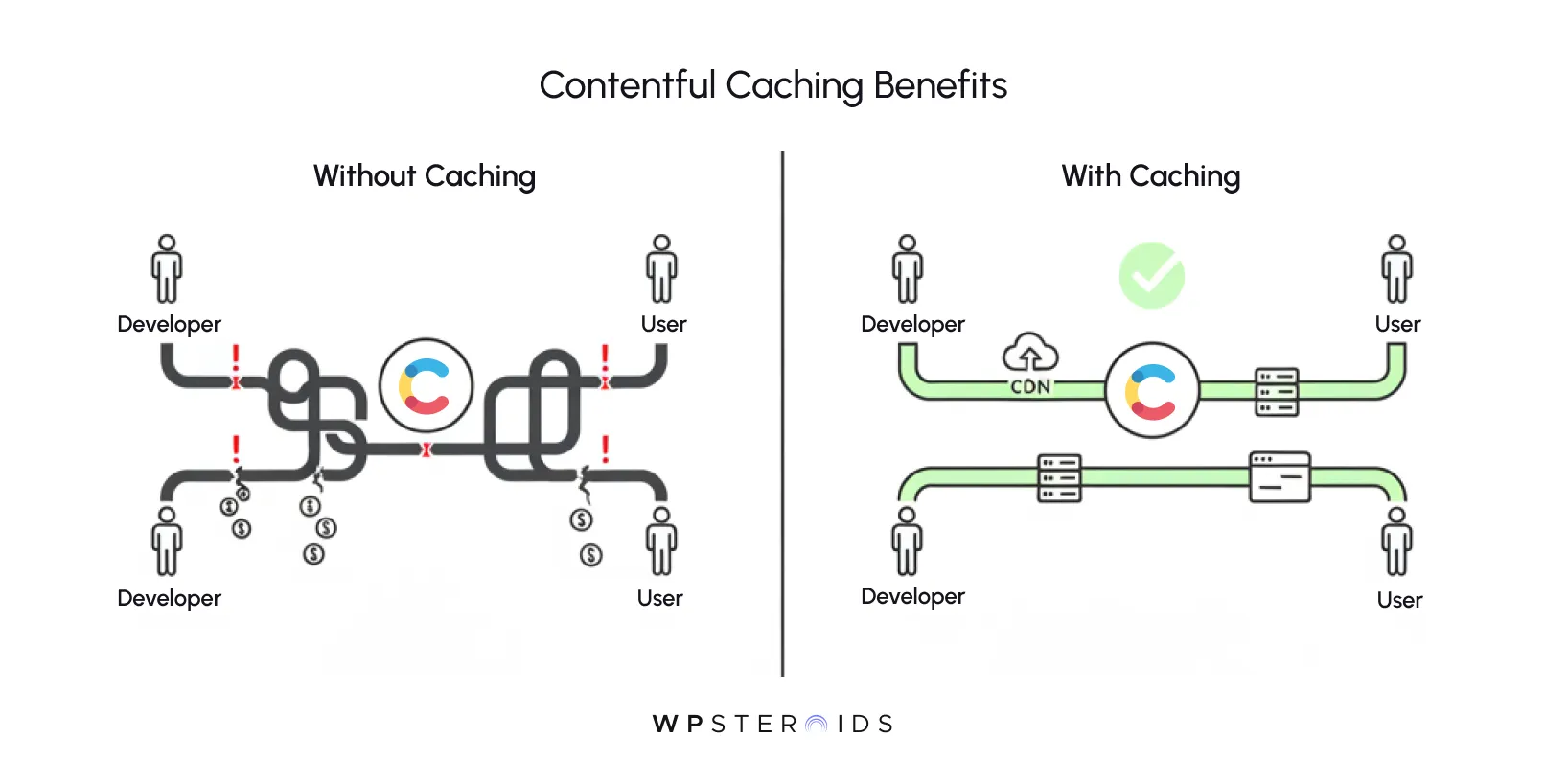
If you feel like your app should be faster but you're getting tangled in a maze of headers, CDNs, and build configurations, you're in the right place. You don't just have a performance problem; you have a caching opportunity.
This practice directly increases application speed, improves reliability, and reduces costs by serving content without repeatedly calling the Contentful API for every single request.
It’s easy to think of caching as a final-step optimization—a nice-to-have tweak to shave a few milliseconds off the page load for the end-user. But that’s a dangerously narrow view.
For modern development teams using a headless CMS, effective contentful caching is a core strategic principle that impacts everything from your daily workflow to your company's bottom line.
While your users will certainly appreciate a faster website, the most immediate and tangible benefits of a smart caching strategy are often felt by you, the developer.
Every API call you can avoid isn't just faster for the user; it's a faster build time, a lower bill from Contentful, and a reduced risk of hitting API rate limits that halt development entirely. Contentful caching isn't just a performance feature; it's a core tenet of efficient, cost-effective development with a headless CMS.
By reducing your reliance on direct API calls, you're not just optimizing the content delivery chain for users; you're creating a more resilient, faster, and less expensive development cycle for your entire team.
Once you’ve stabilized your development process, the focus can shift to the profound impact contentful caching has on business outcomes. It’s not just about a "faster site"—it's about measurable gains.
You need to be able to justify the time you spend on this to stakeholders, and thankfully, the data is on your side.
Let that sink in. A tenth of a second—a delay barely perceptible to a human—can have a material impact on revenue.
When you implement effective performance with caching strategies, you are directly influencing user engagement, lead generation, and sales. It elevates the conversation from a technical chore to a critical business driver.
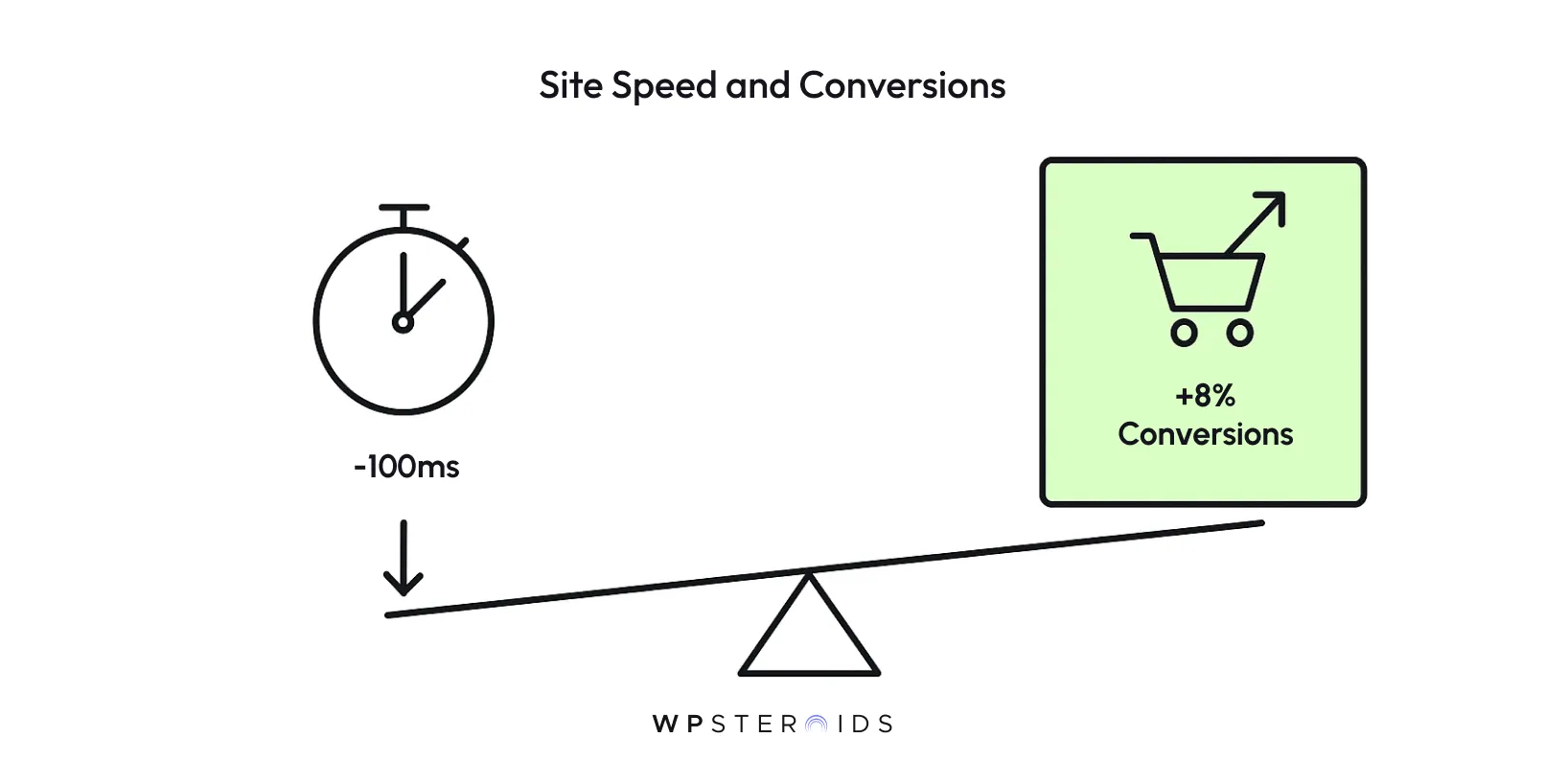
Improving Contentful's performance with these techniques provides a powerful, quantifiable return on investment, all while ensuring excellent data freshness for your users.
Before you write a single line of code, it’s crucial to build a clear mental model of how contentful caching works. Understanding cacheable content before diving into implementation details will save you hours of confusion.
The most effective caching strategies aren't about a single tool; they're about layering different techniques along the entire content delivery path, from Contentful's servers all the way to your user's browser.
To make these abstract layers tangible, let's think about something simple: getting a cup of coffee.
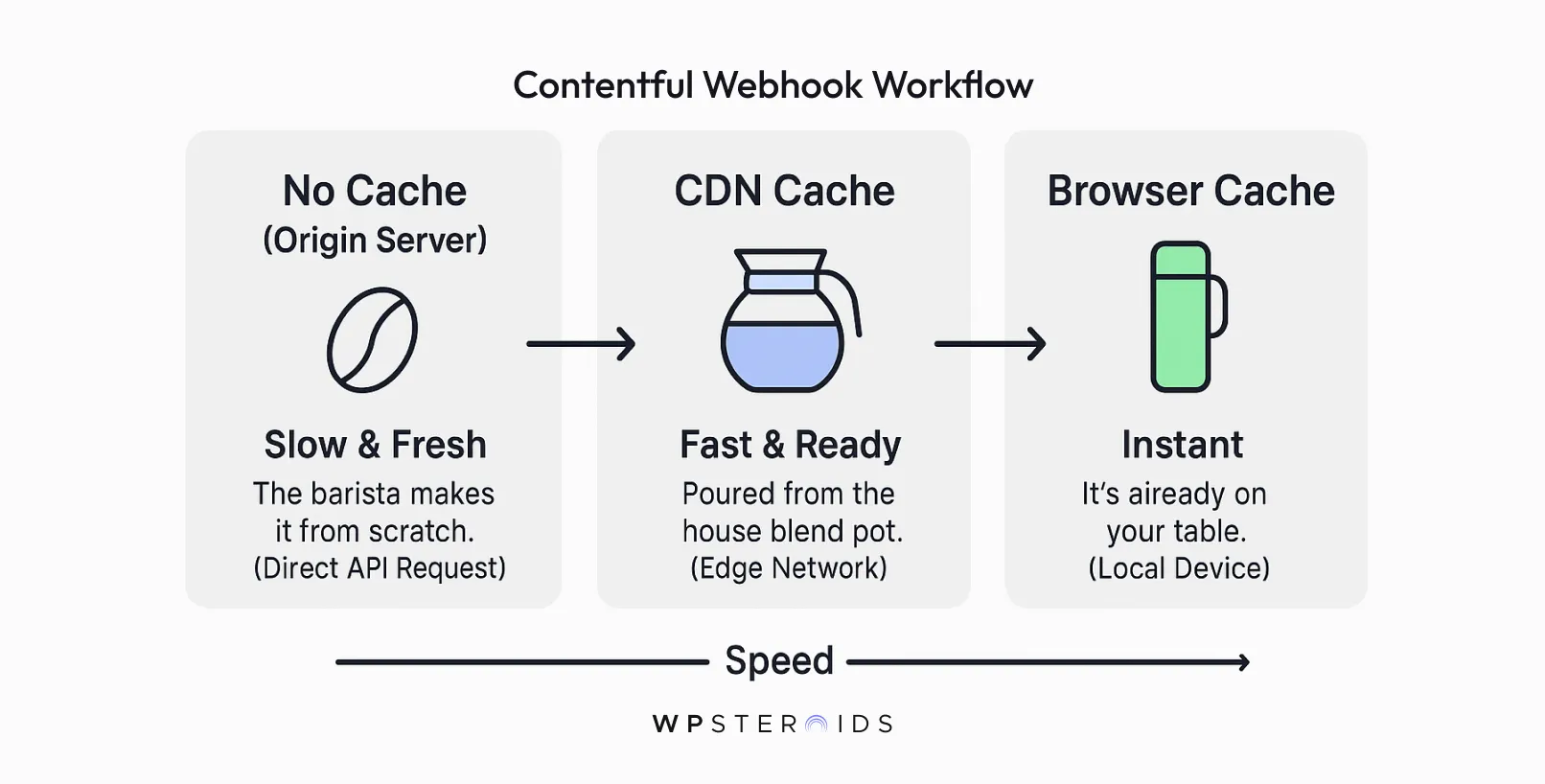
Each layer serves a different purpose, and together, they create a fast, efficient system that serves everyone well.
The good news is that Contentful provides a powerful starting point out of the box. Every request to Contentful’s Content Delivery API (CDA) is automatically served through a global Content Delivery Network (CDN).
This means there's already a "carafe" in place. When you request a piece of content, Contentful's CDN caches that response at an "edge" location physically close to your user.
The next time someone in that same region requests the same content, it can be served directly from the CDN's cache, which is much faster than going all the way back to Contentful's origin servers.
Contentful also sends Cache-Control headers with every API response. These are instructions that tell downstream systems—like your hosting platform's CDN or the user's browser—how long they are allowed to store and reuse a copy of the content before asking for a fresh one.
While Contentful’s defaults are great, true performance comes from strategically implementing your own contentful caching layers that respect these signals.
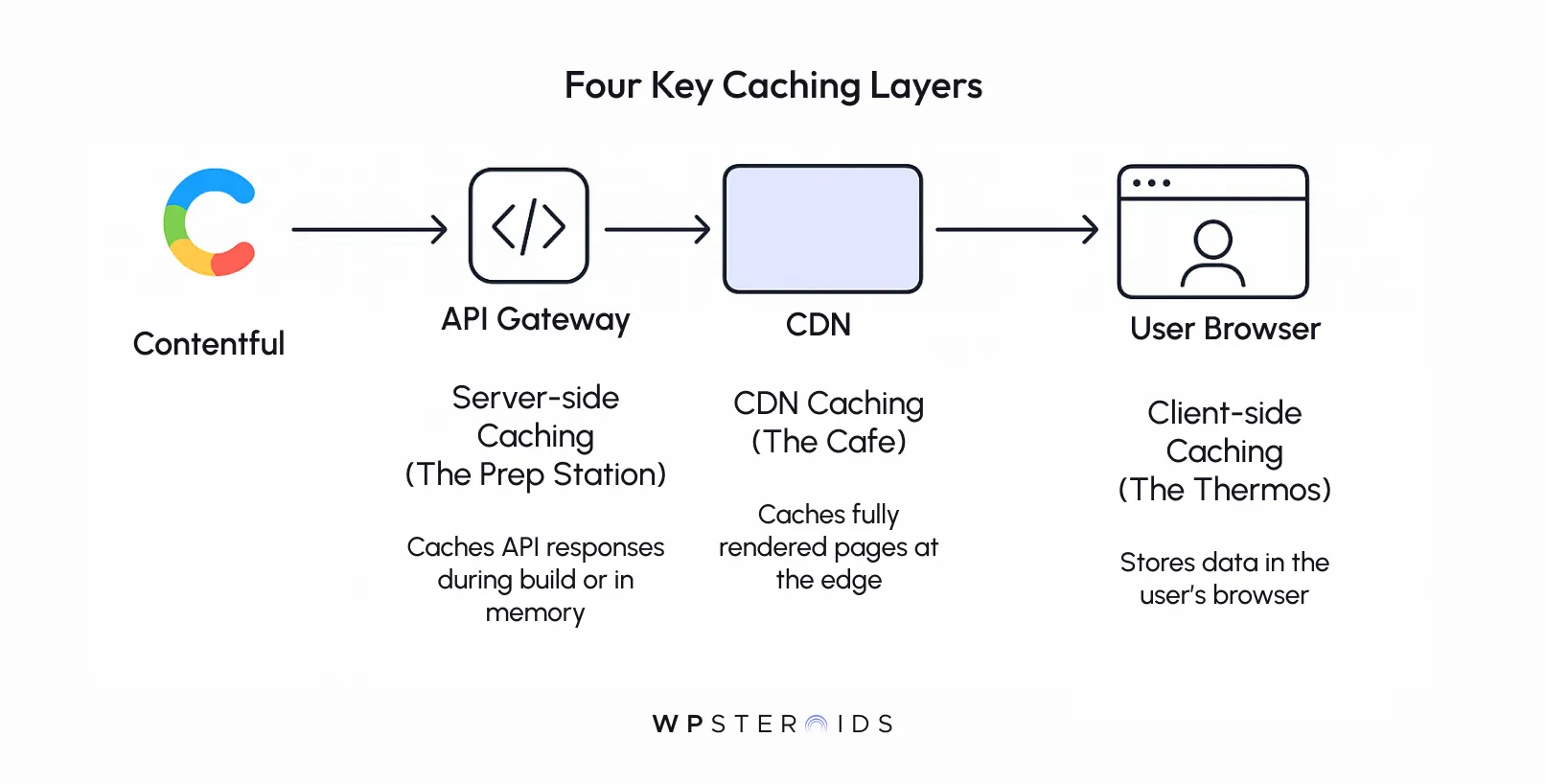
Contentful's Content Delivery API (CDA) is, by design, served through a built-in CDN. This means every piece of public content you fetch is already being cached at edge locations around the world. The key is understanding that this is just the first step.
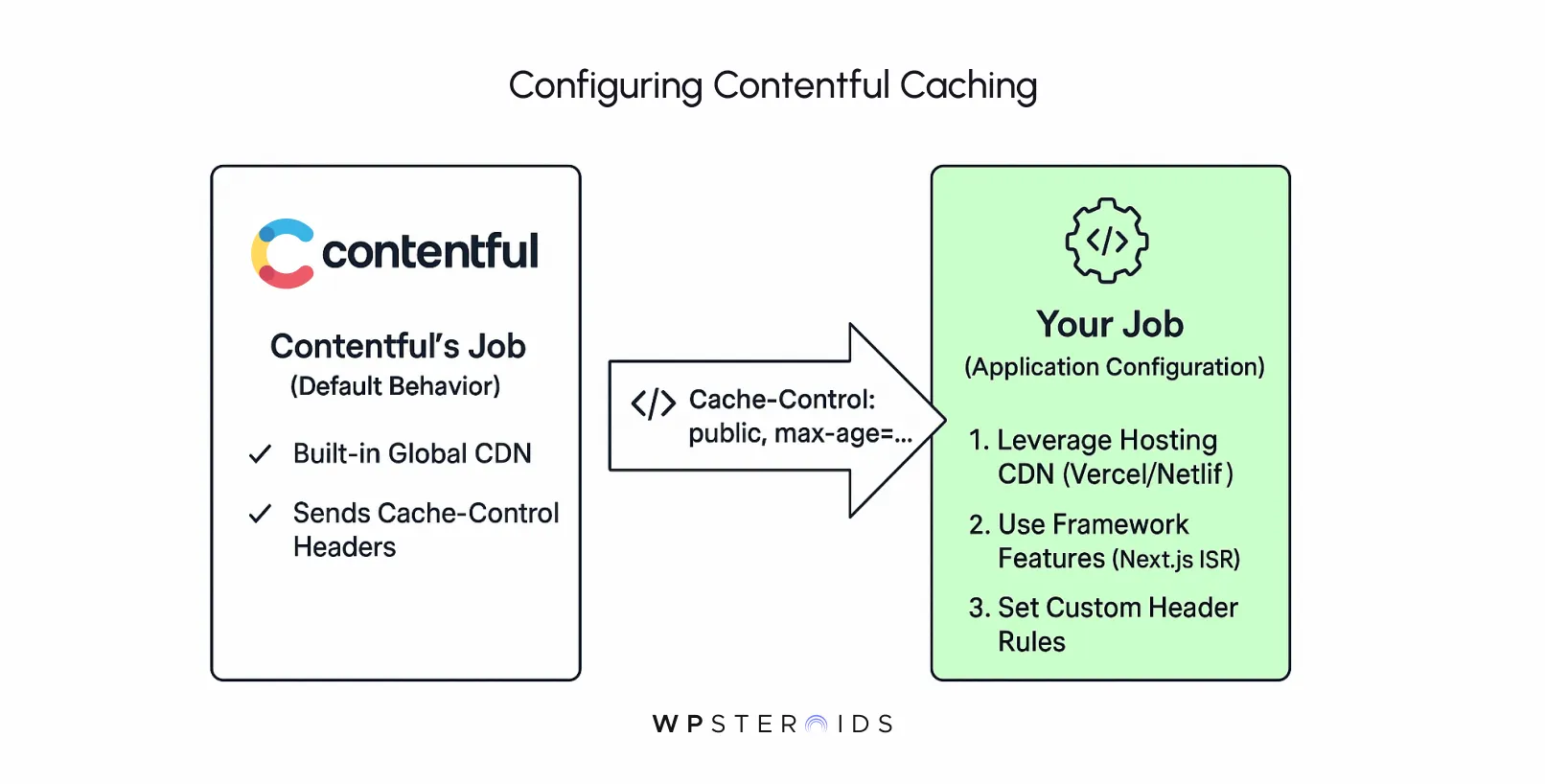
The true power comes from the infrastructure that you connect to Contentful. Platforms like Vercel, Netlify, AWS Amplify, or your own custom server setup act as the primary consumers of the Contentful API. This is where you truly activate advanced caching.
Think of it this way: Contentful sends out a clear signal with every API response in the form of Cache-Control headers. These headers suggest how long a piece of content can be considered "fresh." Your job is to build an application that listens to and respects these signals.
Here’s a practical breakdown of how this configuration works:
In short, "enabling" advanced caching isn't about a setting in Contentful. It's about designing your application and choosing a hosting architecture that intelligently consumes the cacheable data Contentful provides by default.
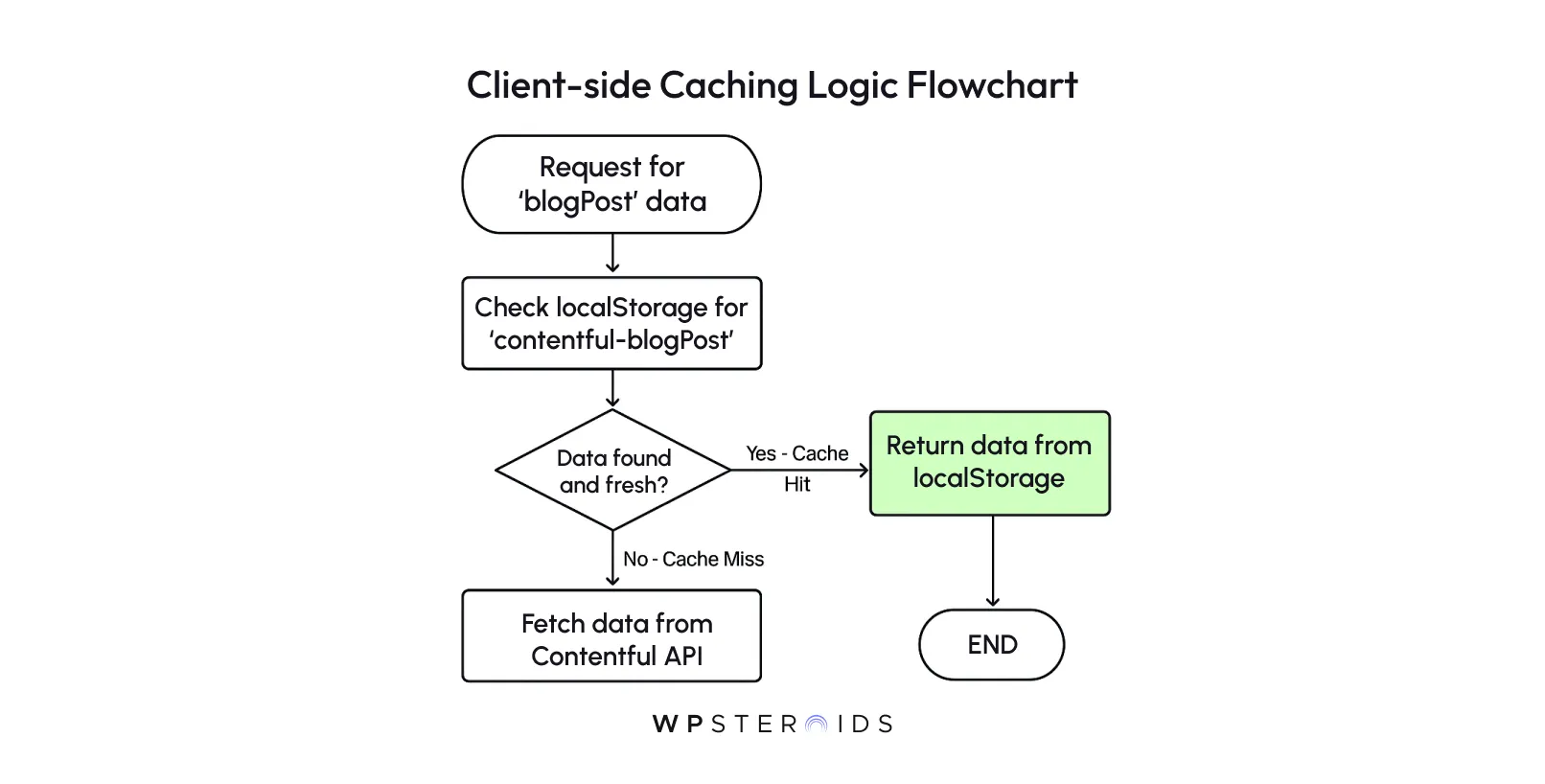
This is the "Personal Thermos" from our analogy—storing data directly in the user's browser so that subsequent requests for it are instantaneous, requiring no network at all.
Here is a basic JavaScript function that wraps the Contentful SDK's getEntries method to add a caching layer with localStorage.
import { createClient } from 'contentful';
// Initialize your Contentful client
const contentfulClient = createClient({
  space: 'YOUR_SPACE_ID',
  accessToken: 'YOUR_DELIVERY_API_TOKEN',
});
/**
 * A function that fetches Contentful entries, with a localStorage cache layer.
 * @param {string} contentType - The ID of the content type to fetch.
 * @param {number} cacheDurationInMinutes - How long to keep the data in cache.
 * @returns {Promise<Array>} - A promise that resolves to the array of entries.
 */
async function getEntriesWithClientCache(contentType, cacheDurationInMinutes = 10) {
  const cacheKey = `contentful-${contentType}`;
  const cachedData = localStorage.getItem(cacheKey);
  const cacheDurationInMillis = cacheDurationInMinutes * 60 * 1000;
  if (cachedData) {
    const { timestamp, items } = JSON.parse(cachedData);
    const isCacheFresh = (Date.now() - timestamp) < cacheDurationInMillis;
    // If the cache is still fresh, return the stored items immediately.
    if (isCacheFresh) {
      console.log(`Serving '${contentType}' from client-side cache.`);
      return items;
    }
  }
  // If there's no cached data or it's stale, fetch from the API.
  console.log(`Fetching fresh '${contentType}' from Contentful API.`);
  const response = await contentfulClient.getEntries({ content_type: contentType });
  // Store the new data along with a timestamp.
  const dataToCache = {
    timestamp: Date.now(),
    items: response.items,
  };
  localStorage.setItem(cacheKey, JSON.stringify(dataToCache));
  return response.items;
}
// Example usage:
// getEntriesWithClientCache('blogPost').then(posts => {
//   console.log('Got blog posts:', posts);
// });
Combining client-side caching with caching strategies on your server and CDN creates a robust, multi-layered defense against latency. However, before you implement it, keep these points in mind:
Now let's look at how caching is implemented in a real-world scenario using Next.js, one of the most popular frameworks for Contentful. Modern frameworks like Next.js have caching built directly into their data-fetching mechanisms, making it easy to leverage.
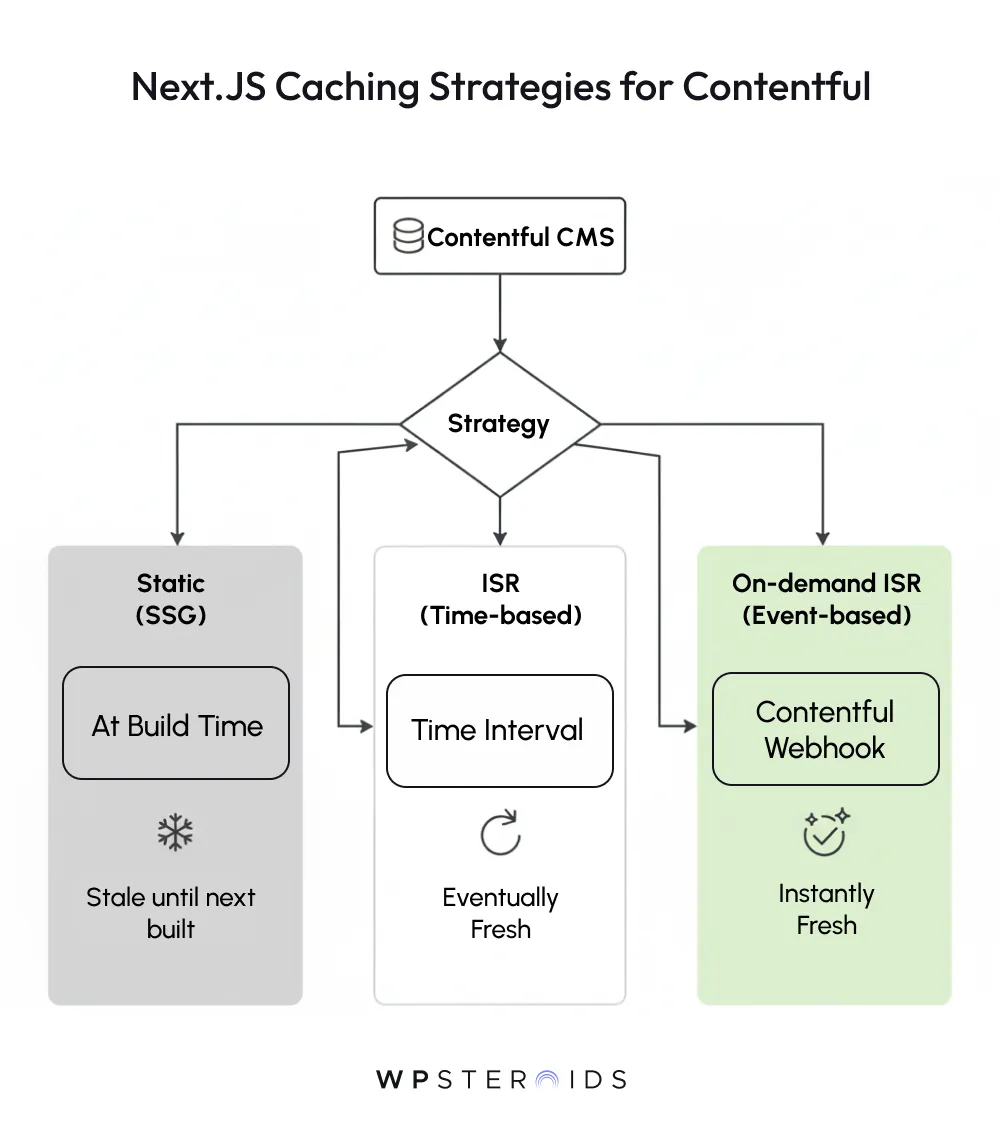
Here is an example of a React Server Component in the Next.js App Router that fetches and caches a blog post from Contentful.
// app/blog/[slug]/page.tsx
import { documentToReactComponents } from '@contentful/rich-text-react-renderer';
import { createClient } from 'contentful';
// This function fetches data from Contentful
async function getBlogPost(slug) {
  const client = createClient({
    space: process.env.CONTENTFUL_SPACE_ID,
    accessToken: process.env.CONTENTFUL_DELIVERY_TOKEN,
  });
  const response = await client.getEntries({
    content_type: 'blogPost',
    'fields.slug': slug,
    include: 2, // Include linked entries
  });
  // Note: The official Contentful SDK uses 'fetch' under the hood,
  // so Next.js can automatically apply caching rules to it.
  return response.items[0];
}
// This is the page component
export default async function BlogPost({ params }) {
  const post = await getBlogPost(params.slug);
  return (
    <div>
      <h1>{post.fields.title}</h1>
      <div>{documentToReactComponents(post.fields.body)}</div>
    </div>
  );
}
// This function controls the caching behavior for the page
export async function generateStaticParams() {
  // At build time, pre-render the 10 most recent posts
  // Other posts will be generated on-demand when a user first visits them
  const client = createClient({ ... });
  const posts = await client.getEntries({ content_type: 'blogPost', limit: 10 });
  return posts.items.map((post) => ({
    slug: post.fields.slug,
  }));
}
// Next.js App Router defaults to static rendering, which is cached indefinitely.
// To add time-based revalidation (ISR), you would configure the fetch call itself,
// but the SDK abstracts this. For page-level control, you can use Route Segment Config:
export const revalidate = 600; // Revalidate this page at most once every 10 minutesYou’ve set up your Contentful caching layers, and your application is flying. But then, a content editor publishes a crucial update—and it doesn't appear on the live site.
This is the other side of the caching coin: invalidation. Storing data is easy; knowing when to throw it away is what makes a caching strategy robust. Ensuring data freshness is just as important as speed.
So, what is the difference between automatic and manual cache purging in Contentful? The answer lies in how your infrastructure responds to change.
Feature | Automatic Purging (via Webhooks) | Manual Purging (via Hosting Dashboard) |
Trigger | A content event in Contentful (e.g., "Entry publish"). | A developer manually clicks "Clear Cache and Redeploy". |
Best For | Routine content updates made by editors. | Code changes, environment variable updates, and emergency fixes. |
Scope | Can be highly targeted (e.g., only rebuild one page). | Usually clears the entire site cache, forcing a full rebuild. |
Effort | "Set it and forget it" after initial configuration. | Requires manual developer action every single time. |
Automatic cache purging is the ideal state you should strive for. It’s a reactive, self-healing system that ensures your site updates itself moments after new content is published, with no manual intervention required. The primary tool for this is the webhook.
The workflow looks like this:
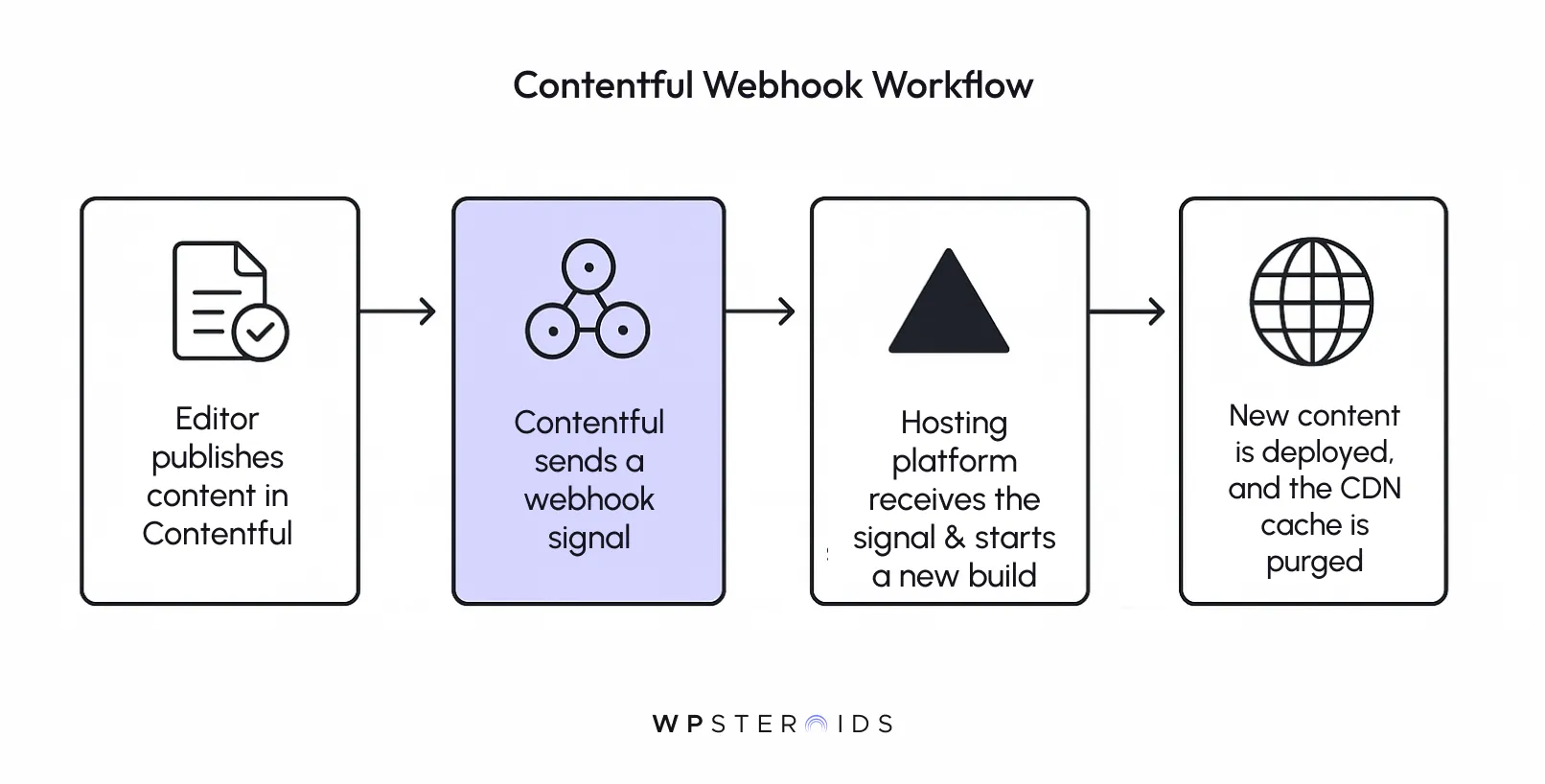
This elegant, event-driven approach is what advanced caching is all about. It connects your content source directly to your infrastructure, ensuring that changes propagate through the content delivery path without a developer ever having to lift a finger.
If automatic purging is your daily driver, manual purging is the emergency toolkit in your trunk. It’s a necessary, powerful option for situations that webhooks don't cover.
Manual purging involves going into your hosting provider's dashboard and clicking a button like "Clear Cache and Redeploy."
You'll need to do this when:
In essence, you rely on automatic purging for all content-driven changes and reserve manual purging for code- or environment-driven changes and troubleshooting. Mastering both gives you complete control over your application's state, ensuring both blazing-fast performance and absolute content accuracy.
You now understand the layers, the implementation patterns, and the invalidation strategies. The final step is to combine these concepts into a cohesive approach.
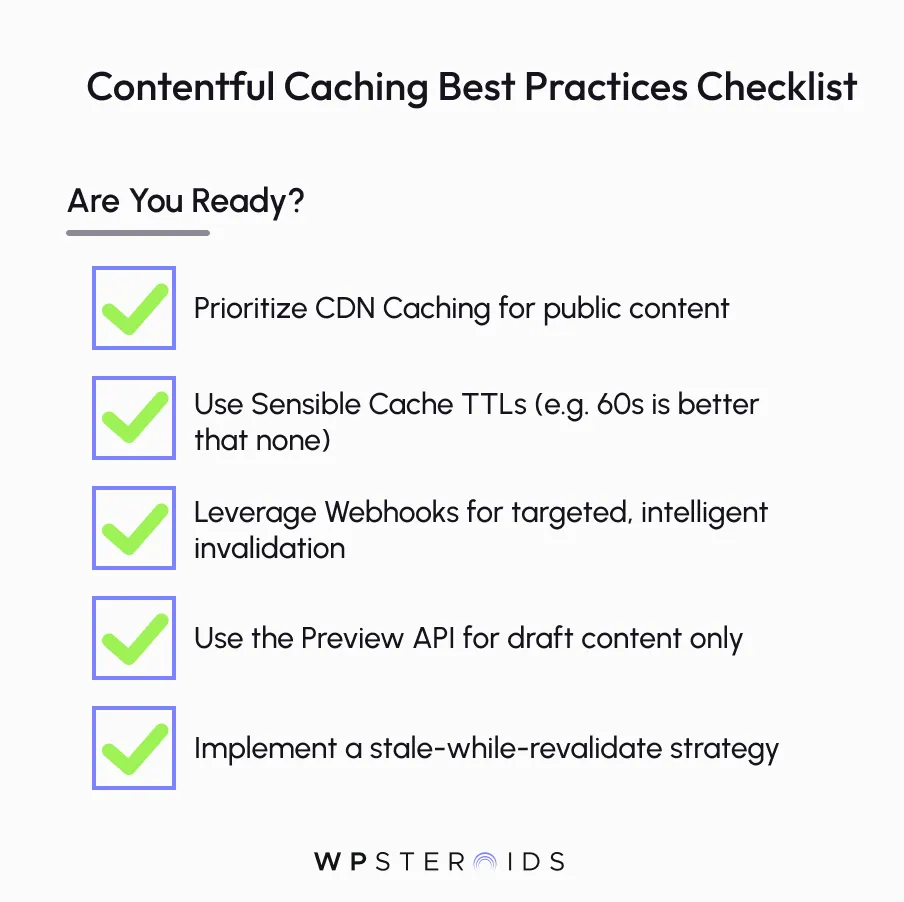
Following a few battle-tested best practices will help you build a robust and efficient content delivery system that maximizes performance with caching and minimizes headaches.
Here is a scannable list of best practices to guide your caching strategies:
Even with the best strategy, you might run into issues. Here are some common problems and how to debug them.
Properly improving Contentful's performance with caching creates a powerful trifecta of benefits: it delivers a radically faster experience to your users, reduces your infrastructure and API costs, and most importantly, it enhances your own team's developer velocity by speeding up builds and preventing frustrating bottlenecks.
The core message is this: by moving beyond the default settings and strategically implementing layers of caching, you transform Contentful from a simple content repository into an incredibly fast, resilient, and cost-effective content delivery engine.
Mastering these contentful caching strategies gives you direct control over your entire stack, turning potential performance problems into a competitive advantage
Stop letting performance bottlenecks dictate your workflow and user experience. It's time to take control of your content delivery path and unlock the true potential of your headless stack. If you're ready to implement these strategies and want expert guidance to get it right the first time, let's talk.
Book your discovery call today.
Here are answers to some of the most common questions developers have when implementing Contentful caching strategies.
Does Contentful cache my images automatically?
Yes. All assets (images, videos, PDFs) delivered through Contentful’s Asset API are automatically served via the same global CDN that serves your content. You can further optimize images using the Contentful Image API to resize, crop, and change formats on-the-fly via URL parameters. The CDN caches each unique version of an image, ensuring these transformations are also incredibly fast after the first request.
What's the difference between caching with the REST API and the GraphQL API?
Fundamentally, there is no difference in the caching mechanism. Both the standard Content Delivery API (REST) and the GraphQL API are served through Contentful's CDN, and the same Cache-Control headers and principles apply. While GraphQL typically uses POST requests, Contentful's CDN is configured to cache responses for identical queries, ensuring fast performance for repeated requests.
How do I test if my caching is working correctly?
The best tool is your browser's Developer Tools. Open the "Network" tab, refresh the page, and inspect the response headers for your page document. Look for:
Will caching show my users outdated content?
It can if not configured correctly. This is why a proper invalidation strategy is critical. Using webhooks to automatically trigger a new build or purge your CDN cache when content is updated minimizes the window where stale content can be served. For highly dynamic content, a short TTL (Time-to-Live), like 60 seconds, provides a great balance of performance and freshness.
Can I cache content from the Contentful Preview API?
No, and you should never try to. The Preview API is designed to show draft content and its responses include a Cache-Control: no-cache header. This explicitly tells browsers and CDNs not to store a copy. Caching preview content would defeat its purpose and could lead to accidentally showing unpublished content to the public.
How does caching work with personalized content?
For pages with a mix of static and personalized data, the best strategy is to cache the static "shell" of the page at the CDN. The personalized data (e.g., a user's name or shopping cart) should then be fetched on the client-side (in the browser) using a separate, uncached API request. This gives you the speed of a static cache for the majority of the page while keeping dynamic parts fresh.
What is a "cache hit ratio" and why does it matter?
The cache hit ratio is the percentage of requests served directly from a cache (HIT) versus those that had to fetch from the origin server (MISS). A high hit ratio (e.g., >95%) is the primary indicator of a well-optimized caching strategy. It means your CDN is doing its job, resulting in a faster user experience, lower server load, and reduced API costs. You can often monitor this in your hosting provider's analytics dashboard.